2026 میں طلبہ کے لیے 7 بہترین AI Lecture Note Taker Tools
اگر آپ کے professor بہت تیزی سے بولتے ہیں تو آپ اس گھبراہٹ کو اچھی طرح جانتے ہوں گے۔ آپ ہر بات لکھنے کی کوشش کرتے ہیں، لیکن جب تک ایک جملہ مکمل کرتے ہیں، تین مزید باتیں نکل چکی ہوتی ہیں۔ کلاس کے بعد آپ کے پاس آدھا صفحہ بکھرے ہوئے نوٹس اور ایک recording رہ جاتی ہے جسے شاید آپ کبھی مکمل دوبارہ نہ سنیں۔
یہیں AI lecture note taker tools کام آتے ہیں۔ یہ tools lecture content کو، چاہے وہ live recording ہو، audio file ہو یا کوئی messy transcript، ایسے study material میں بدل دیتے ہیں جسے آپ واقعی پڑھ اور revise کر سکتے ہیں۔
طلبہ کو AI Lecture Notes میں کیا چاہیے
طلبہ کو صرف یہ transcript نہیں چاہیے کہ کلاس میں کیا کیا کہا گیا۔ انہیں ایسے نوٹس چاہیے جو clear، useful اور بعد میں آسانی سے revise کیے جا سکیں۔ ایک اچھا AI lecture notes generator لمبے یا messy lecture content کو ایسے study material میں تبدیل کرے جو exam سے پہلے واقعی مددگار ہو۔
طلبہ عموماً ان tools سے یہ چیزیں چاہتے ہیں:
Clear summaries: لمبے lectures کو main ideas ضائع کیے بغیر اہم points میں تبدیل کیا جائے
Organized sections: نوٹس کو topics کے حساب سے divide کیا جائے، نہ کہ ایک لمبے text block کی شکل میں دکھایا جائے
Important terms اور definitions: key concepts آسانی سے ملنے اور revise ہونے کے قابل ہوں
Exam-friendly notes: output صرف lecture کو word-by-word repeat نہ کرے بلکہ revision میں مدد کرے
Messy input support: طلبہ audio، transcripts یا rough notes استعمال کر کے بھی readable result حاصل کر سکیں
Quick review format: نوٹس اتنے simple ہوں کہ class، quiz یا exam سے پہلے جلدی scan کیے جا سکیں
Personal edits کی جگہ: طلبہ اپنے examples، professor کے comments اور corrections شامل کر سکیں
2026 میں بہترین AI Lecture Note Taker Tools
1) VoiceCraftTool Lecture Note Taking AI
Best for: Lectures کو آسانی سے structured study notes اور revision-ready summaries میں تبدیل کرنا۔
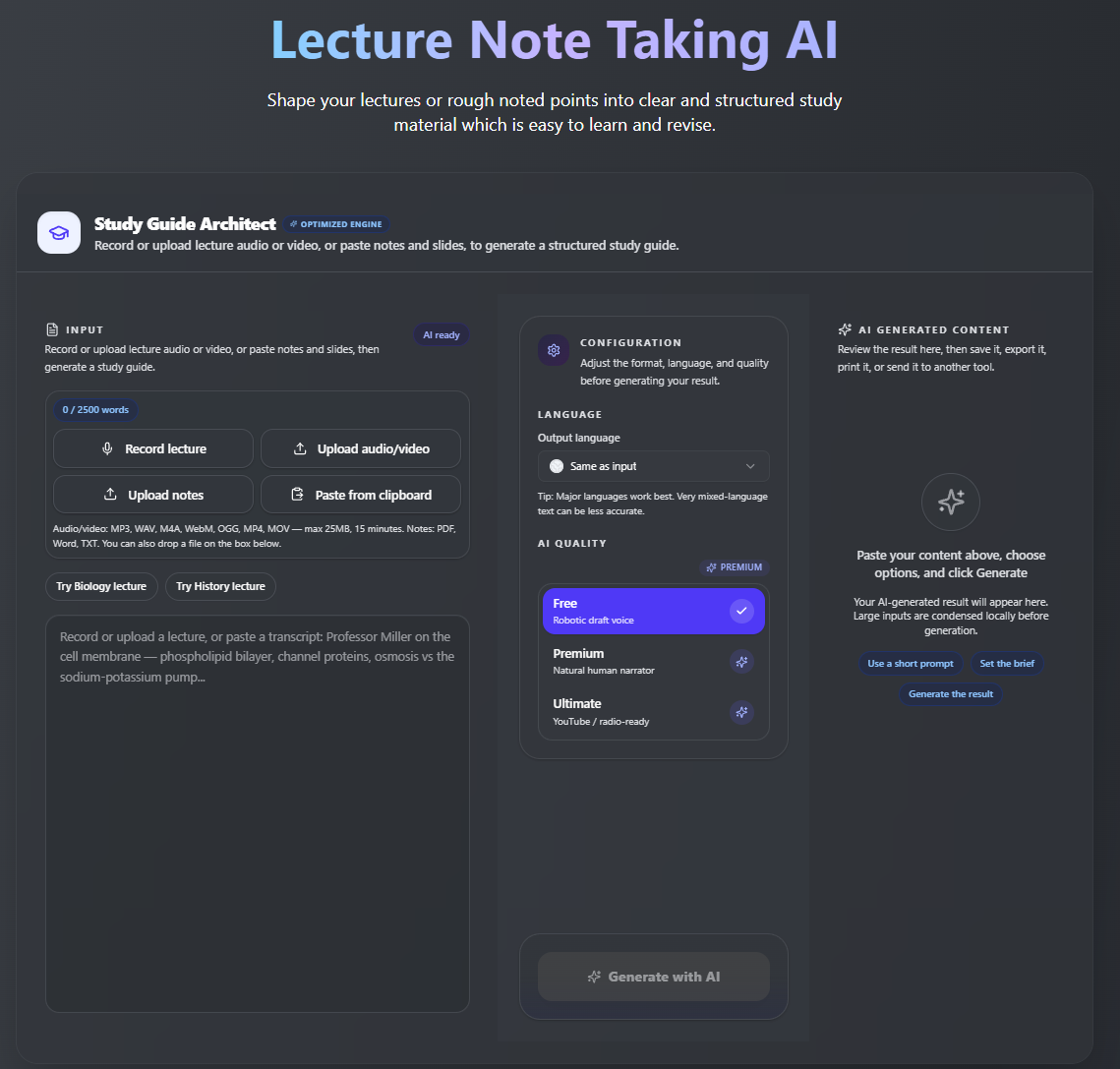
یہ tool خاص طور پر lecture content کے لیے بنایا گیا ہے، business meetings کے لیے نہیں۔ اسی لیے اس کا output meeting summary کے بجائے study notes جیسا محسوس ہوتا ہے۔ Formatting clean ہے اور processing تیز ہے۔
Key Features:
Lecture سے study notes: lecture record کریں یا transcript paste کریں اور اسے clear، structured notes میں تبدیل کریں۔
Key terms summary: اہم terms، concepts اور main points نکالیں تاکہ revision جلدی ہو سکے۔
Probable exam questions: exam-style questions generate کریں تاکہ طلبہ اپنی memory test کر سکیں۔
Messy notes cleanup: rough یا unorganized class notes paste کریں اور انہیں clear study guide میں بدلیں۔
Multilingual support: lecture content ایک language میں دیں اور notes دوسری language میں generate کریں۔
Online learning کے لیے useful: YouTube lectures، course transcripts، webinars اور لمبی recorded classes کے ساتھ اچھا کام کرتا ہے۔
Revision-friendly output: notes کو exam prep، flashcards، study groups یا digital notebook میں استعمال کریں۔
Possible limitation: یہ نسبتاً نیا tool ہے، اس لیے established platforms کے مقابلے میں integrations کم ہو سکتی ہیں۔
Tool کو practically try کرنے کے لیے یہاں click کریں، AI Lecture Note Taker by VoiceCraftTool
2) Otter.ai
Best for: Class کے دوران live transcription یا recorded discussions
آپ live lecture record کر سکتے ہیں اور بعد میں searchable transcript حاصل کر سکتے ہیں۔ Free plan میں ہر مہینے مناسب تعداد میں minutes ملتے ہیں۔
Key Features:
Real-time lecture transcription
Speaker identification
Searchable lecture transcripts
Basic lecture summaries
Audio recording support
In-person classes کے لیے useful
Online sessions کے لیے useful
Possible limitation: Summaries کبھی کبھی surface-level لگ سکتی ہیں، اس لیے science یا law جیسے detail-heavy subjects میں full transcript پڑھنا پڑ سکتا ہے۔
3) Notion AI
Best for: ایسے طلبہ جو اپنے notes پہلے ہی Notion میں organize کرتے ہیں
اگر آپ کا پورا study system پہلے سے Notion میں ہے، تو اسی میں AI features شامل کرنا ایک natural choice ہے۔ آپ کو بار بار مختلف apps کے درمیان switch نہیں کرنا پڑتا۔
Key Features:
Pasted class notes کو summarize کرتا ہے
Messy notes کو cleaner format میں restructure کرتا ہے
Short notes کو زیادہ detail کے ساتھ expand کرتا ہے
Study material کو Notion کے اندر organize کرتا ہے
Notes، summaries اور tasks کو ایک ہی workspace میں رکھتا ہے
ان طلبہ کے لیے useful جو پہلے سے Notion study planning کے لیے استعمال کرتے ہیں
Possible limitation: یہ بنیادی طور پر اسی text پر کام کرتا ہے جو آپ کے پاس پہلے سے موجود ہو۔ یہ audio کو براہ راست transcribe نہیں کرتا، اس لیے اس step کے لیے الگ tool درکار ہوگا۔
4) Fireflies.ai
Best for: Zoom، Teams یا Google Meet پر ہونے والے recorded online lectures
اگر آپ کی زیادہ تر classes video call platforms پر ہوتی ہیں، تو Fireflies آسانی سے workflow میں fit ہو سکتا ہے۔ یہ پچھلے sessions کو store اور organize کرتا ہے تاکہ بعد میں ان میں search کیا جا سکے۔
Key Features:
Online meetings میں automatically join کرتا ہے
Lectures، webinars اور group sessions record کرتا ہے
Meeting transcripts بناتا ہے
Short summaries generate کرتا ہے
Group project discussions review کرنے میں مدد کرتا ہے
Seminar-style online classes کے لیے useful
Previous session notes searchable رکھتا ہے
Possible limitation: یہ mainly professional use کے لیے بنایا گیا ہے، اس لیے summaries کبھی کبھی study notes کے بجائے business meeting recap جیسی لگ سکتی ہیں۔
5) Fathom
Best for: Online class summaries اور video lecture notes
Fathom free to use ہے اور solid quality دیتا ہے۔ یہ live online classes کے دوران background میں کام کرتا ہے اور زیادہ setup کی ضرورت نہیں ہوتی۔
Key Features:
Video meetings record کرتا ہے
Online classes یا sessions summarize کرتا ہے
Important moments highlight کرتا ہے
Clean session summaries بناتا ہے
Session کے بعد action points generate کرتا ہے
طلبہ کو live video lectures جلدی review کرنے میں مدد کرتا ہے
Possible limitation: اس کا focus mainly video calls پر ہے، اس لیے pre-recorded lectures یا in-person class audio recordings کے لیے یہ اتنا useful نہیں ہے۔
6) Google Gemini
Best for: Existing transcripts، messy notes یا pasted lecture content کو organized study material میں تبدیل کرنا۔
Gemini تب useful ہے جب طلبہ کے پاس پہلے سے lecture text ہو اور وہ اسے clearer notes، quick summaries یا revision points میں تبدیل کرنا چاہتے ہوں۔
Key Features:
Lecture transcripts summarize کرتا ہے
Messy notes کو cleaner format میں rewrite کرتا ہے
Difficult concepts کو simpler words میں explain کرتا ہے
Bullet-point study notes بناتا ہے
Practice questions generate کرنے میں مدد کرتا ہے
Pasted class material، notes یا course content کے ساتھ اچھا کام کرتا ہے
Possible limitation: آپ کو content پہلے provide کرنا ہوتا ہے۔ یہ تب best کام کرتا ہے جب آپ کے پاس transcript، copied notes یا lecture material پہلے سے موجود ہو۔
7) ChatGPT
Best for: Existing lecture content سے flexible study notes، explanations، flashcards اور practice questions بنانا۔
ChatGPT flexible ہے۔ طلبہ short summaries، detailed explanations، flashcards یا exam-style questions جیسے مختلف formats میں notes مانگ سکتے ہیں۔
Key Features:
Transcripts کو study notes میں تبدیل کرتا ہے
Summaries اور topic breakdowns بناتا ہے
Complex topics کو simpler language میں explain کرتا ہے
Flashcards اور quiz questions generate کرتا ہے
Notes کو مختلف formats میں rewrite کرتا ہے
طلبہ کو concepts step by step revise کرنے میں مدد کرتا ہے
Possible limitation: یہ اپنے طور پر lecture recorder کو replace نہیں کرتا۔ Best results کے لیے آپ کے پاس پہلے سے transcript، recording text یا rough notes ہونے چاہئیں۔
بہترین Options کا موازنہ
یہ طلبہ کے لیے بہترین AI lecture note taker tools کی simple comparison ہے۔ اس table سے آپ جلدی دیکھ سکتے ہیں کہ کون سا tool آپ کے study style، input type اور lecture setup کے لیے بہتر ہے۔
| Tool | Best For | Input Type | Student Use Case | Free Option |
|---|---|---|---|---|
| VoiceCraftTool | Lecture notes generation | Audio, transcript | General study notes | ہاں |
| Otter.ai | Live transcription | Live audio, recordings | In-person اور online classes | ہاں، limited minutes |
| Notion AI | Notes organization | صرف text | Notion استعمال کرنے والے طلبہ | Paid، Notion plan کے مطابق |
| Fireflies.ai | Online meeting-based classes | Video calls | Zoom اور Teams lectures | ہاں، limited |
| Fathom | Video lecture summaries | Video calls | Live online classes | ہاں |
| Google Gemini | Lecture content summarization | Text، pasted content، access کے مطابق files | Flexible summaries اور explanations | ہاں |
| ChatGPT | Study notes اور revision support | Text، pasted content، access کے مطابق files | Flashcards، summaries اور concept explanations | ہاں |
یہ table ہر کسی کے لیے ایک perfect tool تلاش کرنے کے بارے میں نہیں ہے۔ اگر آپ کو audio سے براہ راست lecture notes چاہیے تو VoiceCraftTool یا Otter.ai زیادہ suitable ہو سکتے ہیں۔ اگر آپ کے پاس پہلے سے transcript ہے تو ChatGPT یا Gemini اسے summaries، flashcards اور clearer study material میں تبدیل کرنے میں مدد کر سکتے ہیں۔
آپ کو کون سا Tool منتخب کرنا چاہیے؟
ان تمام options میں صحیح choice اس بات پر depend کرتی ہے کہ آپ کیسے پڑھتے ہیں اور آپ کی classes کہاں ہوتی ہیں۔
VoiceCraftTool منتخب کریں اگر آپ ایسا simple tool چاہتے ہیں جو lectures کو notes میں بدلے اور خاص طور پر طلبہ کے لیے بنایا گیا ہو
Otter.ai منتخب کریں اگر آپ کو class کے دوران live transcription اور searchable output چاہیے
Notion AI منتخب کریں اگر آپ کے notes پہلے سے Notion میں ہیں اور آپ صرف AI support شامل کرنا چاہتے ہیں
Fireflies.ai منتخب کریں اگر آپ کی زیادہ تر classes Zoom یا Google Meet پر ہوتی ہیں
Fathom منتخب کریں اگر آپ live online classes attend کرتے ہیں اور free، simple summaries چاہتے ہیں
ChatGPT یا Gemini منتخب کریں اگر آپ کے پاس پہلے سے transcript ہے اور flexible summarization یا explanations چاہیے
ہر طالب علم کے لیے ایک ہی tool بہترین نہیں ہو سکتا۔ وہ tool منتخب کریں جو آپ کے existing study workflow کے ساتھ سب سے بہتر fit ہو۔
ان Tools کو استعمال کرنے کے Tips
AI lecture note taker بہت helpful ہو سکتا ہے، لیکن آپ اسے کیسے use کرتے ہیں، یہ براہ راست output quality پر اثر انداز ہوتا ہے۔ چند simple habits notes کو زیادہ clear اور study-friendly بنا سکتی ہیں۔
Clear lecture content سے شروع کریں: اچھی recording، typed notes یا available transcript استعمال کریں
Tool کو کافی context دیں: subject، topic اور کس طرح کے notes چاہیے، یہ بتائیں
Useful format مانگیں: headings، key points، definitions، summaries یا exam-style questions request کریں
Output خود review کریں: names، dates، formulas، examples اور subject-specific terms check کریں
Notes کو active revision کے لیے use کریں: summaries کو flashcards، practice questions یا quick revision sheets میں تبدیل کریں
اپنی understanding کو process میں شامل رکھیں: AI کو learning organize کرنے کے لیے استعمال کریں، learning replace کرنے کے لیے نہیں
Best results تب ملتے ہیں جب طلبہ AI کو study assistant کی طرح use کرتے ہیں اور پھر notes کو اپنی language اور understanding کے مطابق review اور personalize کرتے ہیں۔ ابھی AI Lecture Note Taker by VoiceCraftTool try کریں، آغاز free ہے۔
AI Lecture Notes vs Manual Notes
یہ competition نہیں ہے۔ دونوں methods کی اپنی جگہ ہے، اور طلبہ کو سب سے بہتر result تب ملتا ہے جب وہ AI notes کو manual notes کے ساتھ use کرتے ہیں، ان کی جگہ مکمل طور پر نہیں لیتے۔
| Aspect | AI Notes | Manual Notes |
|---|---|---|
| Speed | Fast | نسبتاً سست |
| Memory retention | اکیلے use کرنے پر کم ہو سکتی ہے | Active writing سے زیادہ ہو سکتی ہے |
| Organization | اچھا | طالب علم پر depend کرتا ہے |
| Accuracy | اچھی، لیکن review ضروری ہے | وہی reflect کرتی ہے جو آپ نے سمجھا |
| Best use | Class کے بعد notes clean اور organize کرنا | Lecture کے دوران |
Practical طریقہ یہ ہے کہ lecture کے دوران rough notes لکھیں اور class کے بعد AI tool سے انہیں clean، organize اور missing information سے complete کریں۔ اس سے آپ کو writing کا memory benefit بھی ملتا ہے اور structured AI notes کی clarity بھی۔
طلبہ کو ان Common Mistakes سے بچنا چاہیے
یہ tools صحیح طریقے سے استعمال کرنے پر وقت بچاتے ہیں، لیکن notes پر مکمل اعتماد کرنے سے پہلے انہیں ایک بار check کرنا ضروری ہے۔
Notes کو Review نہ کرنا
AI-generated notes کچھ words، context یا چھوٹی details miss کر سکتے ہیں۔ Study کرنے سے پہلے انہیں کم از کم ایک بار ضرور پڑھیں۔
خراب Quality کا Audio استعمال کرنا
Noise والی یا unclear recording کمزور notes بنا سکتی ہے۔ Clear recording عام طور پر بہتر results دیتی ہے۔
Diagrams اور Formulas بھول جانا
اگر professor board پر کچھ explain کرتے ہیں تو اسے manually add کریں۔ AI tools visual details کو ہمیشہ صحیح capture نہیں کر سکتے۔
Professor کے Hints کو Ignore کرنا
اگر professor کہتے ہیں کہ کوئی topic exam کے لیے important ہے تو اسے خود اپنے notes میں mark کریں۔
Exam سے ایک رات پہلے تک Wait کرنا
AI notes کو ہر lecture کے بعد use کریں، صرف exam سے پہلے نہیں۔ اس سے revision کافی آسان ہو جاتی ہے۔
نتیجہ
سب سے اچھا AI lecture note taker وہی ہے جو آپ کے actual study style کے ساتھ fit ہو۔ اگر آپ ایسا simple tool چاہتے ہیں جو lectures کو clear study notes میں تبدیل کرنے کے لیے بنایا گیا ہے، تو VoiceCraftTool Lecture Note Taking AI ایک اچھا starting option ہے۔ اگر آپ کو live transcription چاہیے تو Otter.ai ایک strong choice ہے۔ اور اگر آپ کے پاس پہلے سے transcripts ہیں اور آپ کو flexible study support چاہیے تو ChatGPT یا Gemini بھی کافی useful ہیں۔
آپ کوئی بھی tool منتخب کریں، یاد رکھیں کہ AI mainly organization میں مدد کرتا ہے۔ اصل understanding اب بھی آپ کو خود develop کرنی ہوتی ہے۔ ان tools کو اس طرح استعمال کریں کہ notes دوبارہ لکھنے میں کم اور حقیقتاً content سمجھنے میں زیادہ وقت لگے۔ یہاں click کریں اور خود try کریں، AI Lecture Note Taker by VoiceCraftTool
FAQs
طلبہ کے لیے سب سے اچھا AI lecture note taker کون سا ہے؟
یہ آپ کے study setup پر depend کرتا ہے۔ VoiceCraftTool lectures کو structured study notes میں تبدیل کرنے کے لیے اچھا ہے۔ Otter.ai live transcription کے لیے strong ہے۔ اگر آپ کے پاس پہلے سے transcript ہے اور flexible study support چاہیے تو ChatGPT اور Gemini اچھے options ہیں۔
کیا AI audio سے lecture notes بنا سکتا ہے؟
ہاں۔ VoiceCraftTool اور Otter.ai جیسے tools audio file یا live recording کو process کر کے transcript اور summarized study notes بنا سکتے ہیں۔ Quality recording کی clarity اور tool پر depend کرتی ہے۔
AI lecture notes generator کیا ہوتا ہے؟
یہ ایسا tool ہے جو audio، video یا text کی صورت میں lecture content لیتا ہے اور artificial intelligence کی مدد سے organized notes، summaries اور key points بناتا ہے۔ اس کا مقصد طلبہ کا class کے بعد وقت بچانا ہے۔
کیا AI-generated lecture notes accurate ہوتے ہیں؟
زیادہ تر content کے لیے یہ generally reliable ہوتے ہیں، لیکن perfect نہیں۔ Subject-specific terms، names، numbers اور formulas میں mistakes ہونے کا امکان زیادہ ہوتا ہے۔ Study کرنے سے پہلے output ضرور review کریں۔
کیا میں exam preparation کے لیے AI lecture notes use کر سکتا ہوں؟
ہاں، اور بہت سے طلبہ ایسا کرتے ہیں۔ یہ آپ کی اپنی revision کے ساتھ سب سے بہتر کام کرتے ہیں۔ AI notes کو base کی طرح use کریں اور پھر اپنی understanding، examples اور corrections add کریں۔
کیا AI lecture note taker manual notes سے بہتر ہے؟
کوئی بھی method اپنے طور پر ہر situation میں بہتر نہیں ہے۔ Manual notes lecture کے دوران memory میں مدد کر سکتے ہیں۔ AI notes class کے بعد organization، clarity اور coverage میں مدد کرتے ہیں۔ دونوں کو ساتھ use کرنا زیادہ effective ہو سکتا ہے۔
کیا AI tools لمبے lectures summarize کر سکتے ہیں؟
ہاں۔ ان میں سے زیادہ تر tools لمبی recordings بھی handle کر سکتے ہیں۔ دو گھنٹے کا lecture عام طور پر چند منٹ کی processing کے بعد clear key points اور آسانی سے revise ہونے والی summary میں تبدیل کیا جا سکتا ہے۔