
Turn lectures into clear, revisable notes
Lectures can be long, fast, and difficult to revise later. The Lecture Note Taker helps you convert lecture videos, audio recordings, or written lecture material into clean, organized notes that are easier to read, understand, and memorize.
Upload your lecture file, choose your preferred settings, and get structured notes that keep the important ideas, explanations, and key points in one place.
What is Lecture Note Taker?
Lecture Note Taker is a study support tool that turns lecture content into accessible and revisable notes. It can work with video lectures, audio recordings, and text-based lecture material.
Instead of replaying the same lecture again and again, students can use the tool to extract the main points, organize the topic clearly, and prepare notes that are easier to review before exams, assignments, or class discussions.
Upload lectures in different formats
Video lectures
Upload recorded class lectures, online course videos, or educational sessions and convert them into readable notes.
Audio lectures
Use audio recordings from classes, seminars, discussions, or study sessions and turn them into structured study material.
Text lectures
Paste or upload lecture text, rough notes, transcripts, or class material and make them easier to revise.
Key features of Lecture Note Taker
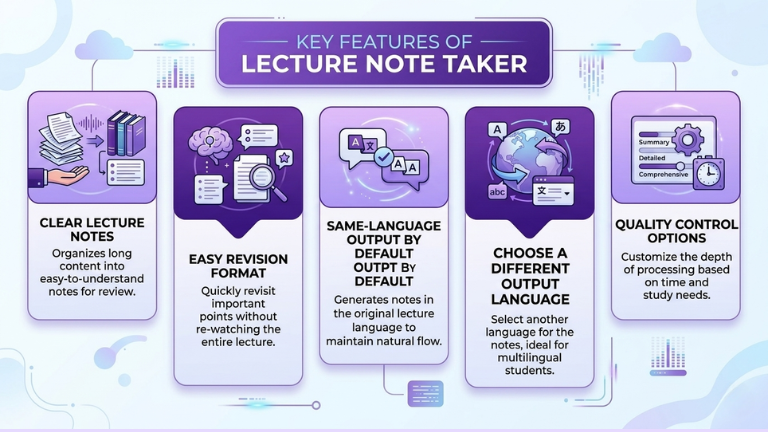
Clear lecture notes
The tool turns long lecture content into well-organized notes, making the material easier to understand and review.
Easy revision format
The output is prepared in a way that helps users revisit important points quickly instead of going through the full lecture again.
Same-language output by default
The notes are generated in the same language as the lecture by default, so the original meaning and flow stay natural.
Choose a different output language
Users can also select another language for the notes, which is helpful for multilingual students or people studying in a second language.
Quality control options
Users can choose how deeply the lecture should be processed based on their time and study needs.
Choose the right processing mode
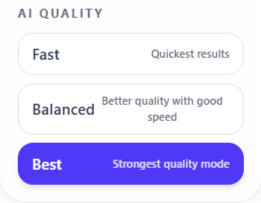
Fast
Best for quick notes when you need a simple overview of the lecture in less time.
Balanced
Best for regular study use. It gives a good mix of speed and quality, making it useful for most lectures.
Best
Best for deeper and more focused notes. This mode may take more time, but the output is more detailed and carefully prepared.
How to use Lecture Note Taker
Step 1: Upload your lecture
Add your lecture in video, audio, or text format.
Step 2: Choose language and quality
Keep the same output language or select another one, then choose Fast, Balanced, or Best mode.
Step 3: Generate your notes
Let the tool process the lecture and turn it into organized notes.
Step 4: Review and revise
Use the notes for memorization, exam preparation, assignments, or quick topic review.
Why use a Lecture Note Taker?
Taking notes manually during a lecture can be difficult, especially when the speaker moves quickly or the topic is complex. Important points can be missed, and rough notes may become hard to understand later.
Lecture Note Taker helps by converting the full lecture into organized notes that are easier to read, remember, and revise. It saves time and makes study material more useful after the lecture is over.
Best use cases
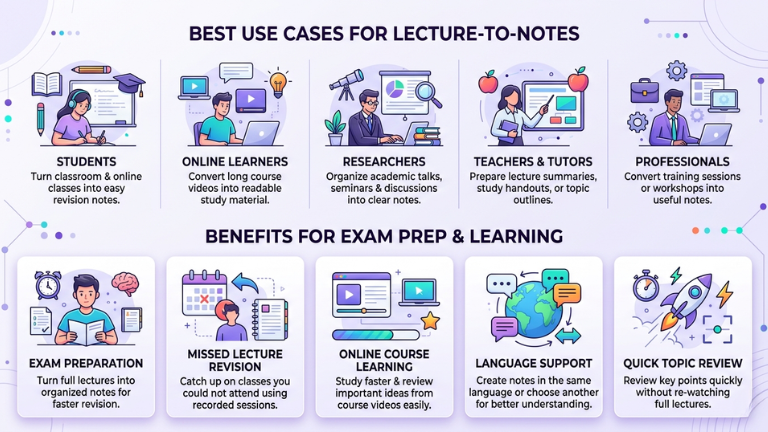
Students: Turn classroom lectures, online classes, and recorded lessons into easy revision notes.
Online learners: Convert long course videos into readable study material.
Researchers: Organize academic talks, seminars, and recorded discussions into clear notes.
Teachers and tutors: Prepare lecture summaries, study handouts, or quick topic outlines.
Professionals: Convert training sessions or workshops into useful notes.
Exam preparation
Turn full lectures into organized notes that are easier to revise before exams. Instead of replaying long recordings, students can review the main points, explanations, and key ideas in a clear study format.
Missed lecture revision
Use recorded lectures to catch up on classes you could not attend. The tool helps convert the lecture into readable notes so you can understand what was covered without going through the full session manually.
Online course learning
Turn long course videos or training lessons into clear notes, so you can study faster and review important ideas easily.
Language support
Create notes in the same language as the lecture, or choose another language for easier understanding.
Quick topic review
Review key points quickly without watching or listening to the full lecture again.
Tips for better lecture notes
Use clear audio or video so the tool can understand the lecture more accurately.
Choose Best mode for detailed or technical lectures when you need more focused notes.
Use Balanced mode for regular study when you want good notes without waiting too long.
Review the final notes and highlight the most important points for your own revision.