Use AI Meeting Minutes Generator in your browser with multilingual output and private processing.
Craft step — shape wording for speaking or publishing
Corporate Minutes Generator
Studio
Paste your meeting transcript (from our Voice Recorder) to architect formal minutes.
Input
Transcript, record, or upload — then set language.
AI ready
0 / 1000 words
Max 15 minutes
Audio: MP3, WAV, M4A, WebM, OGG, MP4 — max 25MB, 15 minutes. Notes: PDF, Word, TXT. Record live to see text appear as you speak.
Same as input · Free
AI Generated Content
Meeting minutes will appear here
Record live, upload audio, or paste a transcript.
1Record or upload the meeting
2Set language & quality
3Generate minutes
Corporate Minutes Generator History
Saved items for this tool (per account)
Corporate Minutes Generator Feedback
Ratings and comments from people who used this tool
No feedback yet for this tool.
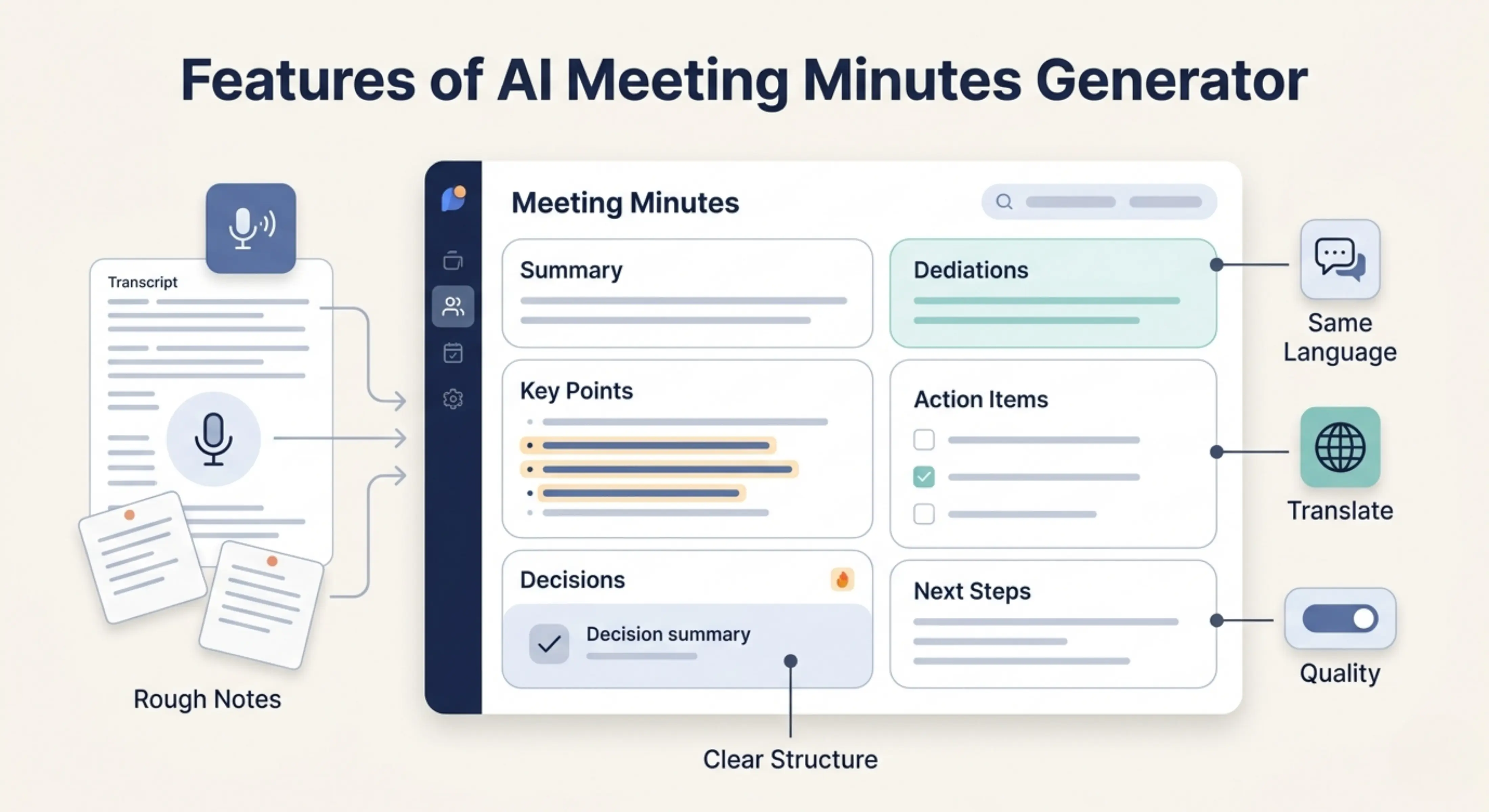
Turn meeting notes, transcripts, or pasted discussion content into clear meeting minutes with key points, decisions, action items, and follow-ups. The Meeting Minutes Generator helps you quickly create organized minutes in the same language as your input by default, with the option to choose another output language and quality mode when needed.
What is a Meeting Minutes Generator?
Meeting Minutes Generator is a meeting productivity tool that helps users create structured meeting minutes from their existing meeting content, notes, transcripts, or discussion points.
Instead of manually reading through long meeting notes or trying to remember every important detail, users can use the tool to convert raw meeting content into a clear summary of what was discussed, what decisions were made, and what needs to happen next.
The tool is useful for business meetings, team discussions, client calls, project reviews, board meetings, academic meetings, nonprofit meetings, and any situation where important points need to be recorded in a professional format.
Upload or paste your meeting content
Meeting transcripts
Upload or paste a meeting transcript and turn the full discussion into organized meeting minutes with key points, decisions, and action items.
Meeting notes
Add rough meeting notes, bullet points, or written discussion details and convert them into a cleaner and more structured minutes format.
Agenda and discussion points
Paste the meeting agenda, topics discussed, participant updates, decisions, and follow-up tasks so the tool can prepare minutes that match the purpose of the meeting.
Key features of Meeting Minutes Generator
Clear meeting minutes structure
The tool organizes your meeting content into a readable minutes format, making it easier to understand what happened during the meeting and what should be done next.
Important point extraction
The tool identifies the main discussion points from your meeting content and presents them in a cleaner way, so users do not have to go through long notes manually.
Decision summary
Meeting decisions can easily get lost in long conversations. The tool helps highlight important decisions so teams can refer back to them after the meeting.
Action item detection
The tool helps extract follow-up tasks, responsibilities, next steps, and important action points from the meeting content.
Useful for long and rough content
Whether your meeting content is detailed, messy, short, or copied from a transcript, the tool helps convert it into a more professional and organized format.
Same-language output by default
The meeting minutes are generated in the same language as the input by default, which helps keep the original communication style and context natural.
Choose a different output language
Users can also select another output language, which is useful for international teams, multilingual organizations, remote teams, or client communication in another language.
Quality control options
Users can choose how detailed and refined the meeting minutes should be based on their time, meeting importance, and level of output needed.
Choose the right processing mode
Fast
Best for quickly generating simple meeting minutes when you need a basic summary of key points and follow-ups in less time.
Balanced
Best for regular meeting minutes. It gives a good mix of speed and quality, making it useful for most team meetings, project discussions, and client calls.
Best
Best for detailed and carefully prepared meeting minutes. This mode may take more time, but the output is more focused, complete, and useful for important meetings.
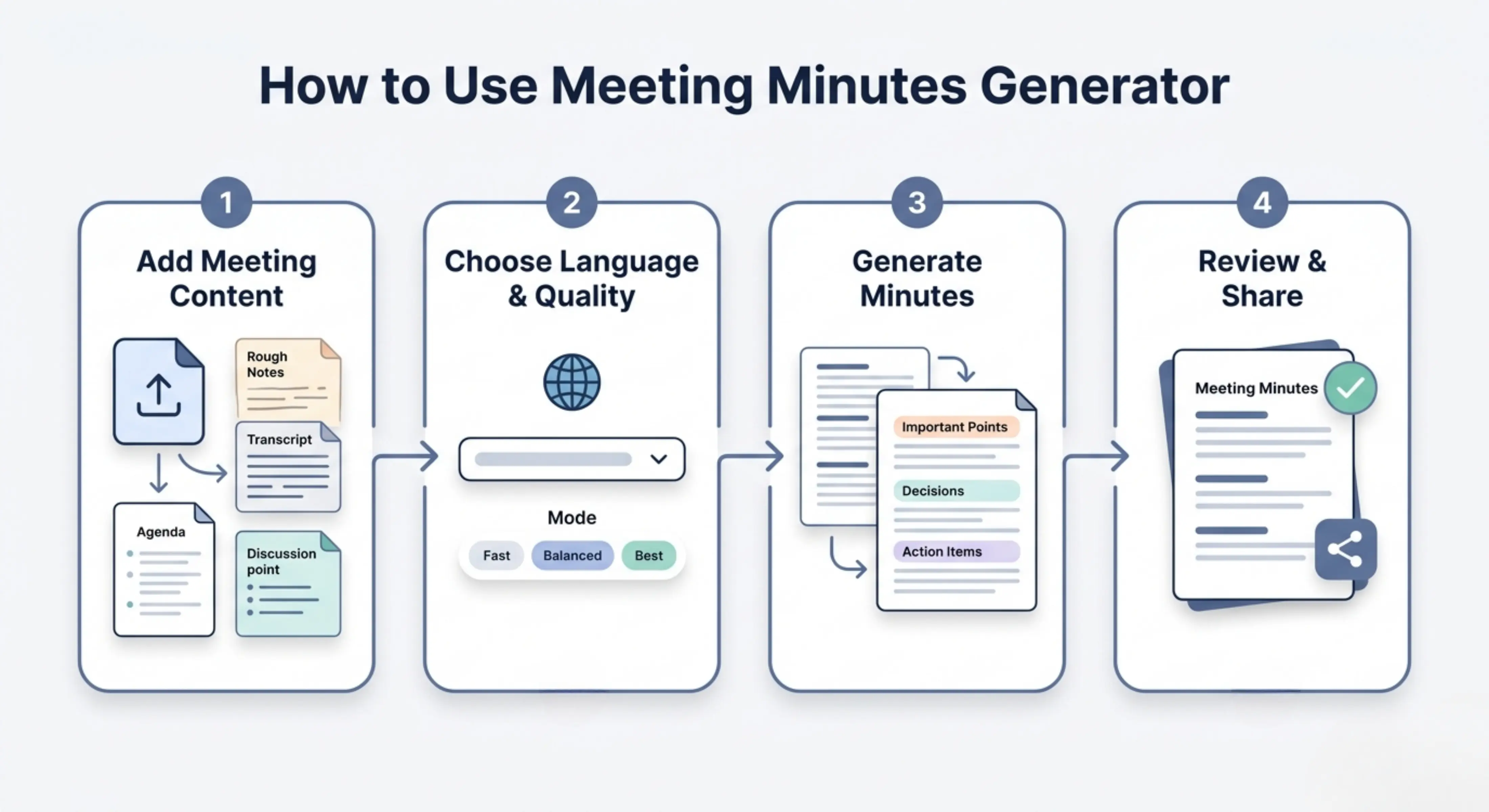
How to use Meeting Minutes Generator
Step 1: Add your meeting content
Upload your meeting file or paste your meeting notes, transcript, agenda, discussion points, or rough summary directly into the tool.
Step 2: Choose language and quality
Keep the same output language or select a different language, then choose Fast, Balanced, or Best mode based on your need.
Step 3: Generate meeting minutes
Let the tool process your meeting content and create structured meeting minutes with important points, decisions, and action items.
Step 4: Review and share
Read the generated minutes, check the details, add any missing names or deadlines, and share the final version with your team, client, or meeting participants.
Why use a Meeting Minutes Generator?
Meeting minutes are important because they help people remember what was discussed, what was decided, and what actions need to be completed after the meeting. But writing minutes manually can be difficult, especially when the meeting is long, the discussion is detailed, or the notes are not well organized.
Meeting Minutes Generator helps by turning meeting content into a clear and useful minutes draft. It saves time, reduces the chance of missing important points, and helps teams stay aligned after the meeting. Instead of spending extra time cleaning notes manually, users can quickly create a structured version that is easier to review, edit, and share.
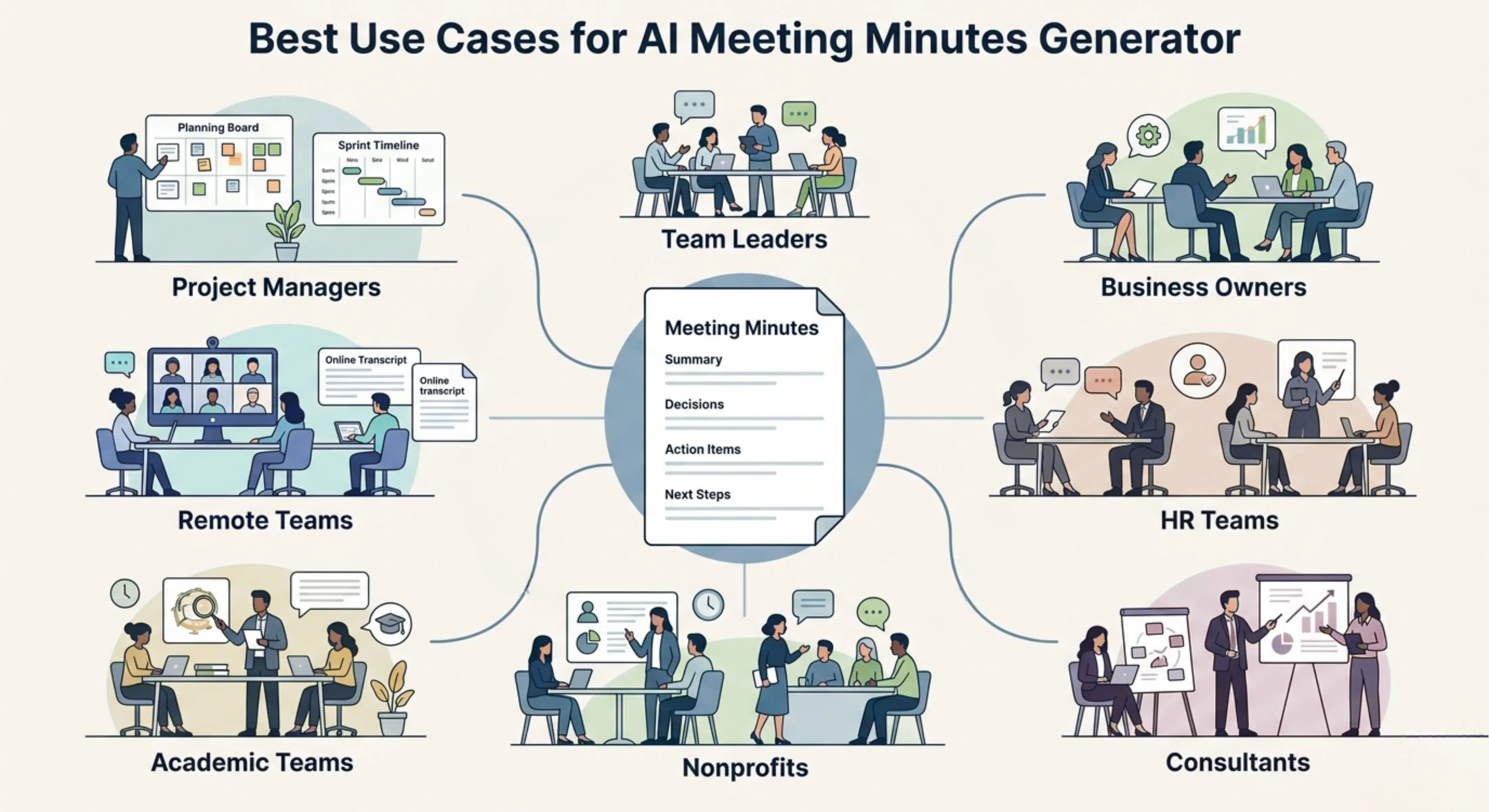
Best use cases
Project managers: Convert project meetings, sprint reviews, planning discussions, and stakeholder updates into clear minutes with action items.
Team leaders: Summarize internal meetings, weekly check-ins, performance discussions, and operational updates in a structured format.
Business owners: Turn client meetings, staff discussions, vendor calls, and business planning sessions into organized meeting records.
HR teams: Create minutes from interviews, employee meetings, onboarding sessions, policy discussions, and internal review meetings.
Consultants: Convert client discovery calls, strategy sessions, workshops, and project meetings into professional follow-up minutes.
Nonprofits: Record board meetings, donor discussions, volunteer meetings, community planning sessions, and program reviews.
Academic teams: Prepare meeting minutes for research meetings, department discussions, student projects, and university planning sessions.
Remote teams: Turn virtual meeting transcripts and online discussion notes into clear minutes that can be shared with distributed team members.
Team meeting minutes
Use the tool to create clear minutes from regular team meetings so everyone can understand the main discussion points, decisions, and next steps.
Client meeting summaries
Convert client calls or consultation discussions into professional meeting minutes that can be reviewed and shared after the meeting.
Project update meetings
Summarize project progress, blockers, responsibilities, deadlines, and decisions so the team can stay aligned.
Board meeting minutes
Turn formal board meeting content into structured minutes that include key discussions, decisions, approvals, and follow-up actions.
Action item tracking
Extract important tasks and follow-up points from meeting content so responsibilities are easier to track after the discussion ends.
Multilingual meeting minutes
Generate minutes in the same language as the meeting content or choose another language for international teams and cross-border communication.
Tips for better meeting minutes
· Add clear meeting content, including the agenda, discussion points, decisions, and follow-up tasks.
· Include participant names, meeting date, meeting purpose, and important context when available.
· Use Best mode for important meetings, board meetings, client discussions, or detailed project reviews.
· Review the final minutes before sharing them to make sure names, dates, decisions, and responsibilities are correct.
· Add missing deadlines, owners, attachments, or links manually if they were not clearly included in the original meeting content.
· Keep the minutes clear and focused instead of turning them into a full transcript of the meeting.
FAQs
What should be included in meeting minutes?
Meeting minutes usually include the meeting title, date, attendees, agenda items, key discussion points, decisions, action items, deadlines, and next steps. The exact format can change depending on the type of meeting, but the minutes should make it easy to understand what happened and what needs to happen next.
How do I write meeting minutes from notes?
Start by organizing your notes into the main topics discussed during the meeting. Then identify the important points, decisions, tasks, deadlines, and responsible people. A Meeting Minutes Generator can help turn rough notes into a cleaner minutes format that is easier to review and share.
What is the difference between meeting notes and meeting minutes?
Meeting notes are usually rough, informal, and written during the meeting for personal or internal use. Meeting minutes are more structured and are often shared as an official or professional record of the meeting. Minutes usually focus on decisions, outcomes, and action items instead of every small detail.
Can AI generate meeting minutes?
Yes, AI can help generate meeting minutes from transcripts, notes, agendas, or meeting summaries. It can organize the content, extract key points, and create a structured draft. However, users should still review the minutes to confirm accuracy, names, deadlines, and any sensitive or important decisions.
How detailed should meeting minutes be?
Meeting minutes should be detailed enough to explain the main discussion points, decisions, and next steps, but they do not need to include every sentence from the meeting. Good minutes are clear, focused, and useful for people who need to understand the outcome without reading a full transcript.
Can I create meeting minutes from a recorded meeting transcript?
Yes, you can use a meeting transcript as input and generate structured meeting minutes from it. This is useful for online meetings, team calls, webinars, project discussions, and client meetings where the transcript contains too much information to read manually.
Next in the studio
Related tools
Next steps in the Speak → Craft → Hear studio — each card shows why it fits.