২০২6 সালে শিক্ষার্থীদের জন্য ৭টি সেরা AI Lecture Note Taker Tool
যদি আপনার professor খুব দ্রুত কথা বলেন, তাহলে আপনি এই চাপটা নিশ্চয়ই ভালোভাবে জানেন। আপনি সবকিছু লিখে রাখার চেষ্টা করেন, কিন্তু একটি sentence শেষ করতে করতেই আরও তিনটি কথা চলে যায়। ক্লাস শেষে আপনার কাছে থাকে অর্ধেক পৃষ্ঠা এলোমেলো notes এবং একটি recording, যেটা আপনি হয়তো আর কখনও পুরোটা শুনবেন না।
এখানেই AI lecture note taker tools কাজে আসে। এই tools lecture content নেয়, সেটা live recording হোক, audio file হোক বা messy transcript, এবং সেটিকে এমন study material-এ রূপান্তর করে যেটা আপনি সত্যিই পড়তে ও revise করতে পারেন।
শিক্ষার্থীদের AI Lecture Notes-এ কী প্রয়োজন
শিক্ষার্থীদের শুধু ক্লাসে যা বলা হয়েছে তার transcript দরকার হয় না। তাদের এমন notes দরকার যা clear, useful এবং পরে সহজে revise করা যায়। একটি ভালো AI lecture notes generator দীর্ঘ বা messy lecture content-কে এমন study material-এ পরিণত করা উচিত যা exam-এর আগে সত্যিই কাজে লাগে।
শিক্ষার্থীরা সাধারণত এসব tools থেকে যা চায়:
Clear summaries: দীর্ঘ lectures থেকে main ideas না হারিয়ে important points বের হওয়া উচিত
Organized sections: notes-কে topics অনুযায়ী ভাগ করা উচিত, একটি বড় text block হিসেবে দেখানো নয়
Important terms এবং definitions: key concepts সহজে খুঁজে পাওয়া এবং revise করা উচিত
Exam-friendly notes: output শুধু lecture word-by-word repeat না করে revision-এ সাহায্য করা উচিত
Messy input support: শিক্ষার্থীরা audio, transcripts বা rough notes ব্যবহার করেও readable result পেতে পারবে
Quick review format: notes এত simple হওয়া উচিত যেন class, quiz বা exam-এর আগে দ্রুত scan করা যায়
Personal edits-এর জায়গা: শিক্ষার্থীরা নিজের examples, professor-এর comments এবং corrections যোগ করতে পারবে
২০২6 সালে সেরা AI Lecture Note Taker Tools
1) VoiceCraftTool Lecture Note Taking AI
Best for: Lectures-কে সহজে structured study notes এবং revision-ready summaries-এ রূপান্তর করা।
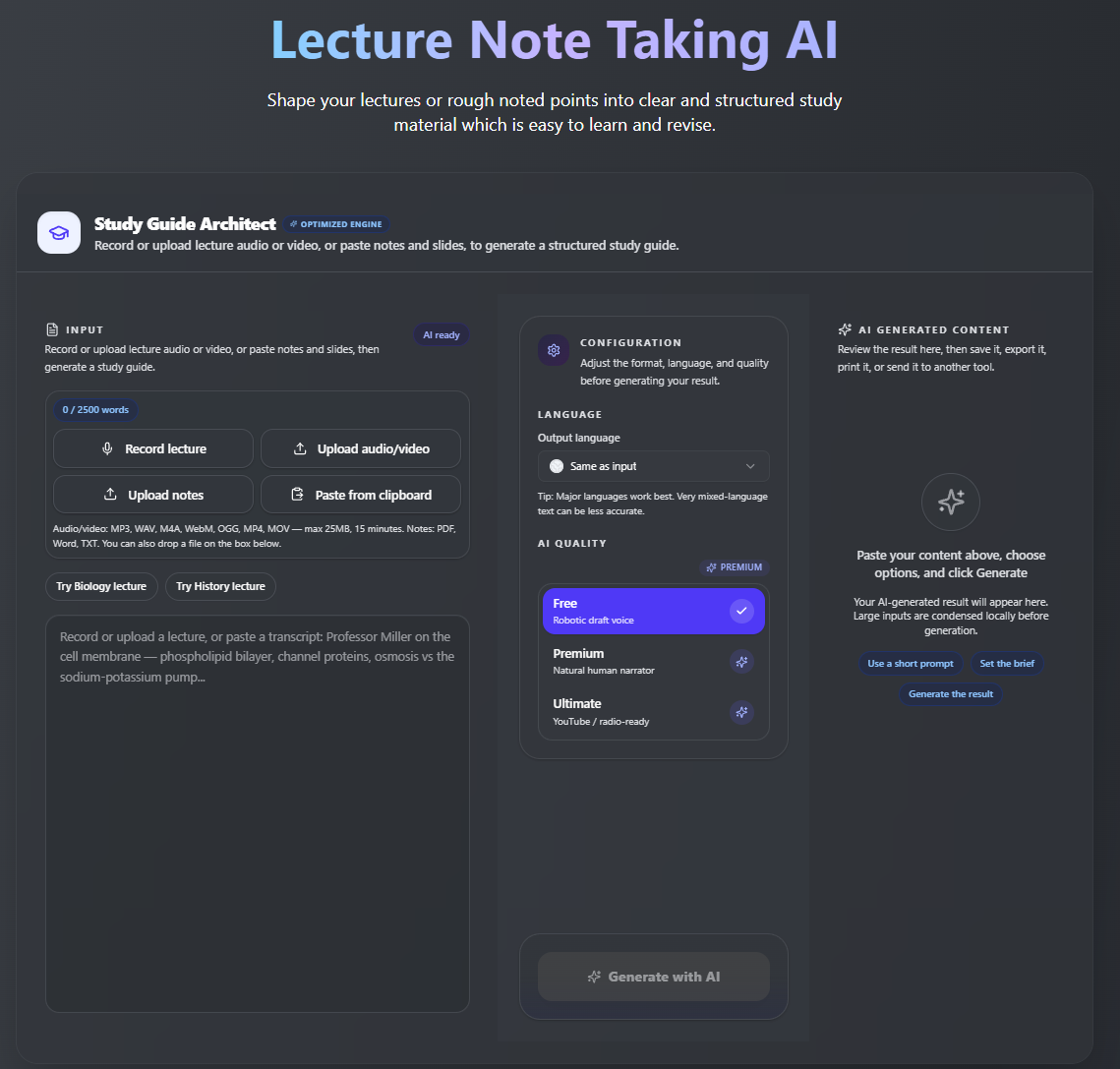
এই tool বিশেষভাবে lecture content-এর জন্য তৈরি, business meetings-এর জন্য নয়। তাই এর output meeting summary-এর চেয়ে study notes-এর মতো মনে হয়। Formatting clean এবং processing দ্রুত।
Key Features:
Lecture থেকে study notes: lecture record করুন বা transcript paste করুন এবং সেটিকে clear, structured notes-এ রূপান্তর করুন।
Key terms summary: দ্রুত revision-এর জন্য important terms, concepts এবং main points বের করুন।
Probable exam questions: exam-style questions generate করুন যাতে শিক্ষার্থীরা নিজেদের memory test করতে পারে।
Messy notes cleanup: rough বা unorganized class notes paste করুন এবং সেগুলোকে clear study guide-এ পরিণত করুন।
Multilingual support: lecture content একটি language-এ দিন এবং notes অন্য language-এ generate করুন।
Online learning-এর জন্য useful: YouTube lectures, course transcripts, webinars এবং দীর্ঘ recorded classes-এর সঙ্গে ভালো কাজ করে।
Revision-friendly output: notes-কে exam prep, flashcards, study groups বা digital notebook-এ ব্যবহার করুন।
Possible limitation: এটি তুলনামূলক নতুন tool, তাই established platforms-এর তুলনায় integrations কম হতে পারে।
Tool-টি practically try করতে এখানে click করুন, AI Lecture Note Taker by VoiceCraftTool
2) Otter.ai
Best for: Class-এর সময় live transcription বা recorded discussions
আপনি live lecture record করতে পারেন এবং পরে searchable transcript পেতে পারেন। Free plan-এ প্রতি মাসে reasonable number of minutes পাওয়া যায়।
Key Features:
Real-time lecture transcription
Speaker identification
Searchable lecture transcripts
Basic lecture summaries
Audio recording support
In-person classes-এর জন্য useful
Online sessions-এর জন্য useful
Possible limitation: Summaries কখনও কখনও surface-level হতে পারে, তাই science বা law-এর মতো detail-heavy subjects-এ full transcript পড়তে হতে পারে।
3) Notion AI
Best for: যারা নিজেদের notes আগে থেকেই Notion-এ organize করে
যদি আপনার পুরো study system আগে থেকেই Notion-এ থাকে, তাহলে একই জায়গায় AI features যোগ করা একটি natural choice। আপনাকে বারবার বিভিন্ন apps-এর মধ্যে switch করতে হবে না।
Key Features:
Pasted class notes summarize করে
Messy notes-কে cleaner format-এ restructure করে
Short notes-কে বেশি detail দিয়ে expand করে
Study material-কে Notion-এর ভেতরে organize করে
Notes, summaries এবং tasks-কে একই workspace-এ রাখে
যারা Notion study planning-এর জন্য ব্যবহার করে তাদের জন্য useful
Possible limitation: এটি মূলত সেই text-এর ওপর কাজ করে যা আপনার কাছে আগে থেকেই আছে। এটি audio সরাসরি transcribe করে না, তাই সেই step-এর জন্য আলাদা tool লাগবে।
4) Fireflies.ai
Best for: Zoom, Teams বা Google Meet-এ হওয়া recorded online lectures
যদি আপনার বেশিরভাগ classes video call platforms-এ হয়, তাহলে Fireflies সহজেই workflow-এ fit করতে পারে। এটি আগের sessions store এবং organize করে, যাতে পরে search করা যায়।
Key Features:
Online meetings-এ automatically join করে
Lectures, webinars এবং group sessions record করে
Meeting transcripts তৈরি করে
Short summaries generate করে
Group project discussions review করতে সাহায্য করে
Seminar-style online classes-এর জন্য useful
Previous session notes searchable রাখে
Possible limitation: এটি mainly professional use-এর জন্য তৈরি, তাই summaries কখনও কখনও study notes-এর বদলে business meeting recap-এর মতো লাগতে পারে।
5) Fathom
Best for: Online class summaries এবং video lecture notes
Fathom free to use এবং solid quality দেয়। এটি live online classes-এর সময় background-এ কাজ করে এবং বেশি setup লাগে না।
Key Features:
Video meetings record করে
Online classes বা sessions summarize করে
Important moments highlight করে
Clean session summaries তৈরি করে
Session-এর পরে action points generate করে
শিক্ষার্থীদের live video lectures দ্রুত review করতে সাহায্য করে
Possible limitation: এর focus mainly video calls, তাই pre-recorded lectures বা in-person class audio recordings-এর জন্য এটি এতটা useful নয়।
6) Google Gemini
Best for: Existing transcripts, messy notes বা pasted lecture content-কে organized study material-এ রূপান্তর করা।
Gemini তখন useful যখন শিক্ষার্থীদের কাছে আগে থেকেই lecture text থাকে এবং তারা সেটিকে clearer notes, quick summaries বা revision points-এ রূপান্তর করতে চায়।
Key Features:
Lecture transcripts summarize করে
Messy notes-কে cleaner format-এ rewrite করে
Difficult concepts-কে simpler words-এ explain করে
Bullet-point study notes তৈরি করে
Practice questions generate করতে সাহায্য করে
Pasted class material, notes বা course content-এর সঙ্গে ভালো কাজ করে
Possible limitation: আপনাকে content আগে provide করতে হবে। আপনার কাছে transcript, copied notes বা lecture material আগে থেকেই থাকলে এটি best কাজ করে।
7) ChatGPT
Best for: Existing lecture content থেকে flexible study notes, explanations, flashcards এবং practice questions তৈরি করা।
ChatGPT flexible। শিক্ষার্থীরা short summaries, detailed explanations, flashcards বা exam-style questions-এর মতো বিভিন্ন formats-এ notes চাইতে পারে।
Key Features:
Transcripts-কে study notes-এ রূপান্তর করে
Summaries এবং topic breakdowns তৈরি করে
Complex topics-কে simpler language-এ explain করে
Flashcards এবং quiz questions generate করে
Notes-কে বিভিন্ন formats-এ rewrite করে
শিক্ষার্থীদের concepts step by step revise করতে সাহায্য করে
Possible limitation: এটি নিজে lecture recorder-এর বিকল্প নয়। Best results-এর জন্য আপনার কাছে transcript, recording text বা rough notes আগে থেকেই থাকা উচিত।
সেরা Options-এর তুলনা
এটি শিক্ষার্থীদের জন্য সেরা AI lecture note taker tools-এর simple comparison। এই table থেকে দ্রুত দেখতে পারবেন কোন tool আপনার study style, input type এবং lecture setup-এর জন্য বেশি suitable।
| Tool | Best For | Input Type | Student Use Case | Free Option |
|---|---|---|---|---|
| VoiceCraftTool | Lecture notes generation | Audio, transcript | General study notes | হ্যাঁ |
| Otter.ai | Live transcription | Live audio, recordings | In-person এবং online classes | হ্যাঁ, limited minutes |
| Notion AI | Notes organization | শুধু text | Notion ব্যবহারকারী শিক্ষার্থীরা | Paid, Notion plan অনুযায়ী |
| Fireflies.ai | Online meeting-based classes | Video calls | Zoom এবং Teams lectures | হ্যাঁ, limited |
| Fathom | Video lecture summaries | Video calls | Live online classes | হ্যাঁ |
| Google Gemini | Lecture content summarization | Text, pasted content, access অনুযায়ী files | Flexible summaries এবং explanations | হ্যাঁ |
| ChatGPT | Study notes এবং revision support | Text, pasted content, access অনুযায়ী files | Flashcards, summaries এবং concept explanations | হ্যাঁ |
এই table সবার জন্য একটি perfect tool খুঁজে বের করার জন্য নয়। যদি audio থেকে সরাসরি lecture notes চান, তাহলে VoiceCraftTool বা Otter.ai বেশি suitable হতে পারে। যদি আপনার কাছে আগে থেকেই transcript থাকে, তাহলে ChatGPT বা Gemini সেটিকে summaries, flashcards এবং clearer study material-এ রূপান্তর করতে সাহায্য করতে পারে।
কোন Tool বেছে নেবেন?
এই সব options-এর মধ্যে সঠিক choice নির্ভর করে আপনি কীভাবে পড়েন এবং আপনার classes কোথায় হয় তার ওপর।
VoiceCraftTool বেছে নিন যদি এমন simple tool চান যা lectures-কে notes-এ রূপান্তর করে এবং শিক্ষার্থীদের জন্য বিশেষভাবে তৈরি
Otter.ai বেছে নিন যদি class-এর সময় live transcription এবং searchable output প্রয়োজন হয়
Notion AI বেছে নিন যদি আপনার notes আগে থেকেই Notion-এ থাকে এবং আপনি শুধু AI support যোগ করতে চান
Fireflies.ai বেছে নিন যদি আপনার বেশিরভাগ classes Zoom বা Google Meet-এ হয়
Fathom বেছে নিন যদি আপনি live online classes attend করেন এবং free, simple summaries চান
ChatGPT বা Gemini বেছে নিন যদি আপনার কাছে আগে থেকেই transcript থাকে এবং flexible summarization বা explanations দরকার হয়
প্রত্যেক শিক্ষার্থীর জন্য একই tool সেরা হবে না। আপনার existing study workflow-এর সঙ্গে সবচেয়ে ভালো fit করে এমন tool বেছে নিন।
এই Tools ব্যবহার করার Tips
AI lecture note taker খুব helpful হতে পারে, কিন্তু আপনি এটি কীভাবে use করেন তা সরাসরি output quality-তে প্রভাব ফেলে। কয়েকটি simple habit notes-কে আরও clear এবং study-friendly করতে পারে।
Clear lecture content দিয়ে শুরু করুন: ভালো recording, typed notes বা available transcript ব্যবহার করুন
Tool-কে যথেষ্ট context দিন: subject, topic এবং কী ধরনের notes চান তা বলুন
Useful format চান: headings, key points, definitions, summaries বা exam-style questions request করুন
Output নিজে review করুন: names, dates, formulas, examples এবং subject-specific terms check করুন
Notes-কে active revision-এর জন্য use করুন: summaries-কে flashcards, practice questions বা quick revision sheets-এ রূপান্তর করুন
নিজের understanding-কে process-এর অংশ রাখুন: AI-কে learning organize করার জন্য ব্যবহার করুন, learning replace করার জন্য নয়
Best results তখন পাওয়া যায় যখন শিক্ষার্থীরা AI-কে study assistant হিসেবে use করে এবং পরে notes নিজের language ও understanding অনুযায়ী review ও personalize করে। এখনই AI Lecture Note Taker by VoiceCraftTool try করুন, শুরু করা free।
AI Lecture Notes vs Manual Notes
এটি কোনো competition নয়। দুই method-এরই নিজস্ব জায়গা আছে, এবং শিক্ষার্থীরা সবচেয়ে ভালো result পায় যখন AI notes-কে manual notes-এর সঙ্গে use করে, পুরোপুরি replace না করে।
| Aspect | AI Notes | Manual Notes |
|---|---|---|
| Speed | Fast | তুলনামূলক ধীর |
| Memory retention | একা use করলে কম হতে পারে | Active writing-এর কারণে বেশি হতে পারে |
| Organization | ভালো | শিক্ষার্থীর ওপর depend করে |
| Accuracy | ভালো, তবে review দরকার | আপনি যা বুঝেছেন সেটাই reflect করে |
| Best use | Class-এর পরে notes clean ও organize করা | Lecture-এর সময় |
Practical উপায় হলো lecture-এর সময় rough notes লেখা এবং class-এর পরে AI tool দিয়ে সেগুলো clean, organize এবং missing information দিয়ে complete করা। এতে writing-এর memory benefit এবং structured AI notes-এর clarity দুটোই পাওয়া যায়।
শিক্ষার্থীদের যে Common Mistakes এড়িয়ে চলা উচিত
এই tools সঠিকভাবে ব্যবহার করলে সময় বাঁচায়, কিন্তু notes-এর ওপর পুরোপুরি নির্ভর করার আগে একবার check করা জরুরি।
Notes Review না করা
AI-generated notes কিছু words, context বা ছোট details miss করতে পারে। Study করার আগে অন্তত একবার অবশ্যই পড়ে নিন।
খারাপ Quality-এর Audio ব্যবহার করা
Noise থাকা বা unclear recording দুর্বল notes তৈরি করতে পারে। Clear recording সাধারণত ভালো results দেয়।
Diagrams এবং Formulas ভুলে যাওয়া
যদি professor board-এ কিছু explain করেন, সেটা manually add করুন। AI tools visual details সবসময় ঠিকভাবে capture করতে পারে না।
Professor-এর Hints Ignore করা
যদি professor বলেন কোনো topic exam-এর জন্য important, সেটি নিজের notes-এ mark করুন।
Exam-এর আগের রাত পর্যন্ত Wait করা
AI notes প্রতি lecture-এর পরে use করুন, শুধু exam-এর আগে নয়। এতে revision অনেক সহজ হয়।
উপসংহার
সবচেয়ে ভালো AI lecture note taker হলো সেটি, যেটি আপনার actual study style-এর সঙ্গে fit করে। যদি এমন simple tool চান যা lectures-কে clear study notes-এ রূপান্তর করার জন্য তৈরি, তাহলে VoiceCraftTool Lecture Note Taking AI একটি ভালো starting option। যদি live transcription প্রয়োজন হয়, তাহলে Otter.ai একটি strong choice। আর যদি আপনার কাছে আগে থেকেই transcripts থাকে এবং flexible study support দরকার হয়, তাহলে ChatGPT বা Gemini-ও বেশ useful।
আপনি যে tool-ই বেছে নিন, মনে রাখবেন AI মূলত organization-এ সাহায্য করে। আসল understanding এখনো আপনাকেই develop করতে হবে। এসব tools এমনভাবে ব্যবহার করুন যাতে notes আবার লিখতে কম সময় লাগে এবং content সত্যিই বুঝতে বেশি সময় দেওয়া যায়। এখানে click করে নিজে try করুন, AI Lecture Note Taker by VoiceCraftTool
FAQs
শিক্ষার্থীদের জন্য সবচেয়ে ভালো AI lecture note taker কোনটি?
এটি আপনার study setup-এর ওপর depend করে। VoiceCraftTool lectures-কে structured study notes-এ রূপান্তর করার জন্য ভালো। Otter.ai live transcription-এর জন্য strong। যদি আপনার কাছে আগে থেকেই transcript থাকে এবং flexible study support দরকার হয়, তাহলে ChatGPT এবং Gemini ভালো options।
AI কি audio থেকে lecture notes তৈরি করতে পারে?
হ্যাঁ। VoiceCraftTool এবং Otter.ai-এর মতো tools audio file বা live recording process করে transcript এবং summarized study notes তৈরি করতে পারে। Quality recording-এর clarity এবং tool-এর ওপর depend করে।
AI lecture notes generator কী?
এটি এমন একটি tool যা audio, video বা text format-এর lecture content নিয়ে artificial intelligence ব্যবহার করে organized notes, summaries এবং key points তৈরি করে। এর উদ্দেশ্য class-এর পরে শিক্ষার্থীদের সময় বাঁচানো।
AI-generated lecture notes কি accurate?
বেশিরভাগ content-এর জন্য এগুলো generally reliable, তবে perfect নয়। Subject-specific terms, names, numbers এবং formulas-এ mistakes হওয়ার সম্ভাবনা বেশি। Study করার আগে output অবশ্যই review করুন।
Exam preparation-এর জন্য AI lecture notes ব্যবহার করা যায়?
হ্যাঁ, এবং অনেক শিক্ষার্থী এমনটাই করে। এগুলো নিজের revision-এর সঙ্গে সবচেয়ে ভালো কাজ করে। AI notes-কে base হিসেবে use করুন, এরপর নিজের understanding, examples এবং corrections add করুন।
AI lecture note taker কি manual notes-এর চেয়ে ভালো?
কোনো method একা সব situation-এ ভালো নয়। Manual notes lecture-এর সময় memory-তে সাহায্য করতে পারে। AI notes class-এর পরে organization, clarity এবং coverage-এ সাহায্য করে। দুটো একসঙ্গে use করলে আরও effective হতে পারে।
AI tools কি দীর্ঘ lectures summarize করতে পারে?
হ্যাঁ। এই tools-এর বেশিরভাগই দীর্ঘ recordings handle করতে পারে। দুই ঘণ্টার lecture সাধারণত কয়েক মিনিটের processing-এর পরে clear key points এবং সহজে revise করা যায় এমন summary-তে রূপান্তর করা সম্ভব।