ऑटोमेटेड मीटिंग मिनट्स बनाने वाले AI टूल्स की तुलना करें
मीटिंग मिनट्स बनाने में 10 मिनट लगने चाहिए, एक घंटा नहीं। फिर भी कई टीमें फैसलों, छूटे हुए action items और अस्पष्ट नोट्स को एक जगह व्यवस्थित करने में समय गंवाती हैं।
AI टूल्स इसमें मदद कर सकते हैं, लेकिन सही टूल चुनना भ्रमित करने वाला हो सकता है। यह गाइड सबसे अच्छे विकल्पों की साफ तुलना करता है, ताकि आप वह टूल चुन सकें जो वास्तव में आपकी जरूरत के अनुसार काम करे।
AI Meeting Minutes Tools की Quick Comparison
यह टेबल आपको एक तेज overview देता है। आगे वाले सेक्शन में पूरी detail दी गई है, लेकिन अगर आपके पास कम समय है, तो यहां से शुरू करें।
| टूल | किसके लिए सबसे अच्छा | Input Type | Output Style | Ease of Use | Free Plan |
|---|---|---|---|---|---|
| AI Meeting Minutes Generator VCT | Formal, structured meeting minutes और simplicity | Transcript / Text | Structured minutes document | बहुत आसान | हां |
| Fireflies.ai | ऐसी टीमें जिन्हें full transcripts + search चाहिए | Audio / Live | Transcript + summary | मध्यम | हां (limited) |
| Otter.ai | Calls के दौरान real-time transcription | Live / Audio | Transcript + highlights | आसान | हां (limited) |
| Fathom | Quick personal meeting recaps | Live (Zoom) | Short summary | बहुत आसान | हां |
| tl;dv | Multilingual teams, video highlights | Live / Video | Clips + summary | आसान | हां |
| Fellow | Team workflows और accountability | Live / Integrated | Meeting agenda + notes | मध्यम | हां (limited) |
| MinutesGenerator | Simple, fast document generation | Text input | Formatted minutes | आसान | हां |
इस तुलना से मुख्य बातें
VoiceCraftTool उन users के लिए सबसे मजबूत overall balance में से एक देता है जिन्हें खास तौर पर structured meeting minutes चाहिए। यह ready-to-use output, आसान access, minimal setup और free option को combine करता है, बिना ऐसी extra features जो पहले से transcript रखने वाले users के लिए जरूरी न हों।
ज्यादातर tools पहले transcription पर focus करते हैं और structure बाद में देते हैं, इसलिए output को share करने से पहले अक्सर editing करनी पड़ती है।
Fathom quick personal summaries के लिए अच्छा है, लेकिन official documentation के लिए जरूरी formal structure नहीं देता।
VoiceCraftTool खास तौर पर structured, share-ready meeting minutes बनाने के लिए बनाया गया है, इसलिए यह सामान्य transcription tools से अलग है।
tl;dv multilingual teams और video review के लिए अच्छा है, लेकिन formal written meeting minutes के लिए कम suitable है।
Fellow complete meeting management के लिए बेहतर है, जिसमें agendas, follow-ups और accountability शामिल हैं, सिर्फ minutes creation नहीं।
7 Best AI Meeting Minutes Generators की सूची
1) VoiceCraftTool का AI Meeting Minutes Generator
Best For: ऐसे users जिन्हें clear, formal और decision-focused meeting minutes चाहिए, बिना raw transcripts को लंबे समय तक edit किए।
Meeting minutes बनाने के लिए इसकी सबसे बड़ी खासियत functionality और simplicity के बीच balance है। किसी meeting bot को configure करने की जरूरत नहीं होती और न ही कोई complex workflow सीखना पड़ता है। जिन users के पास पहले से transcript या notes हैं, उनके लिए process सीधा रहता है। अभी उपलब्ध free access इसे individuals और small teams के लिए भी practical बनाता है जिन्हें full meeting management platform की जरूरत नहीं है।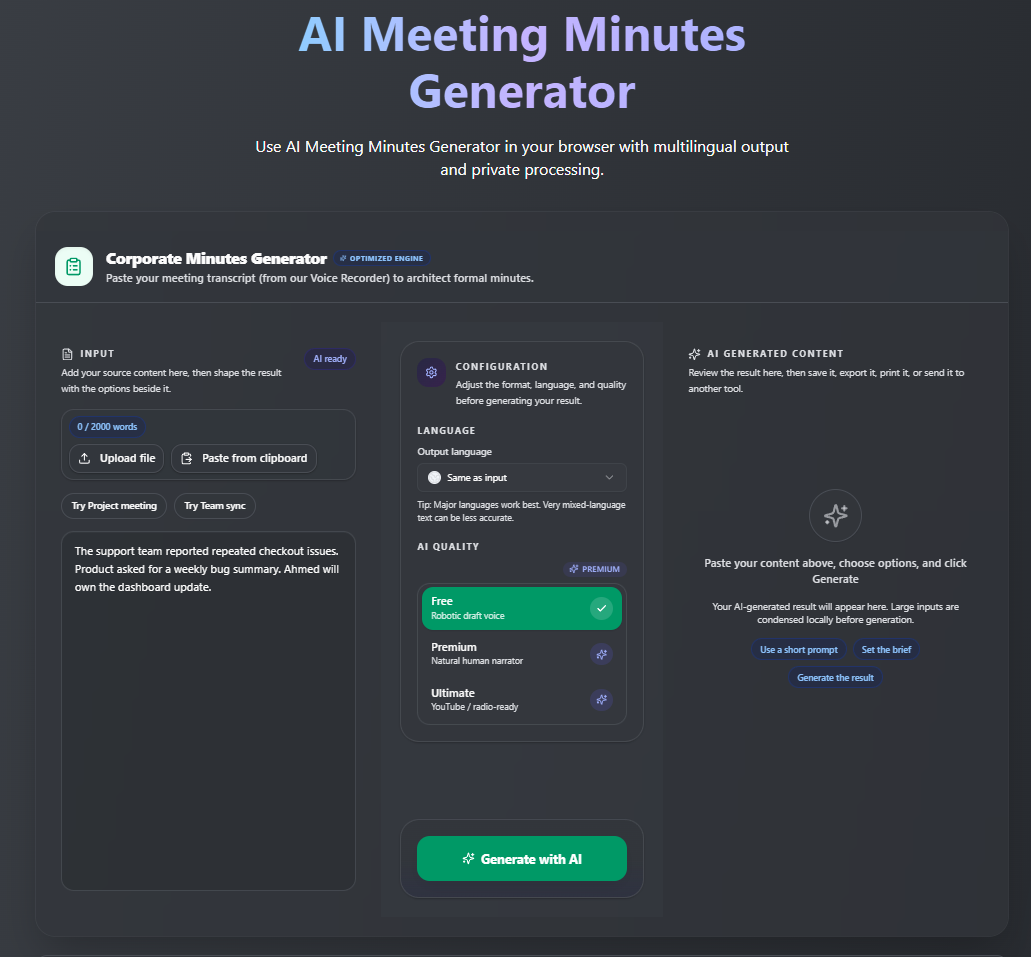
यह कैसे काम करता है
अपनी meeting record करें या जिस platform का उपयोग करते हैं वहां से transcript export करें
Transcript को tool में paste करें
Minutes generate करें और भेजने से पहले review करें
फायदे:
Output तुरंत इस्तेमाल किया जा सकता है
Unnecessary features या clutter नहीं
बहुत आसान और लगभग बिना learning curve के
खास तौर पर final meeting minutes बनाने के लिए बनाया गया
उन users के लिए accessible जो full meeting recording platform नहीं चाहते
Structured minutes की जरूरत वाले users के लिए strong value
नुकसान:
उपयोग से पहले transcript की जरूरत होती है
Real-time transcription के लिए integration चाहिए
बेहतर Results के लिए Tips
Transcript में speaker names जोड़ने से output काफी ज्यादा accurate हो जाता है। Complete transcript हमेशा fragmented notes से बेहतर meeting minutes देता है। Input जितना complete होगा, final document उतना बेहतर होगा। अभी VoiceCraftTool का AI Meeting Minutes Generator try करें।
2) Fireflies.ai
Best For: ऐसी teams जिन्हें searchable transcripts और multiple platforms पर automatic recording चाहिए।
Fireflies आपकी meetings में bot के रूप में join करता है, सब कुछ record करता है और transcript के साथ summary generate करता है। इसकी search functionality खास तौर पर strong है। आप किसी पुराने meeting पर वापस जाकर keyword या speaker name से specific moment खोज सकते हैं।
फायदे:
Broad integration support
Reliable bot attendance
Strong search functionality
Zoom, Google Meet और Teams के साथ काम करता है
नुकसान:
Summary output काफी raw हो सकता है और formal meeting minutes के लिए editing चाहिए
Free plan में storage और features limited हैं
3) Otter.ai
Best For: ऐसे users जिन्हें calls के दौरान कम setup के साथ real-time transcription चाहिए।
Otter इस category के सबसे recognizable tools में से एक है। यह real-time में transcribe करता है, important moments highlight करता है और meeting के दौरान comments add करने देता है। Zoom integration इसे उन users के लिए convenient बनाती है जो पहले से उस platform का उपयोग करते हैं।
फायदे:
Real-time transcription
इस्तेमाल शुरू करना आसान
Clean interface
Individuals के लिए decent free tier
नुकसान:
Output मुख्य रूप से transcript-based है
Structured meeting minutes बनाने के लिए manual work चाहिए
बड़े teams में महंगा हो सकता है
4) Fathom
Best For: Individual professionals जो बिना complex setup के Zoom calls का quick summary चाहते हैं।
Fathom सिर्फ Zoom के साथ काम करता है और इस list के सबसे easy-to-use tools में से एक है। यह calls record करता है, transcribe करता है और हर meeting के बाद short summary automatically generate करता है। इसका free plan वास्तव में उपयोगी है, जो इस category में हमेशा common नहीं होता।
फायदे:
बेहद आसान
अच्छा free plan
Fast output
नुकसान:
सिर्फ Zoom के साथ काम करता है
Formal minutes structure नहीं देता
Team-wide documentation के लिए limited है
5) tl;dv
Best For: International या multilingual teams जिन्हें video highlights create और share करने की जरूरत है।
tl;dv meetings को कई languages में record और transcribe करता है और recordings से highlight clips बनाने देता है। यह तब खास तौर पर useful है जब आपको पूरी document के बजाय meeting का कोई specific moment share करना हो।
फायदे:
Strong multilingual support
Video highlight clipping
Zoom और Google Meet के साथ काम करता है
नुकसान:
Structured documents से ज्यादा clips और summaries पर focus
Formal written meeting minutes के लिए ideal नहीं
6) Fellow
Best For: ऐसी teams जो agenda से follow-up तक structured meeting management चाहती हैं, सिर्फ documentation नहीं।
Fellow सिर्फ minutes generator नहीं बल्कि complete meeting management platform के ज्यादा करीब है। यह meeting से पहले agendas बनाने, meeting के दौरान collaborative notes लेने और बाद में tasks track करने में मदद करता है। यह Asana और Jira जैसे project management tools के साथ भी integrate करता है।
फायदे:
Recurring team meetings के लिए अच्छा
Accountability और task tracking मजबूत
अच्छी integrations
नुकसान:
ज्यादा setup और process की जरूरत
Output formal minutes से ज्यादा notes-based है
सबसे अच्छा तब काम करता है जब पूरी team इसे अपनाए
7) MinutesGenerator
Best For: ऐसे users जो AI transcription के बिना quick notes डालकर formatted meeting minutes document चाहते हैं।
MinutesGenerator एक simple tool है। आप meeting details input करते हैं, sections manually या short notes से भरते हैं, और tool उन्हें properly formatted meeting minutes document में बदल देता है। यह इस list के कुछ दूसरे tools की तरह AI use नहीं करता, लेकिन fast और simple है।
फायदे:
आसान उपयोग
Recording की जरूरत नहीं
Clean, formatted output
नुकसान:
ज्यादा manual input चाहिए
Transcription capability नहीं है
आपको कौन सा AI Tool चुनना चाहिए?
Meeting minutes बनाने के लिए best overall option:
VoiceCraftTool का AI Meeting Minutes Generator. जिन users का main goal existing transcript या notes को clear, structured meeting minutes में बदलना है, उनके लिए यह useful functionality, accessibility, ease of use और value का मजबूत balance देता है। यह live recording या real-time transcription tools को replace नहीं करता, लेकिन actual minutes creation stage में काफी कम setup चाहिए।
Calls के दौरान real-time transcription के लिए best option:
Otter.ai या Fireflies.ai। दोनों live meetings record और transcribe करते हैं। Otter थोड़ा simpler है, जबकि Fireflies search और cross-platform support में बेहतर है।
Quick personal meeting recaps के लिए best option:
AI Meeting Minutes Generator और Fathom। दोनों में बहुत कम effort लगता है और free options individual users की काफी जरूरतें cover करते हैं।
Formal और structured meeting minutes के लिए best option:
VoiceCraftTool का AI Meeting Minutes Generator। अगर आपको ऐसा document चाहिए जिसे archive किया जा सके, stakeholders के साथ share किया जा सके या official record की तरह इस्तेमाल किया जा सके, तो यह इसकी बड़ी strengths में से एक है।
Team accountability और workflows के लिए best option:
Fellow। जब meeting management documentation जितना ही important हो, तो Fellow ज्यादा complete system देता है।
Multilingual teams या video highlights के लिए best option:
tl;dv और AI Meeting Minutes। खास तौर पर तब useful जब आपकी team कई languages use करती है या recording के specific moments share करना full document से ज्यादा valuable हो।
VoiceCraftTool अभी 100% free है। AI Meeting Minutes Generator और दूसरे professional voice तथा text tools अभी बिना किसी charges के try करें।
AI Meeting Tools चुनते समय Common Mistakes
Structured summary tool की जगह transcription tool चुनना
ये दोनों एक ही चीज नहीं हैं। कई users यह फर्क तब समझते हैं जब वे लंबे transcripts clean करने में काफी समय लगा चुके होते हैं।ऐसी features के लिए pay करना जिन्हें आप use नहीं करते
कुछ tools बड़े teams के लिए बनाए गए हैं। अगर आप solo काम करते हैं या small team में हैं, तो simpler tools अक्सर ज्यादा practical और cost-effective होते हैं।Review के बिना perfect output expect करना
AI एक अच्छा first draft दे सकता है, लेकिन decisions और commitments वाले meeting minutes को share करने से पहले हमेशा check करना चाहिए।सिर्फ brand name के आधार पर tool चुनना
Otter और Fireflies जैसे popular tools जाने-पहचाने हैं, लेकिन जरूरी नहीं कि हर use case के लिए best हों।
बेहतर AI Meeting Minutes पाने के लिए Quick Tips
Clean और complete transcript इस्तेमाल करें
Fragmented notes की जगह full transcript इस्तेमाल करें। Input जितना बेहतर होगा, output उतना बेहतर होगा।Speaker labels जोड़ें
“Sarah:” या “John:” जैसे names शामिल करें। इससे AI decisions और tasks को सही व्यक्ति के साथ assign कर पाता है।Meetings को decision-focused रखें
Clear discussions से clear summaries बनती हैं। Disorganized meetings से messy minutes बनते हैं।Share करने से पहले हमेशा review करें
भेजने से पहले एक quick read-through करें। कुछ मिनट की review कई mistakes रोक सकती है।
निष्कर्ष
VoiceCraftTool का AI Meeting Minutes Generator एक साफ जरूरत को पूरा करता है। यह आपके पास पहले से मौजूद information को लेकर उसे एक clean, professional document में बदल देता है। कोई meeting bot नहीं, कोई complicated setup नहीं और बाद में घंटों की editing नहीं।
अगर आपकी priority transcription है, तो Otter या Fireflies अच्छे options हैं। लेकिन अगर आपको proper meeting minutes document चाहिए जिसे archive, share या official record के रूप में use किया जा सके, तो VoiceCraftTool focused functionality, accessibility, simplicity और value के बीच ज्यादा मजबूत balance देता है।
सही tool पूरी तरह इस बात पर depend करता है कि meeting के बाद आपको क्या चाहिए। Transcript reference के लिए useful है। Structured meeting minutes accountability, clarity और record keeping के लिए useful हैं। ये अलग प्रकार के outputs हैं और इनके लिए अलग tools बनाए गए हैं।
AI Meeting Minutes Generator explore करें या VoiceCraftTool के दूसरे professional और creator tools try करें, जो अभी पूरी तरह free हैं।
FAQs
Meeting minutes के लिए सबसे अच्छा free AI tool कौन सा है?
Structured meeting minutes के लिए VoiceCraftTool सबसे मजबूत free options में से एक है क्योंकि यह full meeting platform की जरूरत के बिना transcripts को सीधे usable minutes में बदलने पर focus करता है। Fathom और Otter.ai भी अच्छे free options हैं जब quick recaps या real-time transcription priority हो, हालांकि उनके free plans में कुछ limitations हैं।
Zoom meetings के लिए कौन सा tool सबसे अच्छा काम करता है?
Fathom उन users के लिए सबसे आसान options में से एक है जो सिर्फ Zoom use करते हैं और instant summaries चाहते हैं। Fireflies.ai और Otter.ai भी bots के जरिए meetings में join कर सकते हैं और Zoom सहित कई platforms पर काम करते हैं।
इन tools के action items कितने accurate होते हैं?
VoiceCraftTool और Fellow decisions और tasks को structure करने में अच्छे हैं। Otter जैसे transcription tools को accuracy के लिए review करना चाहिए, खास तौर पर तब जब transcript में speaker labels न हों।
क्या ये tools multilingual meetings support करते हैं?
tl;dv multilingual transcription और video clips की वजह से international teams के लिए खास तौर पर अच्छा है। Fireflies.ai भी कई languages support करता है।
Transcript और structured meeting minutes में क्या अंतर है?
Fireflies और Otter जैसे tools के transcripts searchable और reference के लिए useful होते हैं, लेकिन काफी raw रहते हैं। VoiceCraftTool और MinutesGenerator के structured minutes इसके विपरीत agendas, decisions और action items के साथ share-ready documents देते हैं।
क्या ये tools sensitive या confidential meetings के लिए safe हैं?
हर tool की privacy policy जरूर check करें। Fellow enterprise environments के लिए suitable हो सकता है। Participants को हमेशा inform करें और confidential meetings में bots का उपयोग करने से बचें जब sensitive information को extra protection चाहिए।
AI-generated meeting minutes से बेहतर results कैसे मिल सकते हैं?
Complete transcripts का उपयोग करें जिनमें speaker names हों, जैसे “Sarah: action item”, meetings को goals और decisions पर focused रखें और output को share करने से पहले हमेशा review करें।