Use AI Podcast Notes in your browser with multilingual output and private processing.
Craft step — shape wording for speaking or publishing
Podcast Creator Kit
Studio
Upload a podcast audio file, record a clip, or paste a transcript to generate show notes, timestamps, and hooks.
Input0/1000AI ready
Record a clip, upload audio/video, or paste a transcript. Max 25MB, 10 minutes.
AI Quality
AI Generated Content
Preview or edit your show notes here.
Your show notes will appear here
Add a transcript, choose options, then generate.
1Add audio or paste content
2Adjust options & quality
3Generate show notes
Podcast Creator Kit History
Saved items for this tool (per account)
Podcast Creator Kit Feedback
Ratings and comments from people who used this tool
No feedback yet for this tool.
AI Podcast Notes helps you turn podcast audio or pasted transcripts into clear, structured notes with optional timestamps and social hooks. Upload your podcast file, paste your text, choose your language and quality mode, and quickly create notes that are easier to review, publish, share, and repurpose.
What is AI Podcast Notes?
AI Podcast Notes is a podcast note-making tool that helps users convert podcast audio or written podcast transcripts into organized episode notes.
Instead of listening to the full episode again or manually reading a long transcript, users can use the tool to create notes that highlight the main topics, important points, key ideas, and useful moments from the podcast. It is helpful for podcast creators, marketers, editors, students, researchers, and teams that want to save time after recording or publishing an episode.
The tool can also include timestamps and social hooks when selected, making the output more useful for show notes, episode pages, content planning, and social media promotion.
Upload or paste your podcast content
Podcast audio file
Upload your podcast file and let the tool process the episode into clear notes. This is useful when you have a recorded podcast, interview, discussion, lecture, or long-form audio session.
Podcast transcript or text
Paste your podcast transcript, written conversation, episode script, or copied text directly into the tool. This works well when your podcast is already transcribed or when you want to create notes from written episode content.
Episode details and context
Add clear podcast content so the notes can capture the main discussion, guest insights, topic flow, important ideas, and useful moments more accurately.
Key features of AI Podcast Notes
Structured podcast notes
The tool organizes your podcast content into clean notes that are easier to read, review, and publish. It helps turn long episodes into a more useful written format.
Podcast file and text input
Users can upload a podcast file or paste podcast text directly, making the tool useful for both audio-based workflows and transcript-based workflows.
Optional timestamps
Users can choose to include timestamps in the output notes. This helps listeners find important parts of the episode and makes the notes more practical for show notes, episode summaries, and editing references.
Optional social hooks
The tool can also generate social hooks from the podcast content. These hooks can help you promote the episode on platforms like LinkedIn, X, Instagram, Facebook, TikTok, or YouTube Shorts.
Same-language output by default
The podcast notes are generated in the same language as the input by default. This helps keep the original tone, meaning, and context natural.
Choose a different output language
Users can also select another language for the podcast notes. This is useful for multilingual audiences, international podcasts, global teams, or repurposing content for different markets.
Quality control options
Users can choose how deeply the podcast should be processed based on their time, purpose, and level of detail needed.
Choose the right processing mode
Fast
Best for quickly generating basic podcast notes when you need a simple summary or quick first draft in less time.
Balanced
Best for regular podcast notes. It gives a good mix of speed and quality, making it useful for most podcast episodes, interviews, and content workflows.
Best
Best for detailed and deeply prepared podcast notes. This mode may take more time, but the output is more focused, complete, and useful for important episodes, long interviews, or professional publishing.
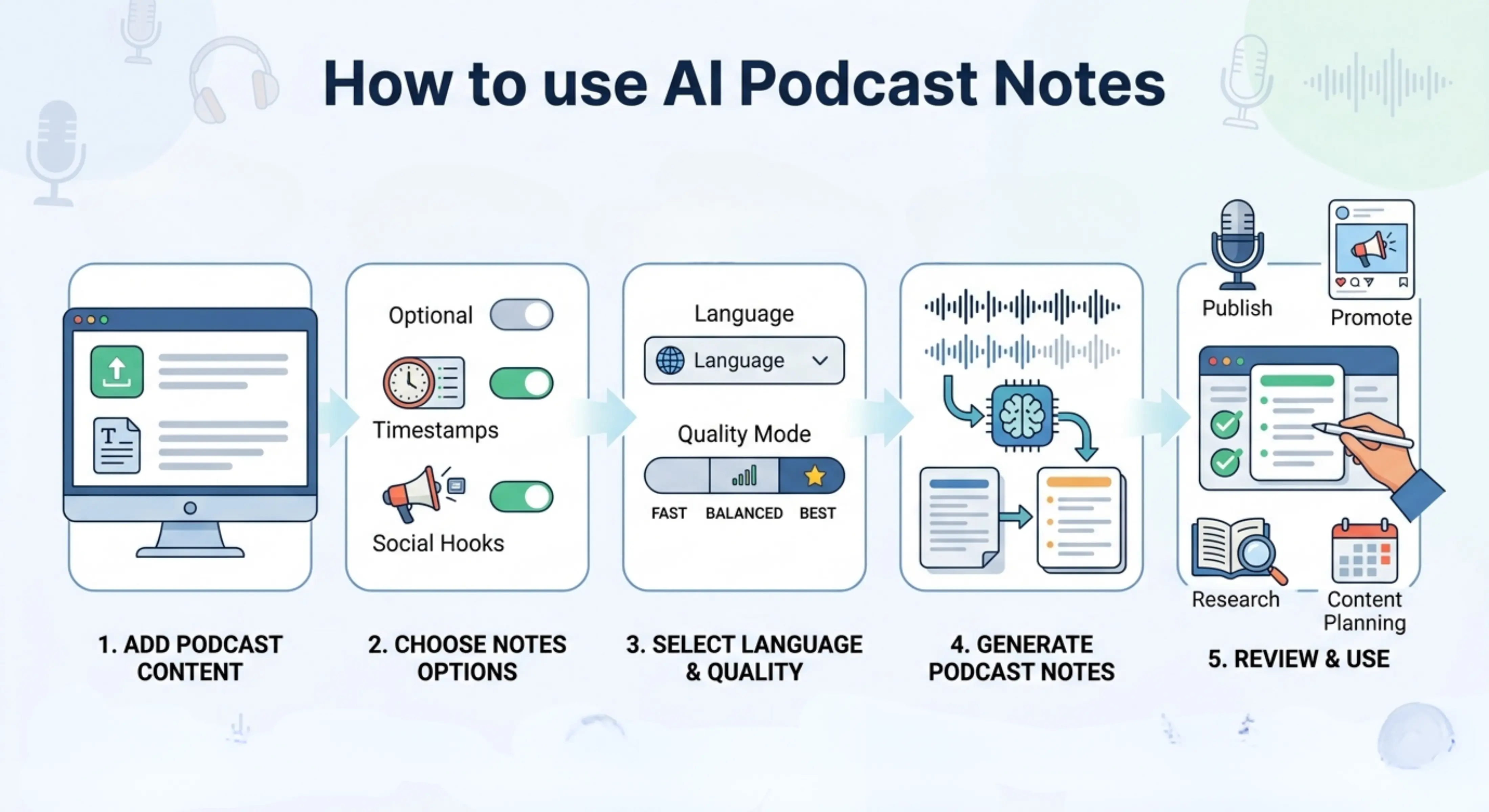
How to use AI Podcast Notes
Step 1: Add your podcast content
Upload your podcast file or paste the podcast transcript, episode text, interview content, or discussion notes directly into the tool.
Step 2: Choose notes options
Select whether you want timestamps and social hooks included in the output notes.
Step 3: Select language and quality
Keep the same output language or choose another one, then select Fast, Balanced, or Best mode based on your needs.
Step 4: Generate podcast notes
Let the tool process your podcast content and turn it into structured notes with the selected options.
Step 5: Review and use
Read the final notes, check the timestamps if included, edit any episode-specific details, and use the output for publishing, promotion, research, or content planning.
Why use AI Podcast Notes?
Podcast episodes often contain valuable ideas, but those ideas can be difficult to find inside long audio recordings or lengthy transcripts. A listener may not have time to listen to the full episode, and a creator may not have time to manually write notes, pull highlights, create timestamps, and prepare social content after every recording.
AI Podcast Notes helps by turning podcast content into a clear written format. It saves time, makes episodes easier to understand, and helps users reuse podcast content for show notes, blog drafts, newsletters, social media captions, episode pages, and internal documentation.
It is especially useful when you want to make your podcast more searchable, easier to browse, and more useful for both listeners and content teams.
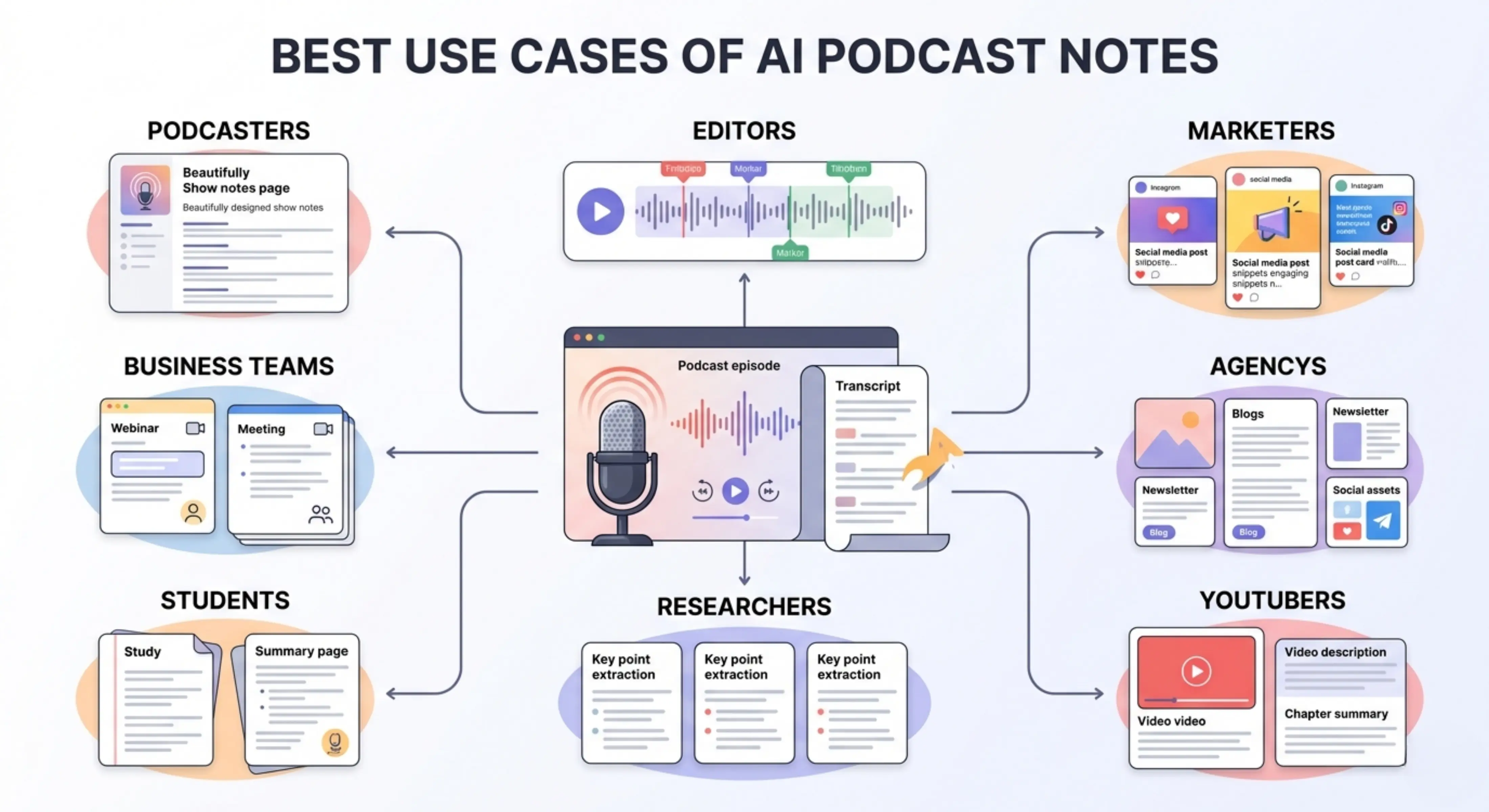
Best use cases
Podcasters: Create episode notes, key takeaways, timestamps, and promotional hooks from podcast recordings or transcripts.
Podcast editors: Use notes and timestamps to quickly understand episode structure, find important sections, and prepare editing references.
Content marketers: Turn podcast episodes into reusable content for social media, newsletters, blogs, and promotional campaigns.
Agencies: Prepare podcast notes, episode summaries, and social hooks for clients who publish regular audio or video episodes.
YouTubers and video creators: Convert long-form video podcasts or interviews into structured notes, highlights, and content ideas.
Researchers: Summarize expert interviews, recorded discussions, field conversations, or research podcasts into organized notes.
Students: Create study notes from educational podcasts, lectures, interviews, and recorded learning sessions.
Business teams: Summarize webinars, internal discussions, founder interviews, training sessions, and thought-leadership podcasts.
Podcast show notes
Create clean show notes that explain what the episode is about, what topics were discussed, and what listeners can expect from the conversation.
Timestamped episode summaries
Generate podcast notes with timestamps so listeners can jump to important sections, topics, questions, guest insights, or key moments in the episode.
Social media content hooks
Use the social hooks option to create short, attention-grabbing lines from your podcast episode. These hooks can help you promote the episode across social platforms.
Interview and guest highlights
Turn guest interviews into notes that capture the strongest ideas, opinions, lessons, stories, and memorable quotes from the conversation.
Long-form content repurposing
Use podcast notes as a starting point for blog posts, newsletters, LinkedIn posts, X threads, YouTube descriptions, short-form video ideas, and content calendars.
Educational podcast notes
Convert lectures, learning podcasts, expert discussions, and course-related audio into notes that are easier to review and study.
Tips for better podcast notes
Use a clear podcast file or accurate transcript for better output.
Add the full episode content when possible so the notes do not miss important sections.
Turn on timestamps when you want the notes to help with navigation, editing, or episode publishing.
Turn on social hooks when you want to promote the podcast on social media.
Use Best mode for long interviews, expert episodes, detailed discussions, or important publishing work.
Review the final notes before publishing and add guest names, links, sponsor details, and episode-specific references manually if needed.
Check timestamps before using them in public show notes, especially if the episode has been edited after upload.
FAQs
How do I create show notes for a podcast?
You can create podcast show notes by listening to the episode or reviewing the transcript, then writing the main topic, key takeaways, guest details, important links, and timestamps if needed. AI Podcast Notes helps speed this up by turning the uploaded podcast file or pasted transcript into structured notes.
Can AI generate podcast notes from a transcript?
Yes. If you already have a podcast transcript, you can paste it into the tool and generate podcast notes from the text. This is useful when you do not want to manually scan a long transcript to find the main points, topics, and highlights.
Can I generate podcast notes from an audio file?
Yes. You can upload a podcast file and use the tool to create notes from the episode. This is helpful when you have a recorded podcast but do not want to write the notes manually from scratch.
Should podcast show notes include timestamps?
Timestamps are useful when your episode covers multiple topics, has a guest interview, includes important sections, or is long enough that listeners may want to jump to specific parts. If your episode is short or simple, timestamps may not always be necessary.
What should be included in podcast show notes?
Good podcast show notes usually include a short episode summary, key topics, important takeaways, guest information, useful links, timestamps, and a call to action. The exact format depends on your podcast style and where you publish the episode.
Can AI create social media posts from a podcast?
AI can help create social hooks, captions, post ideas, and short promotional lines from a podcast episode. These can be used as a starting point for LinkedIn posts, X posts, Instagram captions, YouTube descriptions, or short-form video ideas.
Next in the studio
Related tools
Next steps in the Speak → Craft → Hear studio — each card shows why it fits.