Use AI Content Repurposing in your browser with multilingual output and private processing.
Craft step — shape wording for speaking or publishing
Script Transformer
Studio
Professional Content Repurposing
Input
AI ready
0 / 1000 words
Max recording length: 5 minutes.
Configuration
Pick the target platform, then language and polish.
Language
Tip: Major languages work best. Very mixed-language text can be less accurate.
AI Quality
Free drafts fast. Premium/Ultimate unlock clearer, publish-ready results on Plus.
AI Generated Content
Your repurposed script will appear here
Paste one script. Output is rebuilt for TikTok, LinkedIn, email, or X.
1Paste the source script
2Choose target platform
3Repurpose for that platform
Script Transformer History
Saved items for this tool (per account)
Script Transformer Feedback
Ratings and comments from people who used this tool
No feedback yet for this tool.
Creating content for every platform separately can take a lot of time, especially when you already have a script, article, video idea, podcast notes, or social media content that can be reused in different ways. AI Content Repurposing helps you turn one piece of content into platform-ready formats such as TikTok hooks, LinkedIn posts, Twitter threads, Instagram captions, YouTube descriptions, short-form video ideas, and more. Upload your content or paste it directly, choose your preferred settings, select the output language and quality mode, and get adapted content that fits different platforms without losing the original message.
What is AI Content Repurposing?
AI Content Repurposing is a content writing tool that helps users convert existing content into different formats for multiple platforms. Instead of writing fresh content from scratch for TikTok, LinkedIn, Twitter, Instagram, YouTube, newsletters, or other channels, users can provide one original script or content piece and generate different versions from it.
The tool keeps the main idea, message, and context of the original content but changes the style, structure, length, and tone according to the selected platform. This makes it useful for creators, marketers, businesses, coaches, agencies, and anyone who wants to get more value from their existing content.
Upload or paste your content
Script content
Upload or paste your video script, reel script, podcast script, webinar script, or speaking notes and turn them into platform-specific content pieces.
Written content
Use blog posts, captions, newsletters, articles, social media posts, or marketing copy and repurpose them into shorter, longer, or more engaging formats.
Platform content ideas
Add your main idea, message, topic, offer, product details, or educational content and let the tool adapt it into formats suitable for different social platforms.
Key features of AI Content Repurposing
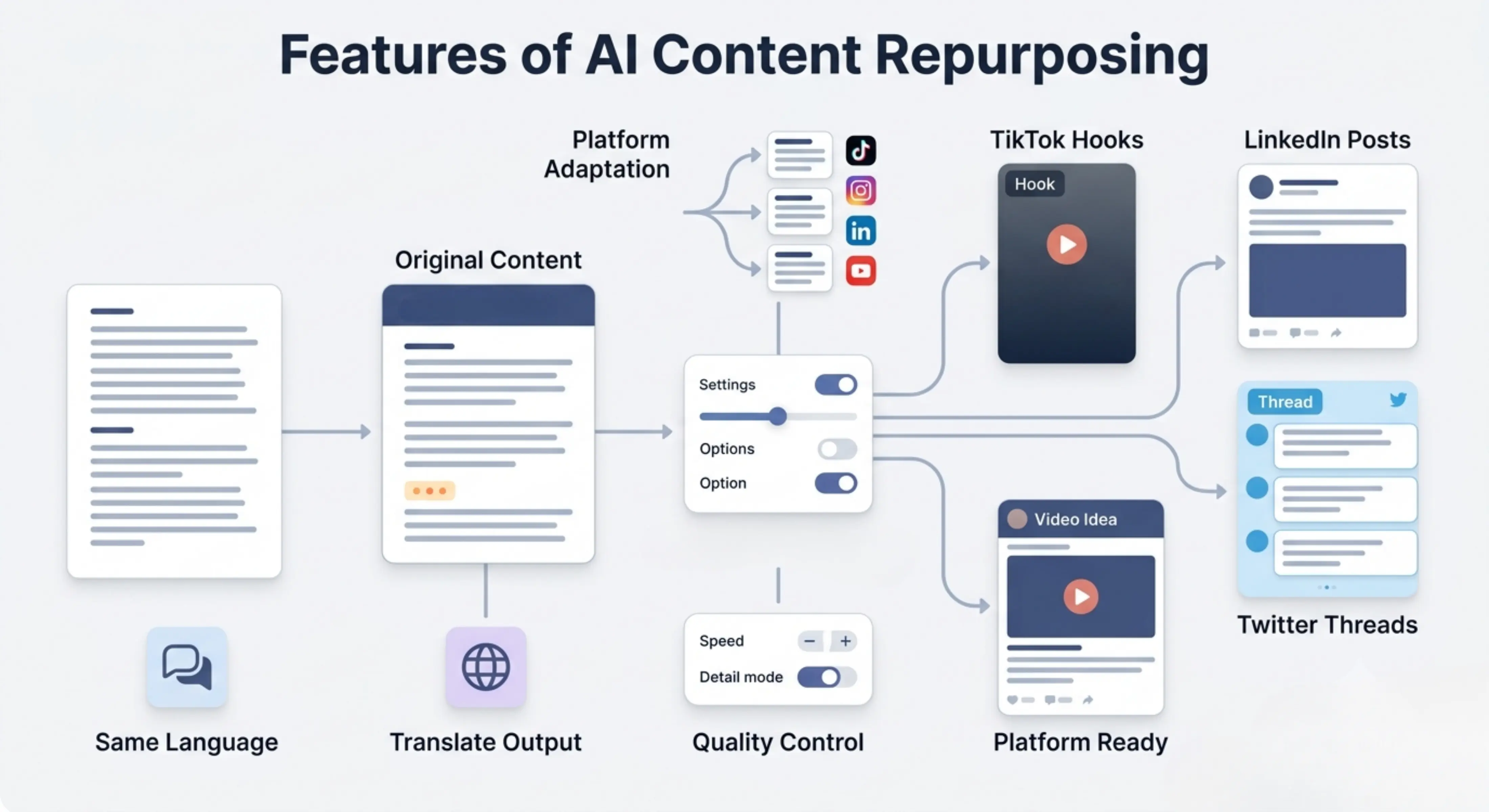
Platform-specific content adaptation
The tool adjusts your content for different platforms such as TikTok, LinkedIn, Twitter, Instagram, YouTube, and more, so each version feels suitable for where it will be posted.
TikTok hooks and short-form ideas
Turn long scripts or rough ideas into attention-grabbing TikTok hooks, short-form video openings, reel ideas, and quick content angles.
LinkedIn post generation
Convert your content into a professional LinkedIn post that is more suitable for business audiences, personal branding, thought leadership, or educational posting.
Twitter thread creation
Repurpose your content into a clear Twitter thread with a strong opening, connected points, and a readable flow for short-form text audiences.
Same-language output by default
The output is generated in the same language as the input by default, helping preserve the original tone, meaning, and natural expression of the content.
Choose a different output language
Users can also select another language for output, which is helpful for multilingual content marketing, international audiences, or repurposing content for different regions.
Personalized configuration options
Users can select their preferred content type, platform, language, quality level, and style settings so the output matches their specific content goal.
Quality control options
The tool gives users control over how quickly or deeply the content should be prepared based on their purpose, deadline, and level of detail needed.
Choose the right processing mode
Fast
Best for quickly creating simple repurposed content when you need quick ideas, short drafts, or starting points in less time.
Balanced
Best for regular content repurposing. It gives a good balance of speed and quality, making it useful for most social media posts, hooks, threads, and captions.
Best
Best for more focused and carefully prepared content. This mode may take more time, but the output is more detailed, polished, and better adapted to the selected platform.
How to use AI Content Repurposing
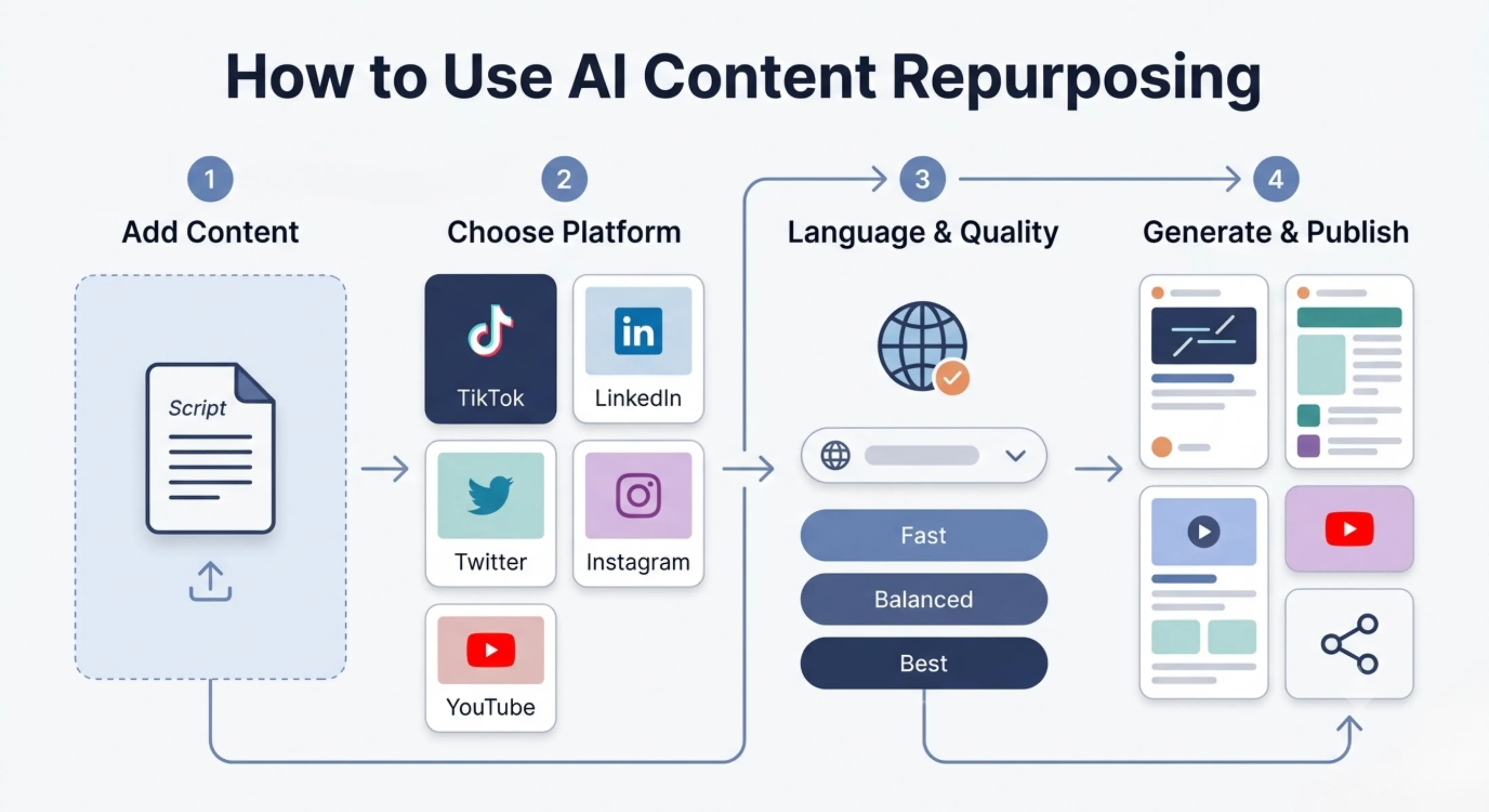
Step 1: Add your content
Upload your script, article, notes, post, or content file, or paste your content directly into the tool.
Step 2: Choose your platform and format
Select the type of output you want, such as TikTok hook, LinkedIn post, Twitter thread, Instagram caption, YouTube description, or another content format.
Step 3: Select language and quality
Keep the same output language or choose a different language, then select Fast, Balanced, or Best mode.
Step 4: Generate and Publish
Let the tool process your original content and create platform-ready versions based on your selected configuration. Read the output, adjust any personal details, add platform-specific hashtags or links if needed, and publish the content on your chosen platform.
Why use AI Content Repurposing?
Creating content once and using it only once limits its value. A single script, article, podcast, webinar, or long-form post can often be turned into many useful content pieces for different platforms. However, each platform has its own style. TikTok needs a strong hook, LinkedIn needs a professional flow, Twitter needs short connected points, and Instagram often needs concise captions or carousel-friendly ideas.
AI Content Repurposing helps save time by turning one original content piece into multiple adapted formats. It reduces the need to rewrite everything manually, keeps your messaging consistent, and helps you stay active across different platforms with less effort. It is especially useful for users who already create content but struggle to reshape it for each channel.
Best use cases
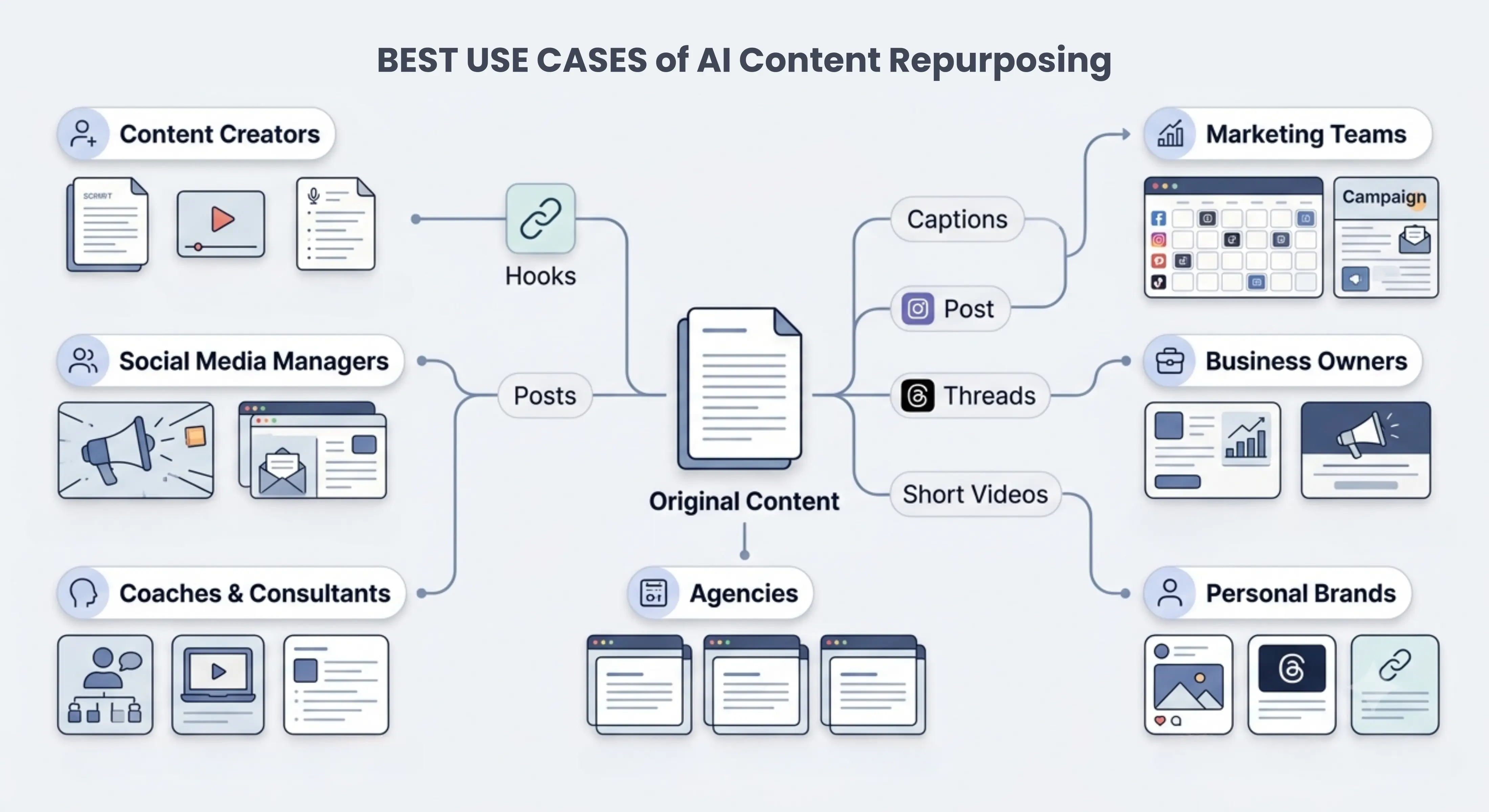
Content creators: Turn scripts, video ideas, podcast notes, and long-form content into short-form hooks, captions, posts, and threads.
Social media managers: Repurpose one brand message into different platform-specific posts for TikTok, LinkedIn, Twitter, Instagram, and more.
Marketing teams: Convert campaign content, product messaging, blog posts, or newsletters into multiple social media formats.
Business owners: Reuse business updates, product explanations, educational content, or promotional messages across different platforms.
Coaches and consultants: Turn advice, lessons, webinar scripts, and educational notes into posts, hooks, threads, and short-form content ideas.
Agencies: Create repurposed content drafts for multiple clients faster while keeping each platform’s style and audience in mind.
Personal brands: Convert one idea into LinkedIn posts, Twitter threads, short video hooks, and captions to stay visible across platforms.
Repurposing scripts into social posts
Turn a video script, reel script, podcast script, or webinar script into short posts, captions, threads, and platform-specific content ideas.
Creating TikTok and Reels hooks
Generate strong opening lines and short-form video angles from your original content so your videos can start with a clearer attention-grabbing hook.
Turning long-form content into short-form content
Convert blogs, newsletters, articles, or long scripts into bite-sized posts, short captions, threads, and quick social media ideas.
Building LinkedIn thought leadership posts
Repurpose educational content, business lessons, professional opinions, or industry insights into LinkedIn posts that feel more polished and relevant for professional audiences.
Creating Twitter threads from one idea
Break down a detailed topic into a readable Twitter thread with a strong opening, short points, and a natural sequence.
Multilingual content repurposing
Use the same input language by default or select another language when creating content for different markets, regions, or audience groups.
Tips for better content repurposing
· Provide clear original content so the tool can understand the main message properly. · Choose the correct platform or format before generating the output. · Use Best mode when the content is important for a campaign, launch, personal brand, or client work. · Review each output before publishing because every platform has different audience behavior and character limits. · Add your personal examples, brand voice, hashtags, links, or call-to-action after generation when needed. · Avoid posting the exact same version everywhere. Use platform-specific versions for better engagement. · Keep the main message consistent, but allow the structure and tone to change based on the platform
FAQs
How do I repurpose content for different social media platforms?
Start with one main content piece and identify the key message. Then adjust the structure for each platform. TikTok needs a strong hook, LinkedIn needs a professional post style, Twitter works better as short connected points, and Instagram often needs a clear caption or visual content idea.
Can AI repurpose content without changing the original meaning?
Yes, AI can help keep the original message while changing the format, tone, and structure for different platforms. However, users should review the final output to make sure the meaning, examples, claims, and brand voice are still accurate.
Can I turn a blog post into social media posts?
Yes, a blog post can be repurposed into LinkedIn posts, Twitter threads, Instagram captions, short video scripts, carousel ideas, email content, and quick tips. This helps you get more value from one detailed piece of content.
How can I repurpose a video script into a TikTok hook?
You can take the strongest problem, result, question, or surprising point from the script and turn it into a short opening line. A good TikTok hook should quickly make the viewer curious and give them a reason to keep watching.
Is repurposed content bad for SEO or social media?
Repurposed content is not bad when it is adapted properly. The goal is not to copy and paste the exact same content everywhere, but to reshape it for each platform, audience, and format. For SEO pages or blogs, make sure the content is original enough and useful for the reader.
What type of content can I repurpose?
You can repurpose scripts, articles, blog posts, podcasts, webinars, newsletters, social media posts, product descriptions, educational notes, interviews, and marketing content. Any content with a clear message can usually be adapted into another format.
Next in the studio
Related tools
Next steps in the Speak → Craft → Hear studio — each card shows why it fits.