Tamil Text to Audio | Generate Tamil Voice from Your Text
Apr 22, 2026
8 min read
There's a particular challenge that comes with Tamil content. It's a classical language with its own script, its own phonetic rules, and a sound that feels very different from most other languages people are used to hearing through digital tools. If you've ever tried to get a text to audio tool to read Tamil properly and ended up with something that sounded completely wrong, that experience is pretty common.
The Need of Tamil Text to Audio Tool
There are also very practical reasons why people look for Tamil text to audio solutions. Learners need to hear how words actually sound, not just read them. Teachers, especially those working with diaspora communities, often need quick ways to turn lessons into audio without recording everything manually.
Common use cases include:
Students learning correct pronunciation and listening skills
Teachers creating audio lessons and reading material
Content creators producing voiceovers for videos and podcasts
Businesses building IVR, support audio, or product explainers
Accessibility support for users who prefer or rely on audio content
Key Features You Need
Plenty of tools claim to support Tamil. What separates one that actually works from one that technically processes the text but produces unusable audio comes down to a few things.
Script Handling - Tamil text must be read from its native script, not transliteration. A tool that requires you to romanize your Tamil before it can process it is adding an unnecessary step and often losing accuracy in the process.
Phonetic accuracy - Tamil has retroflex consonants, sounds produced with the tongue curled back, that are easy to mispronounce. It also distinguishes between short and long vowels in ways that change meaning entirely. If the audio doesn't get these right, it's not usable for
Voice quality - A natural-sounding Tamil voice should have rhythm and flow, not a mechanical word-by-word delivery. Tamil speech has its own cadence and the audio should reflect that.
Dialect awareness - Spoken Tamil differs between regions. The Tamil spoken in Chennai sounds different from Malaysian Tamil or Sri Lankan Tamil. While no tool covers every variation perfectly, having some voice options rather than a single rigid voice matters.
Download and export - If you can only play audio in the browser, the tool is limited. Being able to export the file means you can actually use the output somewhere.
VoiceCraftTool Text to Audio for Tamil
VoiceCraftTool supports Tamil within its multilingual text to audio system, allowing you to work directly with native Tamil script. There’s no need for transliteration or conversion. You simply paste your Tamil text, and the AI processes it as it is, producing speech that follows the natural flow and sound of the language.
The tool runs entirely in the browser, so there’s nothing to install. From entering text to getting a usable audio file, the process is quick and practical for both short tasks and longer content.
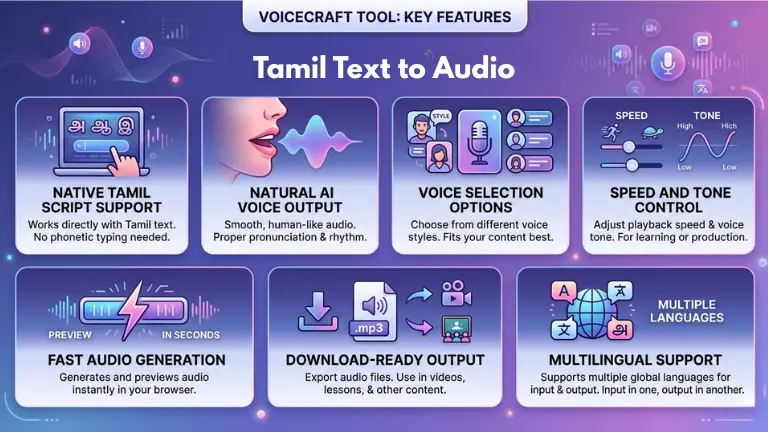
Key Features of VoiceCraftTool:
Native Tamil Script Support: Works directly with Tamil text without requiring phonetic typing or conversion.
Natural AI Voice Output: Produces smooth, human-like audio that reflects proper pronunciation and rhythm.
Voice Selection Options: Offers different voice styles so you can choose what fits your content best.
Speed and Tone Control: Lets you adjust playback speed and voice tone for learning or production needs.
Fast Audio Generation: Generates and previews audio within seconds directly in your browser.
Download-Ready Output: Allows you to export audio files for use in videos, lessons, or other content.
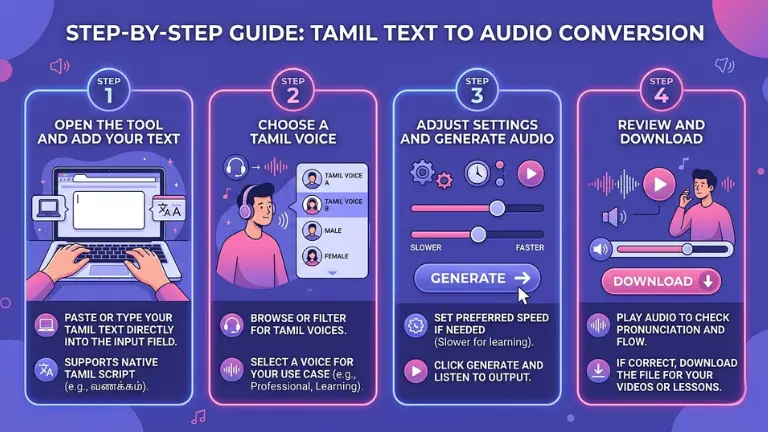
Go to the Text to Audio tool in your browser. Paste or type your Tamil text directly into the input field. No conversion is needed since it supports native Tamil script.
Step 2: Choose a Tamil Voice
Browse or filter for Tamil voices and select one that fits your use case. A clear, neutral voice works well for professional content, while a softer tone suits learning material.
Step 3: Adjust Settings and Generate Audio
Set your preferred speed if needed. Slower speeds help with learning, while default speed works best for natural voiceovers. Then click generate and listen to the output.
Step 4: Review and Download
Play the audio to check pronunciation and flow. If everything sounds right, download the file and use it in your videos, lessons, or other content.
Things That Improve Your Output Quality
A few small habits make a noticeable difference in how the audio turns out.
Keep your punctuation intact:
Tamil text with proper punctuation gives the AI clearer signals for where to pause and where sentences end. Text without punctuation tends to produce audio that runs together or sounds rushed in the wrong places.
Break long content into manageable chunks:
If you're converting a lengthy document, splitting it into paragraphs or sections and generating audio in parts often produces more consistent results than processing everything at once.
Read the output back carefully the first time:
Especially for content that will be published or shared, listen to the whole clip and flag any word or phrase that sounds off. You can adjust the text slightly and regenerate just that section.
Avoid mixing scripts in the same input:
If your Tamil text includes words written in English or other scripts, the voice may handle them inconsistently. Either transliterate them into Tamil or separate them into different audio blocks.
Developers and educators building Tamil learning resources use text to audio to provide native-sounding pronunciation examples without recording entire lesson sets manually.
Tamil YouTube channels:
Creators who script their content but prefer not to appear on camera, or who want a consistent voiceover style across their channel, use AI voice generation to produce audio from their written scripts.
E-learning and tutoring platforms:
Tamil medium academic content, from science explanations to story comprehensions, can be converted into audio resources that students can listen to alongside reading.
Customer communication:
Businesses with Tamil-speaking customer bases use generated audio for automated phone responses, on-hold messages, or short informational clips.
Archiving and documentation:
Organizations preserving Tamil cultural or historical text sometimes produce audio versions to make the content more accessible to modern audiences who are more comfortable listening than reading older script styles.
Conclusion
Tamil is a language that deserves to be represented properly in digital tools, not approximated or mangled. The good news is that AI voice technology has reached a point where Tamil text to audio is genuinely usable for real projects, not just as a novelty.
Whether you're building something for a Tamil-speaking audience, studying the language yourself, or producing content that needs a consistent voice, VoiceCraftTool's Text to Audio gives you a fast and practical way to get there. Paste your text, pick a voice, and the audio is ready in seconds.
FAQs
Does the tool read Tamil script directly?
Yes. You can paste text written in Tamil script and the tool processes it as-is. There's no need to convert to transliteration or romanized Tamil first.
How accurate is the pronunciation?
The AI voices are trained to handle Tamil phonetics, including the retroflex sounds and vowel length distinctions that most generic TTS tools miss. Results are generally accurate for standard Tamil, though highly regional speech patterns may not be perfectly replicated.
Can I use this for Sri Lankan or Malaysian Tamil?
Voice options vary, and regional accent support depends on what's available in the voice library at the time. Check the voice selector for options. If a specific dialect isn't listed, the standard Tamil voice still produces understandable, well-pronounced audio.
Is there a limit to how much text I can convert at once?
For typical use like articles, scripts, or lesson content, the tool handles input well. Very large documents are better processed in sections for consistent quality throughout.
Can the audio be downloaded?
Yes. After generating, you can download the audio file directly. It's suitable for use in videos, apps, presentations, or any other format you need.
Is it free to use?
The tool is 100% free for use till now.
Does it work for Tamil content with numbers or English words mixed in?
It handles mixed content reasonably well, though all-Tamil text with consistent script produces the cleanest results. If English words appear frequently, separating them into their own audio block and merging later can help with consistency.
Did you find this helpful?
Share this article with your friends and colleagues.