Tip: Major languages work best. Very mixed-language text can be less accurate.
AI Quality
Free drafts fast. Premium/Ultimate unlock clearer, publish-ready results on Plus.
AI Generated Content
Clinical note draft will appear here
Paste visit notes or a spoken summary. Output is a structured note (not a diagnosis).
1Add visit notes or audio
2Set language & quality
3Generate the note draft
Medical Scribe History
Saved items for this tool (per account)
Medical Scribe Feedback
Ratings and comments from people who used this tool
No feedback yet for this tool.
Writing clinical notes can take time, especially when you already have patient details, symptoms, observations, treatment information, or medical files but need to organize them into a clear professional format. The Clinical Note Maker helps users turn medical information into structured clinical notes that are easier to review, edit, and use for documentation.
Add the medical details directly, upload a relevant file, choose your preferred language and quality settings, and generate a clinical note that organizes the important information in a clean and readable way.
What is a Clinical Note Maker?
Clinical Note Maker is a medical documentation support tool that helps users create structured clinical notes from patient information, consultation details, medical summaries, observations, or uploaded healthcare-related files.
Instead of writing a note from scratch or manually organizing scattered medical details, users can use the tool to convert their input into a clear clinical note draft. The output can help save time, improve note structure, and make medical information easier to review.
Add or upload your medical information
Medical details
Enter symptoms, patient history, diagnosis details, treatment notes, observations, medications, test information, or follow-up instructions directly into the tool.
Relevant medical files
Upload a related medical document, report, consultation summary, patient note, or supporting file and turn the information into a structured clinical note.
Consultation information
Add details from a patient visit, clinical discussion, case review, or healthcare interaction so the note can summarize the important points clearly.
Key features of Clinical Note Maker
Structured clinical note format
The tool organizes medical information into a clear note format, making the output easier to read, review, and refine.
Medical-detail focused writing
The output is based on the information provided by the user, such as symptoms, patient background, assessment details, treatment information, and follow-up points.
Easy input options
Users can paste medical details directly or upload relevant files, making the tool useful for both short notes and longer medical information.
Same-language output by default
The clinical note is generated in the same language as the input by default, helping preserve the original meaning and context of the medical information.
Choose a different output language
Users can also select another language for the clinical note, which is useful for multilingual teams, international documentation, or patient communication support.
Quality control options
Users can choose how detailed and carefully prepared the note should be based on their time, purpose, and documentation needs.
Choose the right processing mode
Fast
Best for quickly creating a simple clinical note draft when you need a basic structure in less time.
Balanced
Best for regular clinical note preparation. It gives a good mix of speed and quality, making it useful for most medical note drafts.
Best
Best for detailed and carefully prepared clinical notes. This mode may take more time, but the output is more focused, organized, and complete.
How to use Clinical Note Maker
Step 1: Add your medical information
Paste the medical details or upload a relevant file that contains the information you want to convert into a clinical note.
Step 2: Choose language and quality
Keep the output in the same language as your input or select another language, then choose Fast, Balanced, or Best mode.
Step 3: Generate your clinical note
Let the tool process the medical information and turn it into a structured clinical note draft.
Step 4: Review and Use
Read the generated note carefully, verify the medical details, adjust anything required, and use it according to your documentation needs.
Why use a Clinical Note Maker?
Clinical documentation needs to be clear, organized, and easy to review. When medical information is scattered across rough notes, consultation details, reports, or patient summaries, creating a proper clinical note can take extra time.
Clinical Note Maker helps by turning the provided medical information into a clean note draft. It can reduce manual writing effort, improve structure, and help users prepare documentation more efficiently. The final note should always be reviewed by a qualified healthcare professional before it is used for clinical, legal, or patient-care purposes.
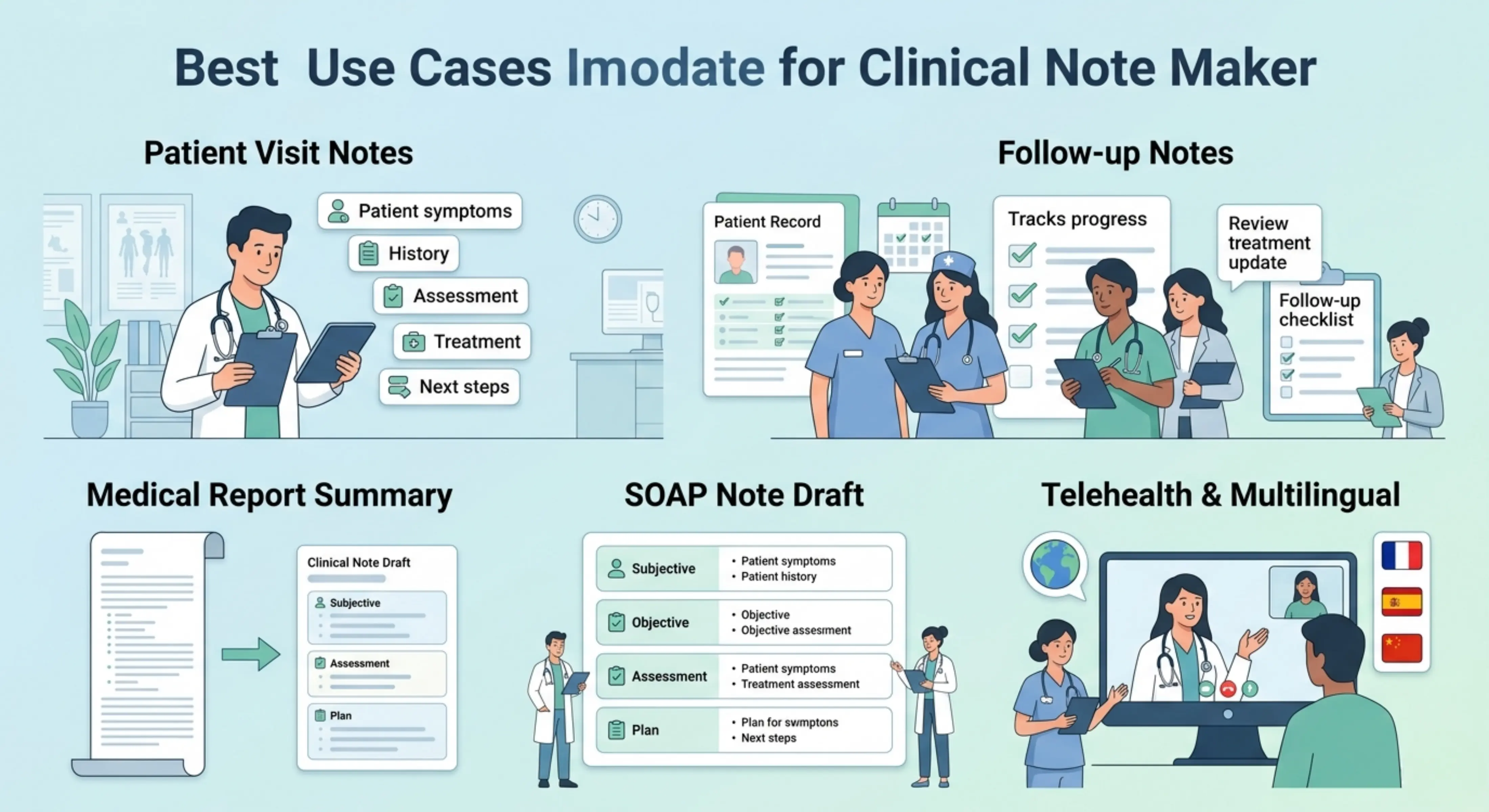
Best use cases
Healthcare professionals: Create structured clinical note drafts from consultation details, patient history, observations, assessments, and treatment information.
Clinics and medical teams: Prepare clear notes from patient visit information, case discussions, reports, or internal documentation material.
Medical students: Practice organizing patient information into clinical note formats for learning, case study preparation, or academic training.
Telehealth providers: Turn online consultation details into readable clinical notes that summarize symptoms, assessment points, and follow-up instructions.
Healthcare administrators: Convert medical summaries, intake details, or appointment notes into organized documentation drafts for review.
Case reviewers: Use the tool to summarize case details, medical background, findings, and care-related information in a clearer structure.
Patient visit notes
Create note drafts from consultation details, including symptoms, patient concerns, medical history, assessment points, and recommended next steps.
Follow-up documentation
Prepare notes for follow-up visits by summarizing previous concerns, current status, progress, treatment updates, and future instructions.
Medical report summaries
Turn longer medical files or reports into a clearer clinical note draft that highlights the key information.
SOAP note preparation
Use the tool to organize medical details into a more structured note draft that can support common documentation styles such as subjective information, objective findings, assessment, and plan.
Multilingual clinical note writing
Generate notes in the same language as the input, or choose another language when documentation needs to be reviewed by multilingual teams or international users.
Tips for better clinical notes
Add clear and complete medical information so the note can reflect the case accurately.
Include important details such as symptoms, history, examination findings, diagnosis, treatment, medication, and follow-up instructions.
Use Best mode when the note requires more detail or careful organization.
Review the final note before using it, especially for patient care, medical records, or professional documentation.
Do not rely on the generated note as a medical decision. Always verify the information with a qualified healthcare professional.
Remove or protect sensitive patient information when using the tool according to your privacy and compliance requirements.
FAQs
What is a clinical note used for?
A clinical note is used to record important information from a patient visit, consultation, treatment, or follow-up. It helps healthcare professionals understand what happened, what was observed, what decision was made, and what should happen next.
How do you write a clinical note quickly?
The fastest way is to start with the key patient details first: the main concern, relevant history, findings, assessment, and plan. You do not need to make the first draft perfect. The goal is to capture the important information clearly, then review and refine it.
What should be included in a patient clinical note?
A patient clinical note can include symptoms, medical history, examination findings, diagnosis, medications, test results, treatment plan, referrals, and follow-up advice. The exact details depend on the type of visit, the medical specialty, and the healthcare setting.
What is the difference between a clinical note and a progress note?
A progress note is a type of clinical note. It usually focuses on how the patient is doing over time, what has changed since the previous visit, and whether the treatment plan needs to be updated.
Can AI write SOAP notes or clinical notes?
Yes, AI can help create a draft SOAP note or clinical note from the information you provide. It can organize details into sections like subjective information, objective findings, assessment, and plan. Still, the note should be checked by a qualified professional before it is used.
Is it safe to use AI for clinical documentation?
It can be useful, but users need to be careful with patient privacy and medical accuracy. Do not treat the generated note as final without review.
Next in the studio
Related tools
Next steps in the Speak → Craft → Hear studio — each card shows why it fits.