7 Best Interview Practice AI Tools in 2026 for Preparation
May 5, 2026
11 min read
Job interviews make most people nervous, and that’s normal. The real issue is not getting enough real practice before the actual interview.
AI tools have changed that. You can now practice with tools that ask questions, listen to your answers, and give feedback instantly, without needing another person. This list covers 7 of the best AI interview practice tools in 2026 you can start using right away.
What You Need from Interview Practice AI Tools
Before jumping into the list, this is a quick look at what you actually get from these tools:
Practice answering real interview questions out loud or in writing
Receive instant feedback on your responses, including clarity and structure
Build confidence through repetition without any social pressure
Prepare for specific job roles, industries, or even particular companies
Track your improvement over multiple sessions
They won't replace the experience of an actual interview, but they make the preparation process much more active and useful than studying alone.
7 Best Interview Practice AI Tools in 2026
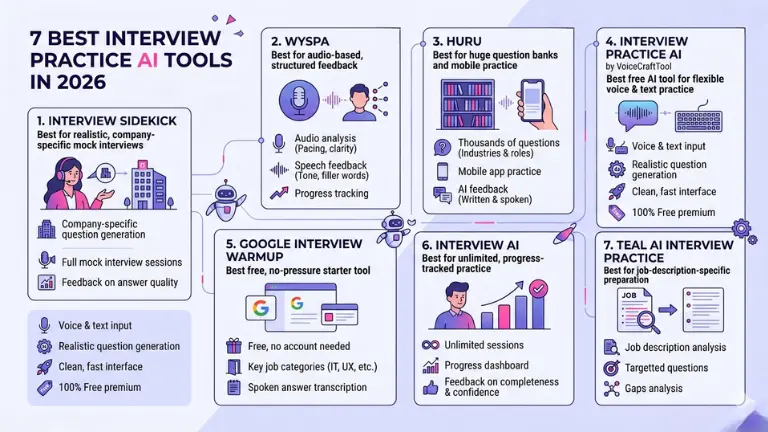
1. Interview Sidekick
Best for realistic, company-specific mock interviews
Interview Sidekick focuses on giving you a mock interview experience that feels close to the real thing. You enter details about the role and company you're applying to, and it generates questions tailored to that context rather than giving you generic prompts.
Key features:
Company and role-specific question generation
Full mock interview sessions with follow-up questions
Feedback on answer quality, structure, and relevance
Behavioral and technical question support
Use Job seekers preparing for interviews at specific companies who want targeted, realistic practice rather than general prep.
2. Wyspa
Best for audio-based, structured feedback
Wyspa is built around spoken practice. You record your answers, and the tool analyzes them for pacing, clarity, filler words, and overall delivery. If you've ever recorded yourself talking and cringed, Wyspa helps you understand exactly what to fix.
Key features:
Audio recording and playback with AI analysis
Feedback on speech pace, tone, and filler word usage
Structured scoring on answer content and delivery
Progress tracking across multiple sessions
Best Use Case: People who struggle with how they come across verbally and want detailed, audio-focused feedback on their communication style.
3. Huru
Best for huge question banks and mobile practice
Huru has one of the largest question libraries among interview prep tools, which makes it great for exploring a wide range of scenarios. The mobile app means you can squeeze in practice during a commute or lunch break without needing to sit at a computer.
Key features:
Thousands of questions across industries and roles
Mobile app for on-the-go practice
AI feedback on written and spoken answers
Interview simulations with timing
Best Use Case: Professionals who want variety in their practice and prefer mobile-friendly tools they can use throughout the day.
3. Interview Practice AI by VoiceCraftTool
Best free AI tool for flexible voice and text interview practice
VoiceCraftTool's Interview Practice AI keeps things simple. You choose your role, pick a question type, and either speak or type your answer. The tool gives you feedback without making you navigate a complicated setup process. For people who just want to practice without any friction, this works well.
Key features:
Voice and text-based answer input, so you can switch between the two
Realistic question generation based on job type
Clean, fast interface with no lengthy onboarding
Free to use without a subscription
Best Use Case: Students, recent graduates, and working professionals who want quick, flexible practice sessions without committing to a paid platform. It's a solid option when you just need to warm up before an interview.
Huru has one of the largest question libraries among interview prep tools, which makes it great for exploring a wide range of scenarios. The mobile app means you can squeeze in practice during a commute or lunch break without needing to sit at a computer.
Key features:
Thousands of questions across industries and roles
Mobile app for on-the-go practice
AI feedback on written and spoken answers
Interview simulations with timing
Best Use Case: Professionals who want variety in their practice and prefer mobile-friendly tools they can use throughout the day.
5. Google Interview Warmup
Best free, no-pressure starter tool
Google Interview Warmup is a no-login, no-cost tool that Google built to help people practice for jobs in fields like data analytics, IT, and UX design. It's not the most advanced option on this list, but for someone who has never used an AI practice tool before, it's a comfortable place to start.
Key features:
Completely free with no account required
Background, situational, and technical question categories
Transcribes your spoken answers for review
Identifies key talking points and common phrases in your responses
Best Use Case: Beginners, students, or anyone who wants a zero-pressure first experience with AI interview practice before trying something more involved.
6. InterviewAI
Best for unlimited, progress-tracked practice
InterviewAI is designed for people who want to practice a lot and see their growth over time. There's no cap on sessions, and the progress tracking system shows you how your answers have improved across different question categories.
Key features:
Unlimited practice sessions
Progress dashboard showing improvement over time
Feedback on answer completeness, confidence, and structure
Wide range of job roles and question types
Best Use Case: Motivated job seekers who want to practice regularly over a longer period and track how their interview skills are developing.
7. Teal AI Interview Practice
Best for job-description-specific preparation
Teal connects your interview practice directly to the job you're applying for. You paste in a job description, and the tool pulls out the key skills and requirements, then generates practice questions based on exactly what that employer is likely to care about.
Key features:
Job description analysis to generate targeted questions
Integrates with Teal's broader job search tools
Feedback on how well your answers address specific job requirements
Helps you identify gaps between your experience and the role
Best Use Case: Active job seekers who are tailoring their applications to specific roles and want their practice to match the actual job posting.
How to Choose the Right AI Interview Tool for You
Not every tool on this list is right for every person. Here's a quick way to narrow it down:
If you want the most realistic mock interview experience, go with Interview Sidekick or Teal, since both tailor the session to the actual role and company.
If feedback on how you speak is a priority, Wyspa is built for exactly that.
If you're a beginner or on a budget, Google Interview Warmup and VoiceCraftTool are both free and easy to start with.
If you want to practice frequently over weeks or months, InterviewAI's unlimited sessions and progress tracking make it a good long-term option.
If you're applying to multiple roles and need variety, Huru's large question bank gives you the most range.
There's no wrong choice here. Picking one and actually using it will do more for your preparation than spending too much time deciding.
How to Get the Best Results from AI Interview Practice
The tool is only as useful as the effort you put into it. A few things that make a real difference:
Practice out loud: Typing answers is fine for structure, but your goal is to speak in an interview. Use voice mode whenever possible, even if it feels awkward at first.
Be consistent: One session the night before an interview is better than nothing, but regular practice over a couple of weeks builds genuine confidence. Even 15 minutes a few times a week adds up.
Actually read the feedback: It's easy to finish a session and move on without absorbing what the tool told you. The feedback is the point. Sit with it and adjust your next answer accordingly.
Mix in real conversations: Practice with a friend, a mentor, or a career coach at least once. AI tools are excellent for repetition, but a real person can catch things an algorithm misses, like whether you seem genuinely excited about the role.
Limitations of AI Interview Tools
These tools are genuinely useful, but it's worth being clear-eyed about what they can't do.
They don't fully replicate the pressure of a real interview. Talking to a hiring manager who can see your face, interrupt you, or ask an unexpected follow-up is a different experience than responding to a screen. AI practice reduces nerves, but it doesn't eliminate them entirely.
Feedback from AI tools can also miss emotional nuance. A tool might rate your answer highly because you covered the right points, but a human interviewer might still feel the answer sounded rehearsed or lacked enthusiasm. That layer of judgment is hard to automate.
There's also a risk of over-relying on them. If you practice the same questions enough times, you can end up sounding too polished and scripted rather than natural and adaptable. The goal is confident fluency, not memorized lines.
Conclusion
AI interview tools have made it easier than ever to practice in a way that's actually useful. Whether you're preparing for your first professional role or going after a senior position, putting in structured practice time with one of these tools will make a difference in how ready you feel.
The best approach is to pick one tool that fits your needs, use it consistently, and treat each session as a real opportunity to improve rather than just something to check off. Start with a free tool which is offering you useful features in simple usage, Interview Practice AI by VoiceCraftTool, try it now!
FAQs
What are the best AI interview practice tools in 2026?
In 2026, popular AI interview practice tools include Interview Sidekick, Final Round AI, Huru, InterviewAI, Google Interview Warmup, and Teal AI Interview Practice. These platforms focus on realistic mock interviews, large question banks, progress tracking, and role‑specific practice, making them ideal for job seekers who want structured, repeatable sessions.
Are there good free AI tools for practicing job interviews?
Yes, several free AI interview tools exist, such as Google Interview Warmup and various mock interview platforms. They let you answer questions by voice or text, transcribe your answers, and give feedback on structure and content, all without a subscription, which is perfect for beginners or budget‑conscious users.
Can AI tools listen to my voice and give feedback on how I speak?
Yes, many AI tools now support voice‑based practice and analyze your speech for pacing, clarity, filler words, and overall structure. They record your answers and score them on how natural, confident, and concise you sound, helping you improve your delivery over time.
Do AI interview tools tailor questions to specific companies or job descriptions?
Yes, leading tools can generate questions based on the role, industry, or even a pasted job description. This tailor practices the exact skills and requirements the employer cares about, so your answers feel more relevant and less generic.
How often should you use an AI interview practice tool before a real interview?
Most experts recommend 3–5 focused sessions per week over 2–4 weeks, with each session lasting about 15–30 minutes. This builds fluency and confidence without over‑relying on memorized answers, so you can adapt to real‑time questions.
Are AI interview tools safe and private to use with my data?
Most reputable tools follow standard privacy practices and let you review or delete your data. Still, it’s wise to check the privacy policy, avoid sharing highly confidential details, and prefer platforms that define clear data retention and security rules.
Did you find this helpful?
Share this article with your friends and colleagues.