Tip: Major languages work best. Very mixed-language text can be less accurate.
AI Quality
Free drafts fast. Premium/Ultimate unlock clearer, publish-ready results on Plus.
AI Generated Content
Call analysis will appear here
Paste a call transcript or upload audio. Output is CRM-ready insights.
1Paste transcript or upload call
2Set language & quality
3Analyze the call
Sales Call Analyzer History
Saved items for this tool (per account)
Sales Call Analyzer Feedback
Ratings and comments from people who used this tool
No feedback yet for this tool.
Sales calls can contain many important signals, but it is not always easy to understand what went well, where the conversation became weak, or what could have been handled better. The Sales Call Analyzer helps you review a sales call from a professional sales perspective by analyzing the audio file, transcript, or call script and turning it into clear feedback about the call’s strengths, weaknesses, missed opportunities, objection handling, buyer interest, and improvement areas.
What is a Sales Call Analyzer?
Sales Call Analyzer is a sales review tool that helps users analyze sales calls, discovery calls, demo calls, closing conversations, or sales scripts. It reviews the conversation and gives structured feedback on how the call performed from a sales, communication, and conversion point of view.
Instead of manually listening to long calls or guessing what went wrong, users can upload the call audio or paste the transcript and get a detailed analysis that highlights what worked, what needs improvement, and how the sales conversation can become clearer, stronger, and more persuasive.
Upload audio or paste your call content
Sales call audio file
Upload your recorded sales call and let the tool analyze the conversation for communication quality, customer interest, objections, sales flow, and improvement points.
Call transcription
Paste a written transcript of the sales call to get a clear review of the conversation structure, talking points, buyer responses, and missed opportunities.
Sales script or practice call
Add a sales script, mock call, or roleplay conversation and use the tool to check how strong, natural, and conversion-focused the conversation sounds.
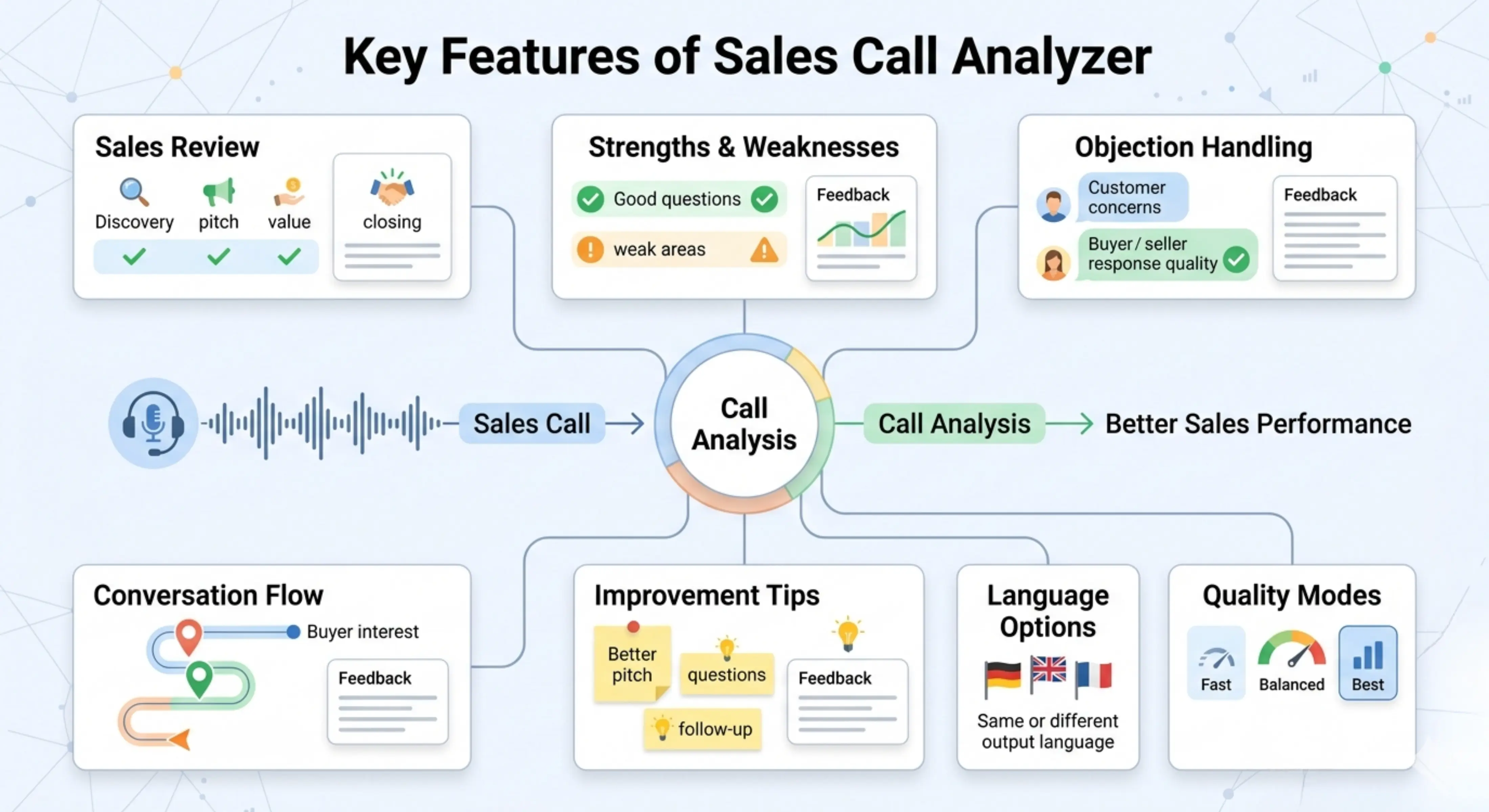
Key features of Sales Call Analyzer
Professional sales call review
The tool reviews the call from a sales perspective and helps identify how well the conversation handled discovery, pitching, objections, value explanation, and closing.
Strength and weakness analysis
It highlights the strong parts of the call, such as good questions, clear explanations, active listening, or strong closing moments, while also showing weak areas that need improvement.
Objection handling feedback
The tool can review how objections were handled and suggest where the response could be clearer, more confident, or better connected to the customer’s concern.
Buyer interest and conversation flow analysis
It helps users understand whether the conversation stayed focused, whether the buyer seemed engaged, and whether the sales flow moved naturally from problem to solution.
Improvement suggestions
The output gives practical recommendations that can help salespeople improve future calls, strengthen their pitch, ask better questions, and avoid common sales mistakes.
Same-language output by default
The analysis is generated in the same language as the input by default, so the tone, meaning, and sales context remain natural.
Choose a different output language
Users can also select another language for the analysis, which is useful for international sales teams, multilingual managers, or training teams working across different regions.
Choose the right processing mode
Fast
Best for quickly reviewing a sales call when you need a simple analysis in less time.
Balanced
Best for regular sales call analysis. It gives a good mix of speed and quality, making it useful for most sales reviews and coaching needs.
Best
Best for deeper sales call analysis. This mode may take more time, but the feedback is more detailed, focused, and carefully prepared.
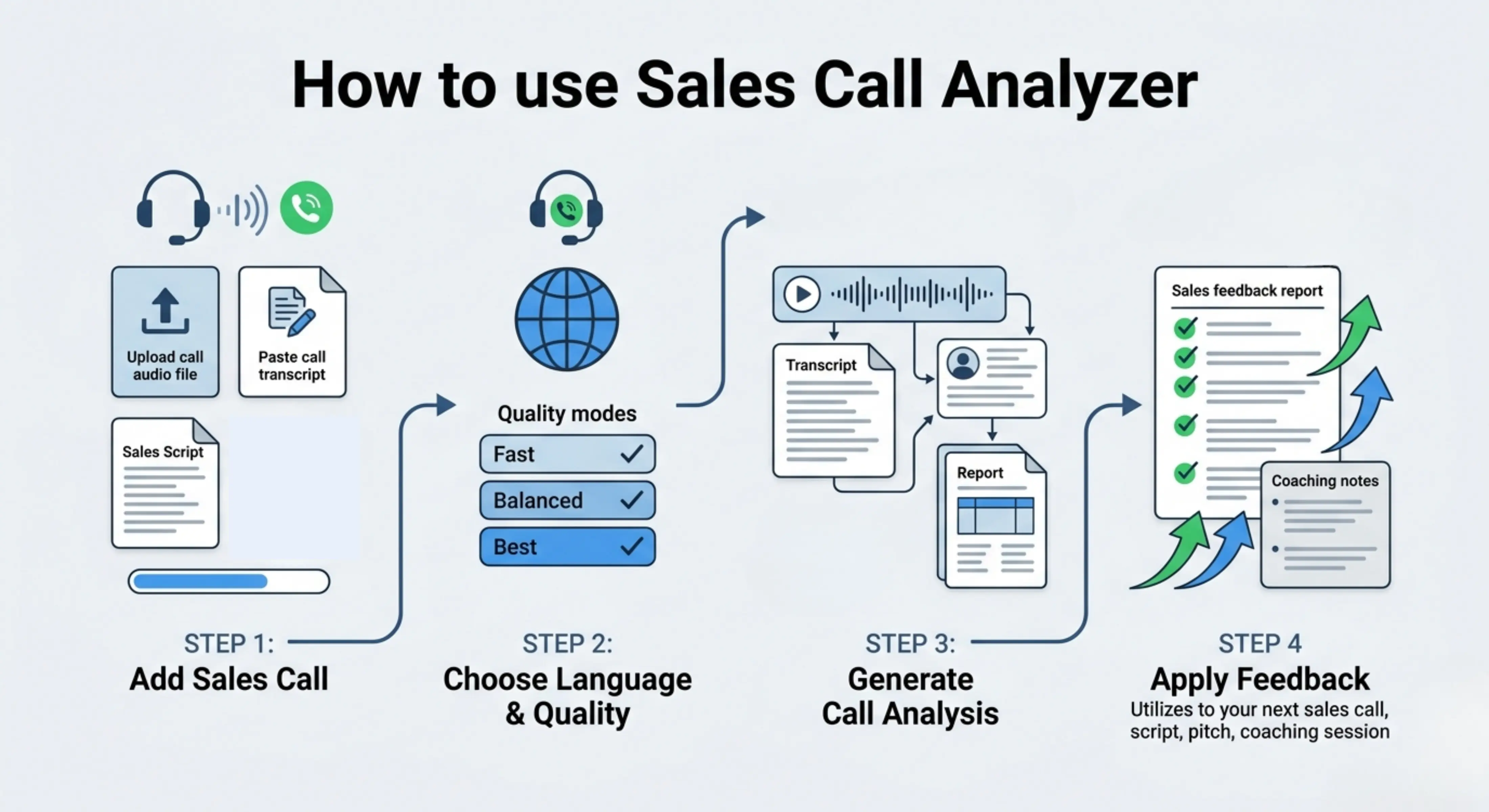
How to use Sales Call Analyzer
Step 1: Add your sales call
Upload the sales call audio file or paste the call transcript, sales script, or conversation notes directly into the tool.
Step 2: Choose language and quality
Keep the output in the same language as your input or select another language, then choose Fast, Balanced, or Best mode.
Step 3: Generate the call analysis
Let the tool review the sales conversation and prepare a structured analysis of the call’s performance.
Step 4: Review and apply the feedback
Read the analysis, check the improvement suggestions, and use the feedback to improve your next sales call, script, pitch, or coaching session.
Why use a Sales Call Analyzer?
A sales call is not only about speaking to a prospect. It is about asking the right questions, understanding the customer’s problem, explaining value clearly, handling objections, and guiding the conversation toward the next step. Many salespeople lose deals not because the product is weak, but because the conversation does not create enough trust, urgency, or clarity.
Sales Call Analyzer helps users review their sales conversations in a more structured way. It makes it easier to understand what happened during the call, where the salesperson performed well, what could be improved, and how the next conversation can be stronger. This helps sales teams improve communication, refine scripts, train representatives, and build better sales habits over time.
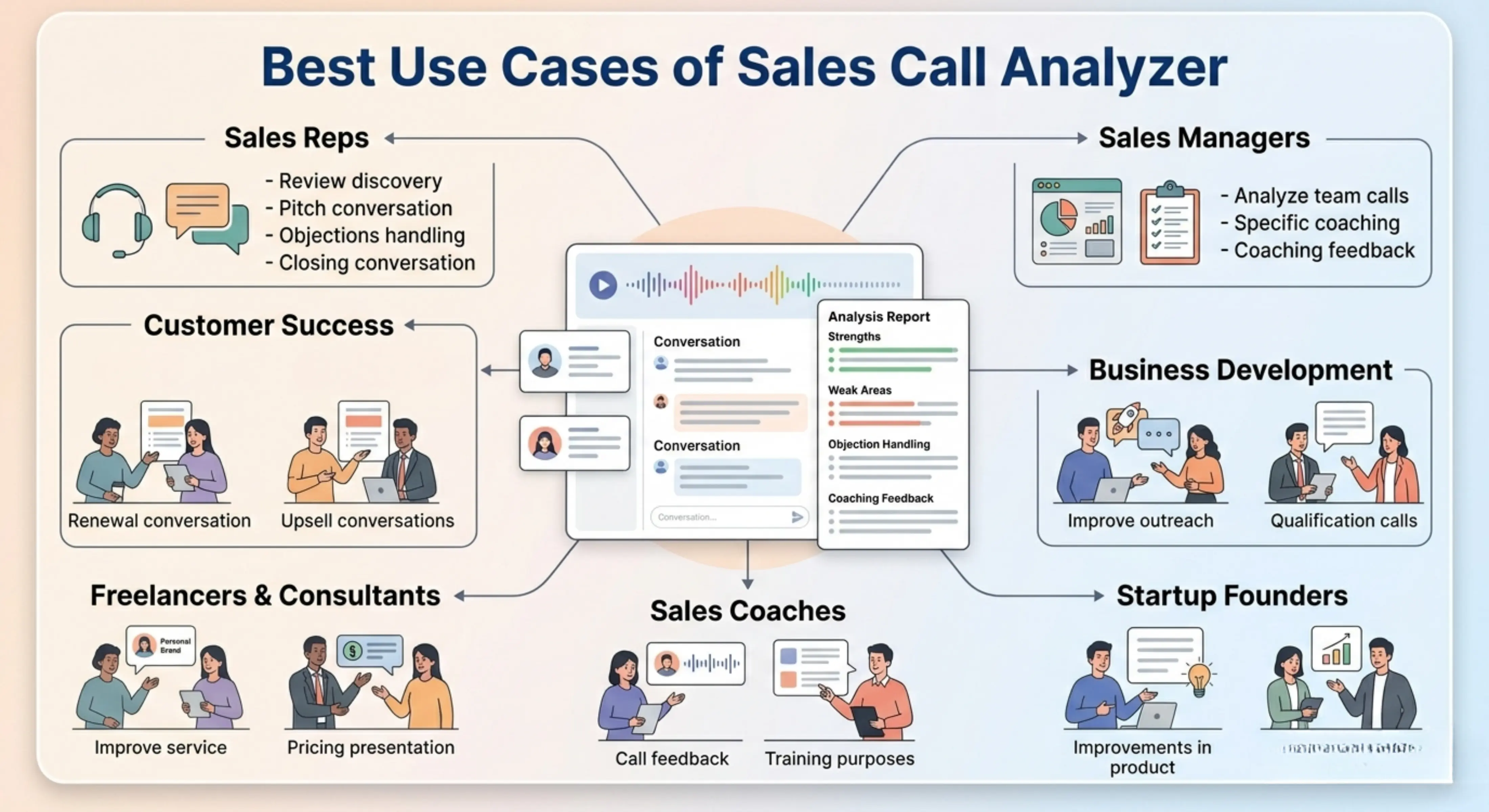
Best use cases
Sales representatives: Review personal sales calls and understand how to improve discovery, pitching, objection handling, and closing.
Sales managers: Analyze team calls and identify coaching points, common mistakes, and areas where representatives need support.
Business development teams: Improve outreach calls, qualification calls, and first conversations with potential customers.
Startup founders: Review sales conversations and improve how they explain their product, pricing, value, and customer problem.
Sales coaches: Use call analysis to give clearer feedback, prepare training sessions, and help salespeople improve specific skills.
Customer success teams: Analyze renewal, upsell, or customer conversation scripts to improve communication and value explanation.
Freelancers and consultants: Review client sales calls and improve how services, offers, pricing, and outcomes are presented.
Sales call performance review
Analyze a complete sales call and understand how well the conversation performed. The tool can help identify strong moments, weak points, unclear explanations, missed questions, and areas where the call could have been more persuasive.
Discovery call analysis
Review whether the salesperson asked useful questions, understood the customer’s needs, explored the problem properly, and connected the conversation to a relevant solution.
Objection handling improvement
Check how objections about price, timing, trust, features, or competition were answered. The tool can suggest better ways to respond with clarity, confidence, and customer-focused reasoning.
Sales script improvement
Paste a sales script or call script and analyze whether it sounds natural, convincing, customer-focused, and clear. This is useful before using the script in real sales conversations.
Sales coaching and training
Use the analysis to train sales representatives, compare call quality, identify repeated mistakes, and create better coaching feedback for future calls.
Multilingual sales call review
Analyze calls in the same language as the input or choose another output language when sales teams, managers, or clients work across different countries and languages.
Tips for better sales call analysis
● Use a clear audio file or accurate transcript so the tool can understand the conversation properly. ● Include the full call if you want feedback on opening, discovery, pitch, objections, and closing. ● Use Best mode for important sales calls, coaching reviews, or detailed performance analysis. ● Add context about the product, target customer, or sales goal if the call needs more accurate evaluation. ● Review the suggestions carefully and turn them into specific action points for the next call. ● Do not only focus on what went wrong; also study the strong parts so successful patterns can be repeated.
FAQs
What makes a good sales call?
A good sales call usually has a clear purpose, strong opening, useful questions, active listening, relevant product explanation, confident objection handling, and a clear next step. The salesperson should focus on the customer’s problem instead of only talking about the product.
How can I improve my sales calls?
You can improve sales calls by asking better discovery questions, listening more carefully, avoiding long product explanations too early, handling objections calmly, and ending the call with a clear next action. Reviewing past calls also helps you notice repeated mistakes and improve faster.
Can AI analyze sales calls?
Yes, AI can help analyze sales calls by reviewing transcripts or audio-based content and identifying strengths, weaknesses, objections, missed opportunities, and improvement suggestions. However, users should still review the feedback and apply their own sales judgment, especially for important client conversations.
What should I look for when reviewing a sales call transcript?
When reviewing a sales call transcript, look for the customer’s main problem, buying signals, objections, unclear answers, weak questions, strong moments, and the final next step. The transcript can show whether the salesperson understood the prospect or moved too quickly into pitching.
How do you give feedback on a sales call?
Good sales call feedback should be specific and practical. Instead of saying the call was good or bad, explain which parts were strong, where the conversation became weak, what the salesperson missed, and what they should do differently in the next call.
Can I analyze a sales script before using it?
Yes, you can analyze a sales script before using it in real calls. This helps you check whether the script sounds natural, explains the value clearly, includes good questions, handles likely objections, and guides the prospect toward the next step.
Next in the studio
Related tools
Next steps in the Speak → Craft → Hear studio — each card shows why it fits.