Turn a rough idea into a clear, structured AI prompt for ChatGPT, Claude, YouTube scripts, and VoiceCraft tools.
Craft step — shape wording for speaking or publishing
Prompt Builder
Studio
Speak or paste your idea, pick an audience and AI target, then generate a structured ready-to-copy prompt.
Input0/1000AI ready
Speak your idea, upload audio, or paste a brief. Max 10MB, 3 minutes.
AI Quality
AI Generated Content
Copy this prompt and paste it into ChatGPT or another AI tool.
Your ready-to-paste prompt will appear here
Describe what you need, then generate a simple prompt for ChatGPT or similar tools.
1Add audio or paste content
2Adjust options & quality
3Generate prompt
Prompt Builder History
Saved items for this tool (per account)
Prompt Builder Feedback
Ratings and comments from people who used this tool
No feedback yet for this tool.
Have an idea in mind but not sure how to explain it to an AI tool? A basic instruction often leads to a basic result. The AI Prompt Builder turns your rough idea into a clear, detailed prompt with the right context, style, format, and requirements.
You can use it to create prompts for writing, images, videos, marketing, coding, business tasks, social media, and more. It is made for creators and professionals who want better AI results without spending time learning advanced prompt engineering.
What Is an AI Prompt Builder?
An AI Prompt Builder helps you turn a simple request into a well-structured prompt for an AI tool.
For example, you may start with:
Create an image for a fitness campaign.
That idea is understandable, but it leaves many questions unanswered. What should be shown? Who is the campaign for? What style, setting, lighting, color direction, and image size should be used?
The prompt builder fills in these useful details and creates a stronger instruction that an AI image generator can understand more clearly.
You remain in control of the idea. The tool simply helps you explain it better.
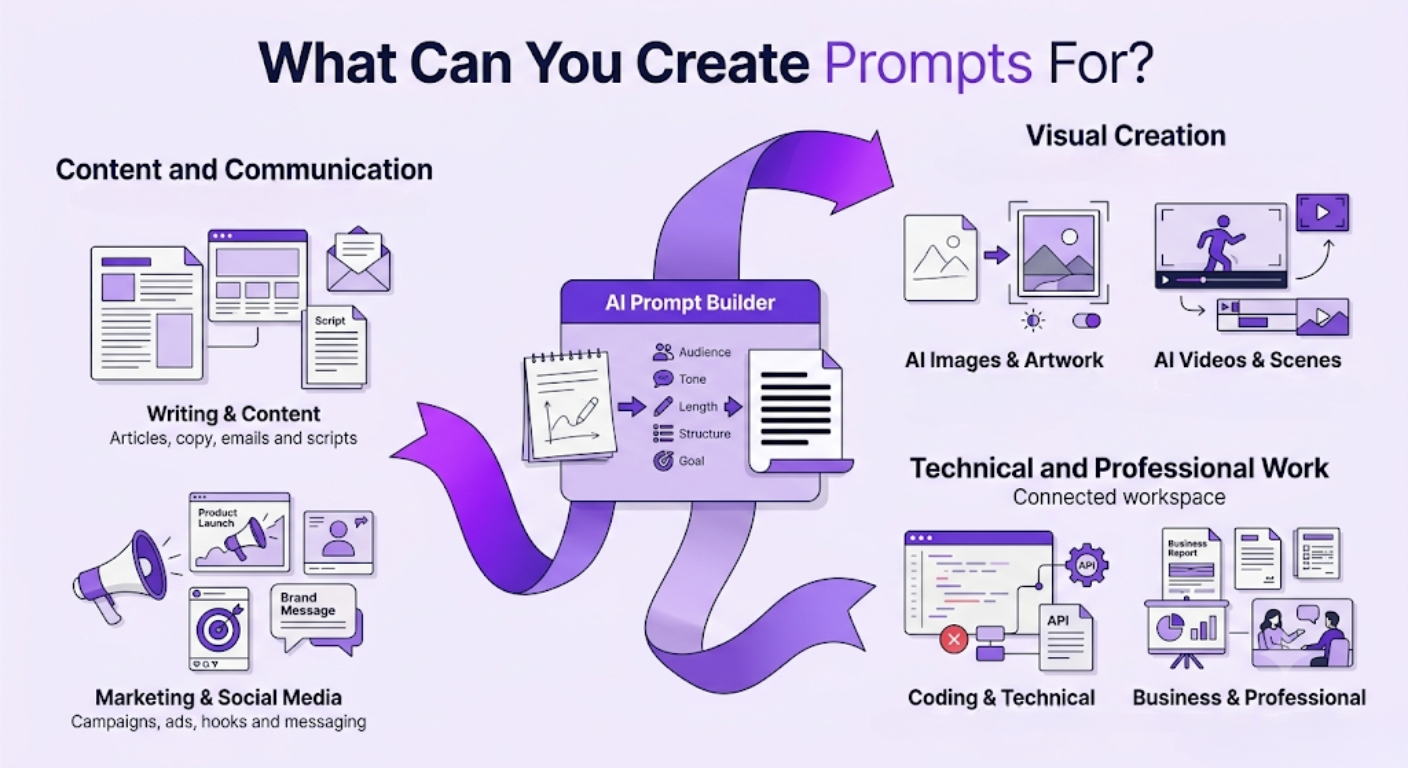
What Can You Create Prompts For?
The AI Prompt Builder is not limited to one type of content. You can use it to prepare prompts for creative, technical, marketing, and professional tasks.
Writing and content
Create detailed prompts for:
Blog posts and articles
Website and landing page copy
Social media posts
Email campaigns
Video and podcast scripts
Product descriptions
Stories and newsletters
Reports and presentations
The generated prompt can include the topic, audience, tone, length, structure, important points, and expected outcome.
AI images and artwork
Turn a basic visual idea into a more descriptive AI image prompt.
The tool can help define:
The main subject
Background and environment
Composition and camera angle
Lighting and colors
Mood and visual style
Image dimensions or aspect ratio
Details to include or avoid
This can be useful for social media graphics, thumbnails, product concepts, illustrations, advertisements, and creative artwork.
AI videos and scenes
Create prompts for AI video generators, animations, short-form videos, advertisements, and cinematic scenes.
A generated video prompt may cover the scene, action, setting, camera movement, visual style, lighting, mood, duration, and ending.
Marketing and social media
Build prompts for:
Promotional campaigns
Product launches
Social media advertisements
Captions and hooks
Content ideas
Audience research
Brand messaging
Sales and email copy
Add your offer, audience, platform, campaign goal, and brand style to get a prompt that fits the task.
Coding and technical work
Create structured prompts for generating code, fixing errors, reviewing applications, writing documentation, building APIs, or explaining technical concepts.
You can include the programming language, framework, existing code, error message, expected result, and any technical limitations.
Business and professional tasks
Use the prompt builder for reports, proposals, project plans, presentations, meeting agendas, client communication, market research, job descriptions, and other workplace tasks.
How to Use the AI Prompt Builder
Step 1: Describe your idea
Enter what you want the AI to create or help you with.
You can write a short sentence, paste an existing prompt, or add a complete project requirement.
Step 2: Add important details
Mention anything that may affect the result, such as:
Target audience
Platform
Tone or visual style
Output format
Length
Purpose
Requirements or restrictions
Your input does not need to be perfectly written. Simple notes are enough.
Step 3: Build your prompt
The tool will organize your idea and turn it into a clearer AI prompt.
It may add relevant context, structure, formatting instructions, and details that help the selected AI tool understand your request.
Step 4: Review and use it
Read the generated prompt and make any final changes.
Add names, figures, product information, brand guidelines, examples, or technical details when needed. You can then copy the prompt and use it with your preferred AI platform.
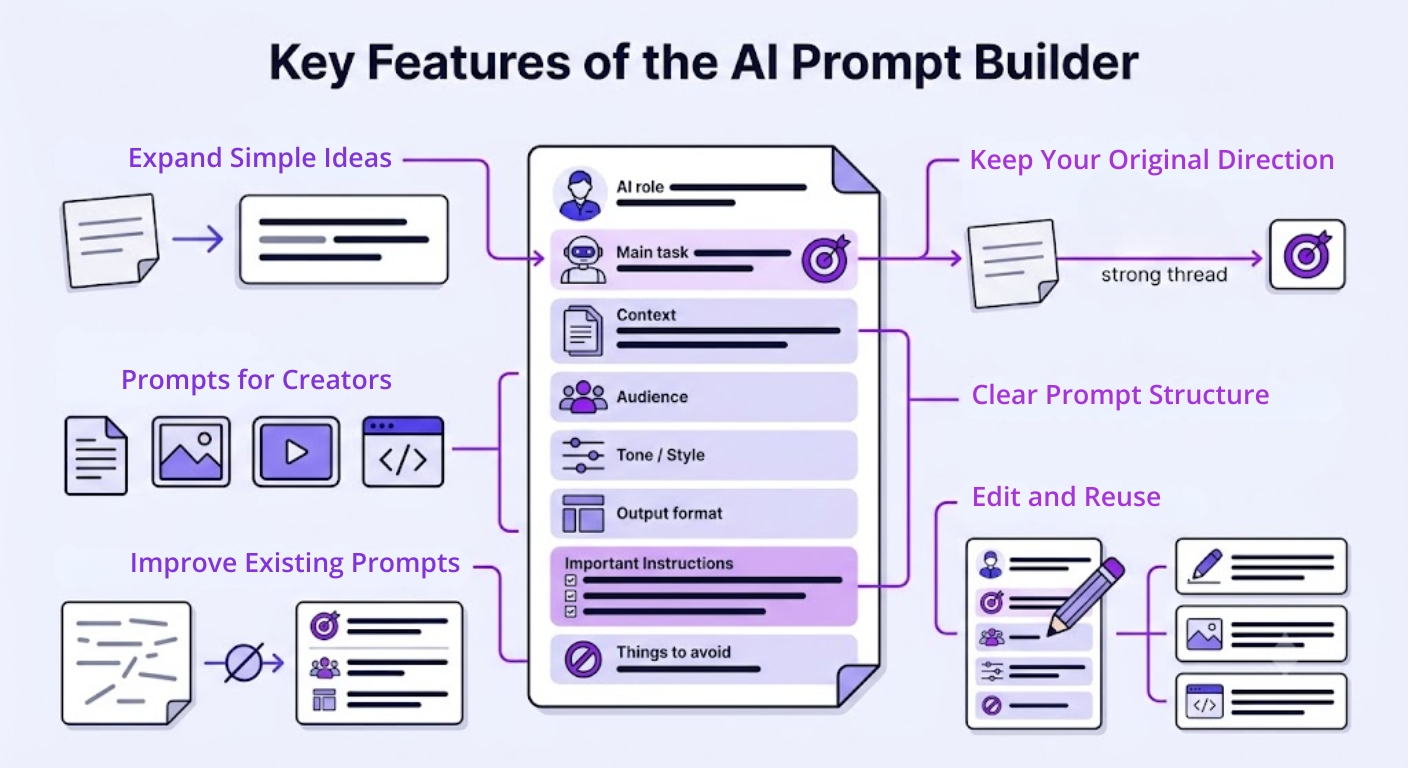
Key Features
Turn simple ideas into detailed prompts
Start with a few words or a rough instruction. The tool expands the idea into something clearer and more useful.
Create prompts for different AI tasks
Use it as a text prompt generator, AI image prompt generator, video prompt generator, coding prompt generator, or general prompt creation tool.
Improve existing prompts
Already have a prompt that is not producing good results? Paste it into the tool and build a clearer version.
Keep your original direction
The prompt builder adds detail without replacing the main idea or changing what you are trying to achieve.
Get a clearer prompt structure
Depending on the task, the generated prompt may organize information such as:
The role of the AI
Main task
Background context
Intended audience
Tone or style
Required format
Important instructions
Things to avoid
Edit and reuse your prompts
You can adjust the generated prompt, save its structure, and reuse it for similar projects.
Built for Creators and Professionals
The AI Prompt Builder helps turn rough ideas into clear prompts for creative and professional tasks.
For Creators
Creators can use it to build prompts for:
Scripts and social posts
Images and thumbnails
Video scenes
Titles and promotional content
It is useful for writers, designers, YouTubers, marketers, podcasters, and social media creators.
For Professionals
Professionals can use it to create more focused prompts for:
Reports and presentations
Marketing and business tasks
Coding and technical work
Research and planning
The tool helps add the right purpose, audience, context, and format to each request.
Popular Ways to Use the Tool
Build a better ChatGPT prompt
Turn a short question or instruction into a prompt with clearer context, structure, and output requirements.
Create an AI image prompt
Describe your visual idea and generate a prompt covering the subject, style, composition, lighting, mood, and background.
Prepare an AI video prompt
Expand a basic scene into a video prompt with action, camera direction, setting, timing, and visual details.
Improve a writing prompt
Create better instructions for articles, scripts, captions, landing pages, emails, stories, or other written content.
Plan marketing content
Build prompts for campaign ideas, advertisements, product messaging, audience research, hooks, and promotional content.
Explain a coding problem
Include the language, framework, code, error, expected behaviour, and restrictions in one organized technical prompt.
Prepare a content brief
Generate a prompt that covers the topic, audience, tone, structure, keywords, examples, and purpose of the content.
Create a custom prompt
You are not limited to predefined categories. Describe your task and use the tool for any creative or professional requirement.
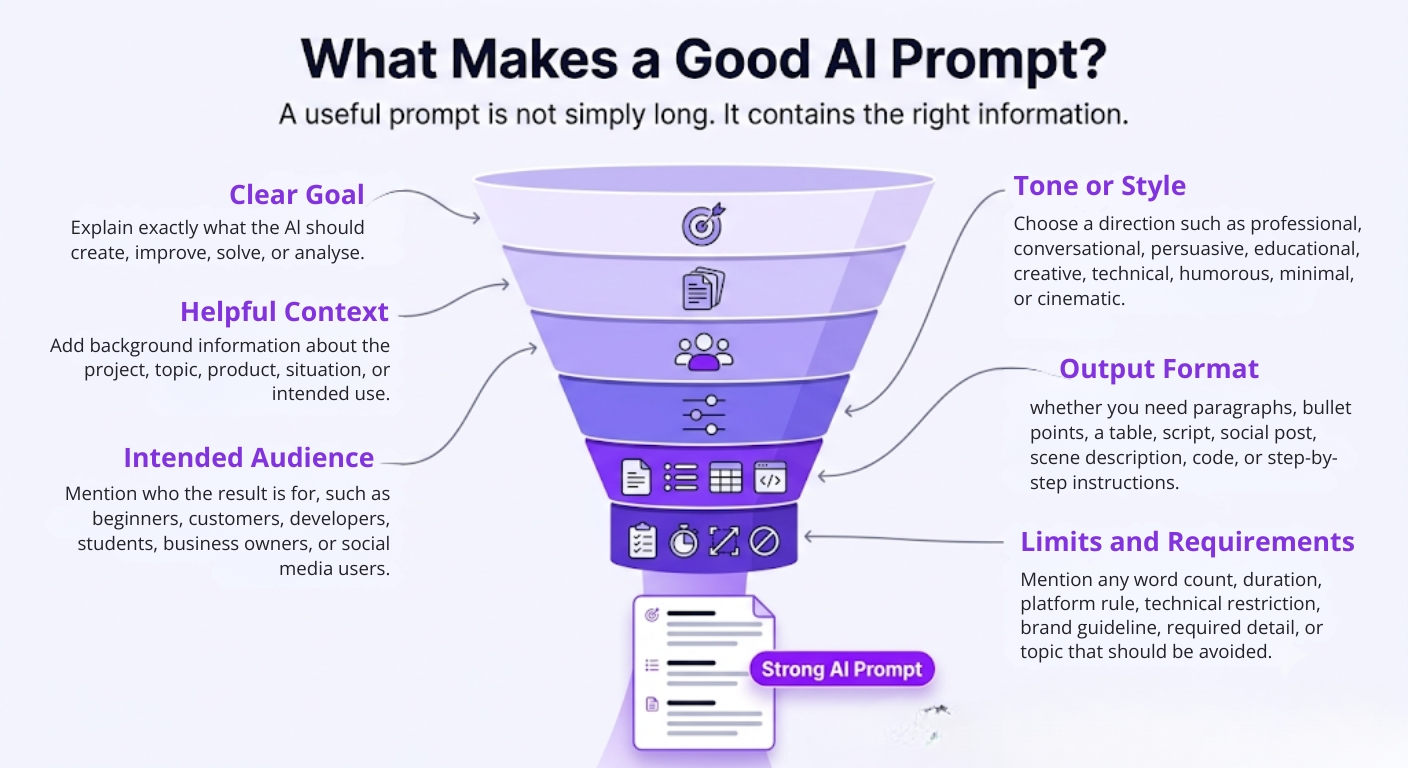
What Makes a Good AI Prompt?
A useful prompt is not simply long. It contains the right information.
Depending on your task, try to include:
A clear goal
Explain exactly what the AI should create, improve, solve, or analyse.
Helpful context
Add background information about the project, topic, product, situation, or intended use.
The intended audience
Mention who the result is for, such as beginners, customers, developers, students, business owners, or social media users.
Tone or style
Choose a direction such as professional, conversational, persuasive, educational, creative, technical, humorous, minimal, or cinematic.
Output format
Tell the AI whether you need paragraphs, bullet points, a table, script, social post, scene description, code, or step-by-step instructions.
Limits and requirements
Mention any word count, duration, platform rule, technical restriction, brand guideline, required detail, or topic that should be avoided.
The AI Prompt Builder helps bring these elements together without making you structure everything manually.
Tips for Better Results
Explain what you want the final result to achieve.
Mention where the output will be used.
Include your audience, platform, or industry.
Add examples when you have a specific direction in mind.
Mention the required tone, style, length, and format.
Include accurate project or product information.
Remove any generated instruction that does not apply.
Add your brand guidelines or personal preferences before using the prompt.
Adjust the prompt according to the specific AI model.
Review factual, legal, medical, financial, academic, and technical results carefully.
Avoid entering private or confidential information unless you understand how the AI service handles it.
FAQs
What does an AI Prompt Builder do?
It turns a simple idea, rough request, or existing prompt into a clearer and more detailed instruction for an AI tool.
What can I create with an AI Prompt Builder?
You can build prompts for text, images, videos, coding, marketing, social media, business documents, research, education, design, and many other tasks.
The tool creates the prompt rather than the final image, video, article, or code itself.
Can I use it as an AI image prompt generator?
Yes. You can describe your visual concept and generate a detailed image prompt with information about the subject, environment, composition, lighting, mood, style, and other visual details.
Can it create prompts for AI video generators?
Yes. The tool can help structure a video prompt containing the scene, action, camera movement, setting, lighting, visual style, timing, and intended mood. The final result may vary depending on the video-generation model being used.
Can I use the generated prompt with ChatGPT?
A generated text prompt can generally be copied into ChatGPT or another conversational AI tool. Review and adjust the prompt according to the model, your account settings, and the type of output you need.
Is an AI Prompt Builder the same as an AI prompt generator?
The terms are often used for similar tools. Both help users create AI prompts. A prompt builder usually focuses on expanding and structuring the user’s own idea, while some prompt generators may provide ready-made prompts based on a selected topic.