
Writing a cold email can be difficult when you know your offer but do not know how to present it clearly. The Cold Email Generator helps you turn your idea, source content, product details, or service information into a professional cold email that grabs attention, explains value, and helps you start sales conversations.
What is a Cold Email Generator?
Cold Email Generator is a sales and outreach writing tool that helps users create professional cold emails from their existing content, business idea, service details, product information, or rough message.
Instead of spending time thinking about the right subject line, opening line, value proposition, and call to action, users can use the tool to turn their input into a clear and persuasive cold email draft.
The tool helps create emails that are suitable for reaching new leads, introducing services, starting business conversations, promoting offers, requesting meetings, or following up with potential clients.
Upload or paste your cold email content
Source content
Upload or paste your product details, service description, business offer, sales notes, company information, or marketing material and turn it into a professional cold email.
Cold email idea
Write the idea you already have in your mind, such as who you want to contact, what you want to offer, and what action you want the reader to take.
Sales and outreach details
Add details about your target audience, pain point, benefit, offer, pricing, meeting request, or business goal so the email can sound more relevant and focused.
Key features of Cold Email Generator
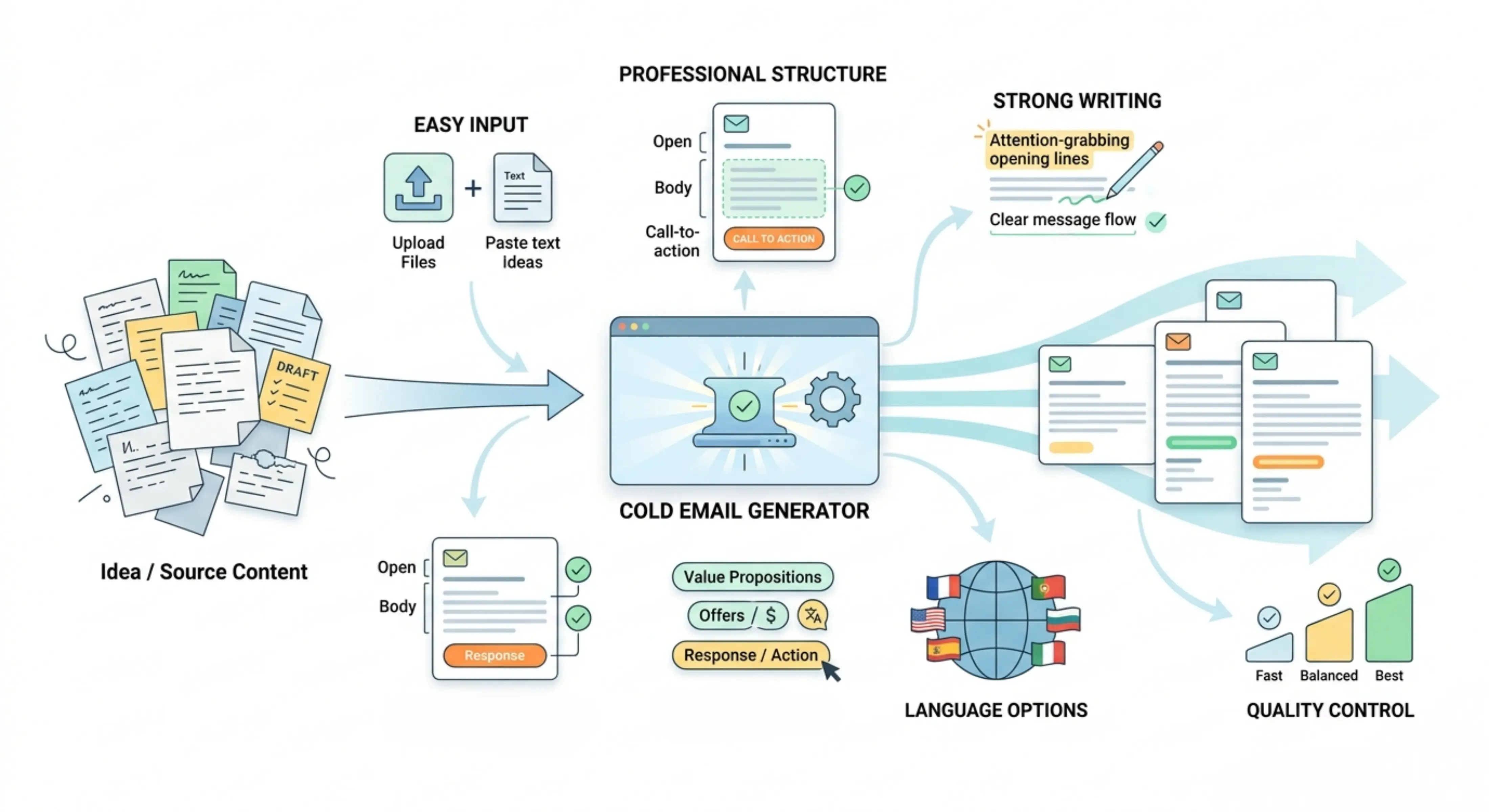
Professional cold email structure
The tool organizes your message into a clear cold email format with a strong opening, useful context, value-driven body, and clear next step.
Strong and attention-grabbing writing
The output is written to quickly catch the reader’s attention while still keeping the tone professional, respectful, and suitable for business outreach.
Sales-focused messaging
The tool helps explain your offer in a way that highlights value, solves a problem, and encourages the recipient to respond or take action.
Easy content input
Users can upload source content or paste a rough idea directly, making the tool useful for both detailed business material and simple outreach concepts.
Same-language output by default
The cold email is generated in the same language as your input by default, helping the message stay natural and aligned with the original context.
Choose a different output language
Users can also select another language for the cold email, which is useful for international outreach, multilingual sales campaigns, and communication with global prospects.
Quality control options
Users can choose how deeply the cold email should be prepared based on their time, purpose, and level of detail needed.
Choose the right processing mode
Fast
Best for quickly creating a simple cold email draft when you need a usable starting point in less time.
Balanced
Best for regular cold email writing. It gives a good mix of speed and quality, making it useful for most sales outreach and lead generation emails.
Best
Best for carefully prepared cold emails where the message needs to be more focused, polished, and persuasive. This mode may take a bit more time, but the result is more deeply prepared.
How to use Cold Email Generator
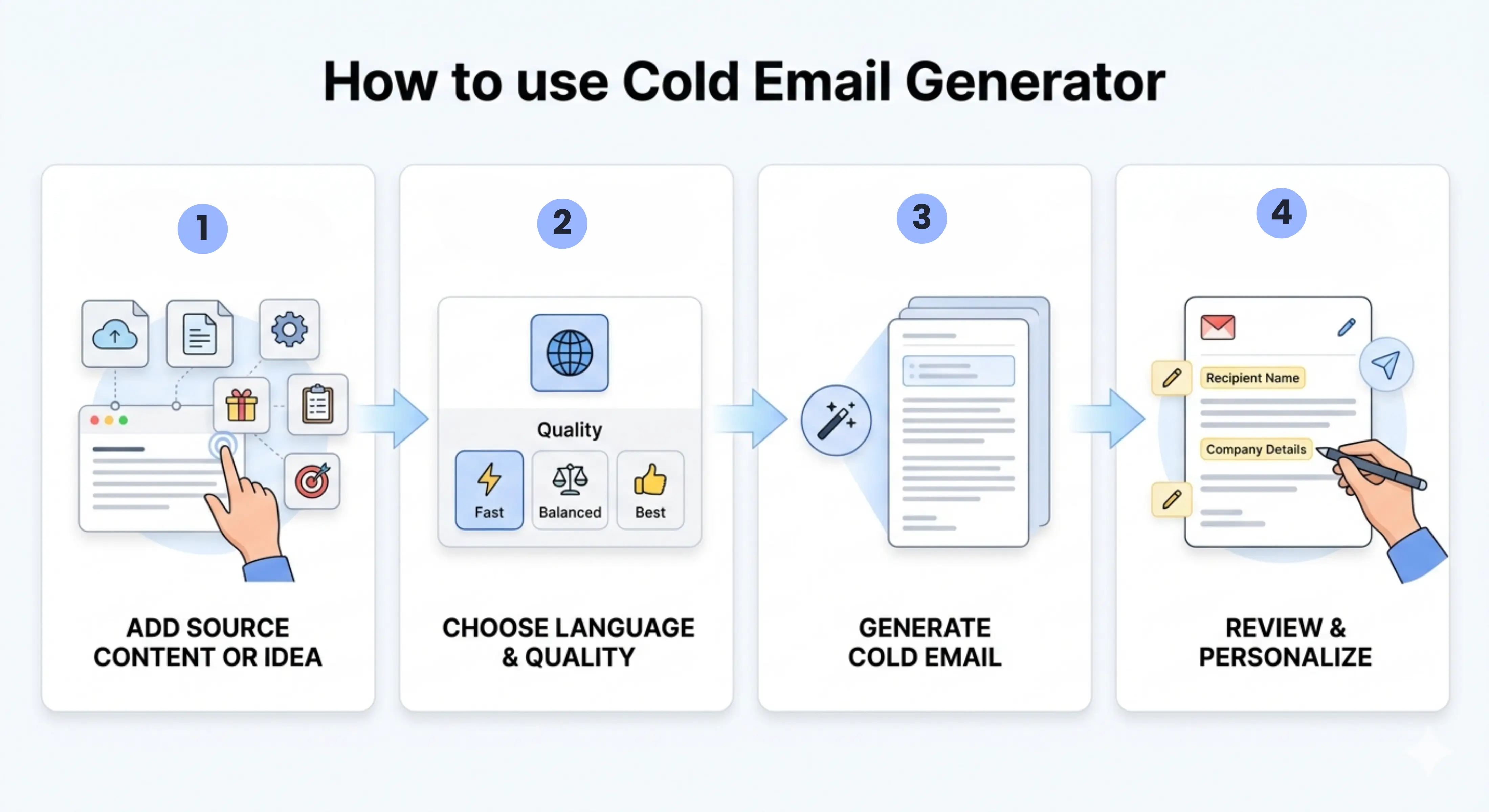
Step 1: Add your source content or idea
Upload your content or paste your cold email idea, service details, product information, sales notes, or outreach goal directly into the tool.
Step 2: Choose language and quality
Keep the same output language or select a different one, then choose Fast, Balanced, or Best mode.
Step 3: Generate your cold email
Let the tool process your input and turn it into a professional cold email draft.
Step 4: Review and personalize
Read the email, check the details, add the recipient’s name or company information, and adjust the message before sending it.
Why use a Cold Email Generator?
Cold emails need to be short, clear, and convincing. A weak cold email can sound generic, too long, too salesy, or unclear. Many users know their offer but struggle to write it in a way that makes the reader interested enough to reply.
Cold Email Generator helps by turning your rough idea or source content into a professional outreach email that is easier to send, edit, and personalize. It saves time, improves message clarity, and helps users create sales emails that feel more structured and purposeful.
The tool is especially helpful when you need to write multiple cold emails, test different outreach angles, explain your offer clearly, or create a better first draft before starting a sales campaign.
Best use cases

Sales teams: Create cold emails for lead generation, product demos, service outreach, meeting requests, and new client conversations.
Freelancers: Write professional emails to reach potential clients, pitch services, introduce skills, and start project discussions.
Startups: Introduce new products, request partnerships, reach investors, contact early customers, or promote a business solution.
Agencies: Create outreach emails for marketing services, web design, development, SEO, branding, automation, and client acquisition.
Business owners: Contact potential customers, suppliers, partners, local businesses, or decision-makers with a clear and professional message.
Recruiters: Write outreach emails to candidates, hiring partners, companies, or professional contacts.
Consultants: Present services, explain expertise, reach new leads, and request discovery calls with potential clients.
Real estate professionals: Contact property owners, buyers, sellers, investors, or local businesses with personalized outreach emails.
B2B marketers: Prepare cold email campaigns for different audiences, industries, offers, and sales funnels.
Job seekers: Write professional cold emails to companies, recruiters, founders, or hiring managers for career opportunities.
Sales outreach emails
Use the tool to create cold emails that introduce your product or service, explain the value, and encourage the recipient to reply or book a call.
Lead generation emails
Turn your offer, target audience, and business details into cold emails that help start conversations with potential leads.
Client acquisition emails
Create outreach emails for pitching services, sharing your expertise, and reaching businesses that may need your help.
Partnership emails
Write professional cold emails for collaboration requests, business partnerships, affiliate opportunities, or strategic introductions.
Product or service introduction
Explain what your product or service does, who it helps, and why the recipient may find it useful.
Meeting request emails
Generate cold emails that ask for a short call, demo, consultation, or introduction in a clear and respectful way.
Follow-up cold emails
Create follow-up messages for prospects who did not respond to the first email, while keeping the tone polite and professional.
Multilingual cold outreach
Generate cold emails in the same language as your input or choose another language for international sales communication.
Tips for better cold emails
- Add clear details about your offer, audience, problem, benefit, and call to action.
- Keep the email short and easy to read.
- Personalize the email with the recipient’s name, company, role, industry, or recent activity.
- Avoid sounding too aggressive, spammy, or overly promotional.
- Use one clear call to action, such as asking for a reply, booking a call, or reviewing an offer.
- Use Best mode when the email is for an important client, high-value lead, investor, or business partner.
- Review the final email before sending and make sure all names, links, claims, and contact details are correct.
- Test different subject lines and email angles when running a larger outreach campaign.