
User Guide for HR & Recruiters
HR teams and recruiters often need to create job descriptions quickly, but the role details may be rough, incomplete, or scattered at first. If the job description is unclear, too generic, or badly formatted,
HR teams and recruiters often work with job requirements, candidate details, interview preparation, hiring notes, employee feedback, meeting discussions, and follow-up tasks while trying to keep the hiring and workplace communication process clear and organized. Their work is not only about finding people for roles, but also about writing accurate job descriptions, preparing better interviews, reviewing performance fairly, summarizing important information, and turning scattered HR content into structured material that helps teams make better decisions.
Tools Overview
All the important functions for a HR & Recruiter
Write clear job posts that attract relevant candidates
Problem
HR teams and recruiters often need to create job descriptions quickly, but the role details may be rough, incomplete, or scattered at first. If the job description is unclear, too generic, or badly formatted, it can attract the wrong candidates and make the hiring process slower.
Solution
The Job Description Generator helps users turn basic role details into a clean and properly formatted job description. Recruiters can add the main information about the role, responsibilities, requirements, skills, and work details, and the tool creates a structured job description that is easier for candidates to understand and apply for.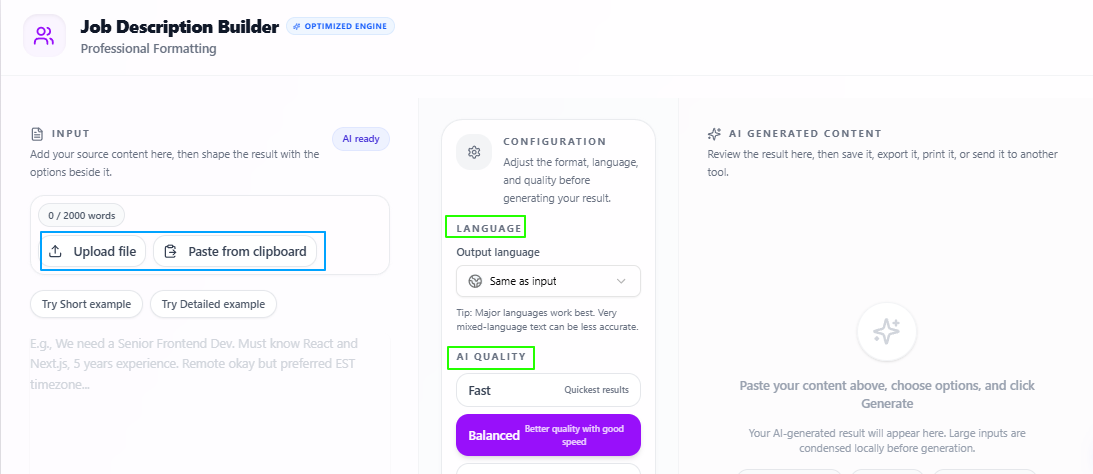
Features:
Basic role input
Users can add the basic details they want for the job role and use them as the base for the generated job description.
Clean job description
The tool turns rough role information into a clear and formatted job description that is easier to read and publish.
Candidate-focused writing
The output explains the role in a way that helps relevant candidates understand the opportunity more clearly.
Structured format
The job description is organized with useful sections such as role overview, responsibilities, requirements, skills, and other important details.
Language flexibility
The output language stays the same as the input by default, but users can also select another language if needed.
Quality control
Users can choose Fast for quick output, Balanced for a mix of speed and quality, or Best for deeper and more focused results.
Tips to remember
Add clear details about the role before generating the job description.
Include responsibilities, required skills, experience level, location, and work type if available.
Use Balanced for regular job posts.
Use Best when preparing job descriptions for important or senior roles.
Review the final job description once to make sure the role details are accurate.
Adjust the tone if the job post needs to sound more formal, friendly, or industry-specific.
Prepare better interviews from role requirements
Problem
HR teams and recruiters often need to prepare interview questions for different roles, but every job has different skills, responsibilities, and expectations. If the interview is not prepared according to the actual role requirements, it can become too general and may not properly test whether the candidate is suitable for the position.
Solution
The Interview Helper helps users create useful interview preparation material from a job description. Recruiters can add the job description, and the tool generates important guidelines, questions, and answer points based on the role, requirements, responsibilities, and other details mentioned in the description.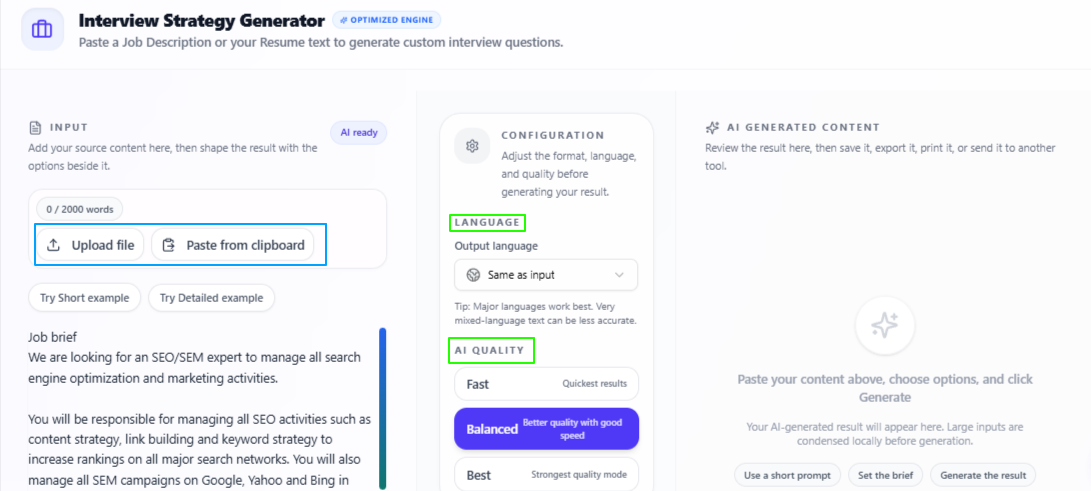
Features:
Job description input
Users can add the job description for the role and use it as the base for interview preparation.
Role-based guidelines
The tool creates useful guidelines according to the role requirements, helping recruiters understand what areas should be focused on during the interview.
Interview questions
It generates relevant questions based on the skills, responsibilities, experience level, and role details mentioned in the job description.
Suggested answer points
The tool provides answer points that can help recruiters understand what a strong or suitable response may include.
Requirement-focused preparation
The output is based on the actual job details, so the interview preparation feels more specific and less generic.
Language flexibility
The output language stays the same as the input by default, but users can also select another language if needed.
Quality control
Users can choose Fast for quick output, Balanced for a mix of speed and quality, or Best for deeper and more focused results.
Tips to remember
Add the complete job description for more accurate interview preparation.
Include responsibilities, required skills, experience level, and role expectations in the description.
Use Balanced for regular interview preparation.
Use Best when preparing interviews for senior, technical, or important roles.
Review the questions once and adjust them according to the company’s hiring style.
Use the suggested answer points as guidance, not as fixed answers.
Turn rough feedback into professional employee reviews
Problem
HR teams, managers, and recruiters often need to prepare performance reviews, but the feedback points may be rough, scattered, or written in an informal way. This can make it difficult to create a review that sounds fair, clear, professional, and suitable for formal workplace discussions.
Solution
The Performance Review Generator helps users turn rough feedback points or uploaded performance data into a refined and professional review. HR teams can use it to organize employee feedback, improve the tone, and create reviews that are easier to share in evaluations, internal records, or performance meetings.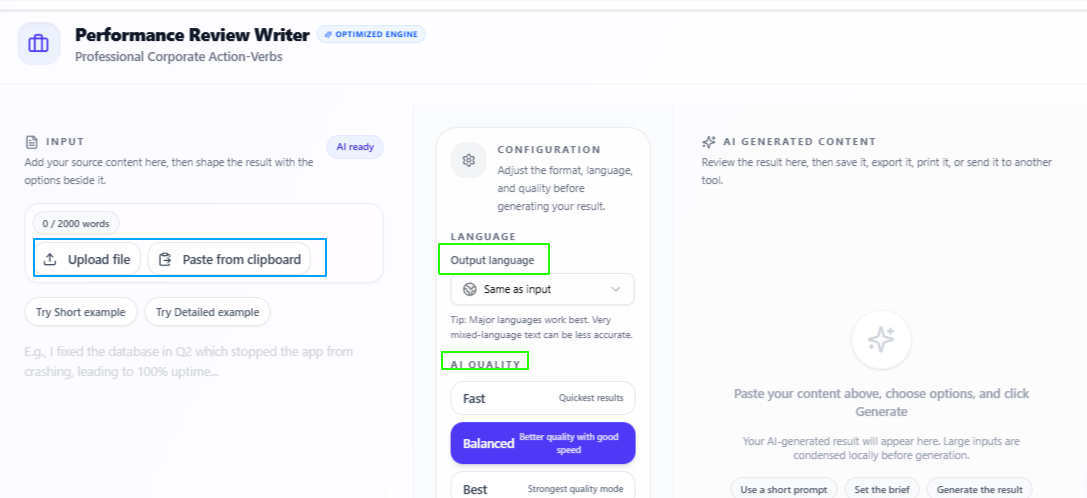
Features:
Rough feedback input
Users can upload their data or add rough feedback points as the base for the performance review.
Professional review writing
The tool turns simple notes into a formal and polished review that fits workplace and HR settings.
Refined feedback tone
The output helps make the feedback sound more balanced, respectful, and suitable for professional discussions.
Clear review structure
The review is organized in a way that makes strengths, improvement areas, and overall performance easier to understand.
Formal use support
The generated review can be used for employee evaluations, HR documentation, manager feedback, or internal performance records.
Language flexibility
The output language stays the same as the input by default, but users can also select another language if needed.
Quality control
Users can choose Fast for quick output, Balanced for a mix of speed and quality, or Best for deeper and more focused results.
Tips to remember
Add clear feedback points before generating the review.
Include both positive performance points and improvement areas for a balanced result.
Use Balanced for regular employee reviews.
Use Best when preparing reviews for important evaluations or sensitive feedback.
Review the final output to make sure the wording feels fair and accurate.
Adjust any personal or sensitive details before sharing the review officially.
Turn HR meetings into clean and important points
Problem
HR teams and recruiters often discuss hiring plans, candidate updates, employee matters, onboarding tasks, policy changes, and internal team decisions in meetings. After the meeting, it can be difficult to organize everything clearly, especially when the discussion is long, scattered, or full of small but important points.
Solution
The Meeting Minutes Generator helps users turn meeting content into clear meeting minutes and important points. HR teams can upload or paste their meeting notes, transcript, or discussion content, and the tool organizes the information into a cleaner format that is easier to review, share, and keep for records.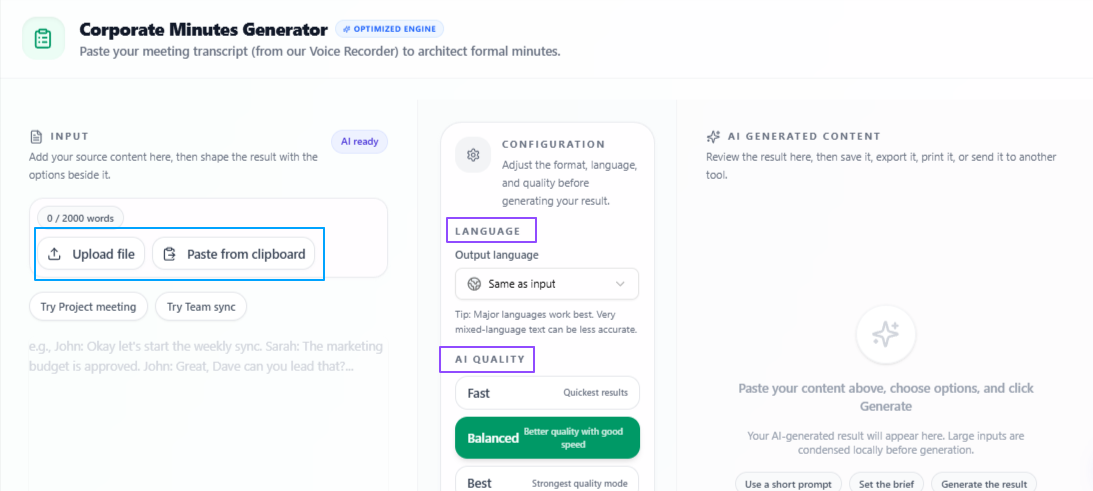
Features:
Meeting content input
Users can upload or paste meeting content and use it as the base for generating minutes.
Meeting minutes generation
The tool turns raw meeting content into organized minutes that are easier to read and understand.
Important point extraction
It highlights the key points from the meeting so HR teams can quickly see what was discussed and decided.
HR discussion support
The output can be used for hiring meetings, interview planning, onboarding discussions, employee updates, and internal HR reviews.
Clear record format
The generated minutes help keep meeting information in a structured form for future reference and team communication.
Language flexibility
The output language stays the same as the input by default, but users can also select another language if needed.
Quality control
Users can choose Fast for quick output, Balanced for a mix of speed and quality, or Best for deeper and more focused results.
Tips to remember
Upload or paste complete meeting content for better minutes.
Include speaker notes or clear discussion points when available.
Use Balanced for regular HR meetings.
Use Best when preparing minutes for important hiring, policy, or management discussions.
Review the final minutes once to make sure all decisions are correctly captured.
Share the minutes with the team after checking names, dates, and action-related details.
Turn discussions into clear tasks and follow-ups
Problem
HR teams and recruiters often deal with many follow-up points from interviews, hiring meetings, onboarding discussions, employee updates, and internal planning. When these points stay inside long notes or meeting content, it can be easy to miss an important task, delay a follow-up, or lose track of what needs to be done next.
Solution
The Action Item Extractor helps users turn uploaded content into clear and actionable tasks. HR teams can use it to extract follow-ups, priorities, and deadlines from meeting notes, candidate discussions, interview feedback, or internal HR content, so the next steps become easier to manage.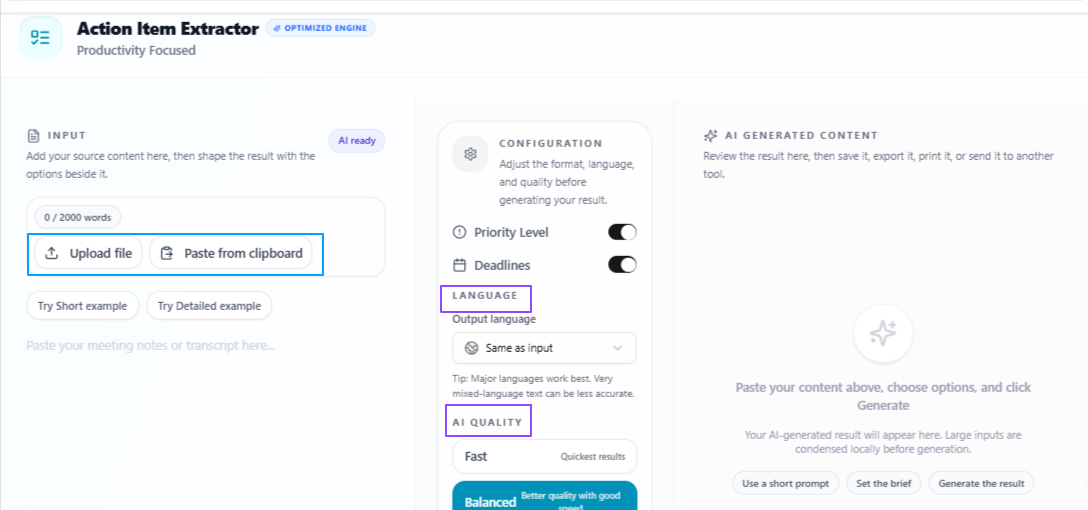
Features:
Content upload
Users can upload their content and use it as the base for extracting action items.
Actionable output
The tool turns general HR content into clear tasks that are easier to understand and follow.
Priority level
Users can select priority settings so the output can organize tasks according to their importance.
Deadline support
The deadline option helps mention ending times or due points for tasks when they are available in the content.
HR task planning
The extracted action items can help with recruitment follow-ups, onboarding tasks, employee updates, interview next steps, and internal responsibilities.
Language flexibility
The output language stays the same as the input by default, but users can also select another language if needed.
Quality control
Users can choose Fast for quick output, Balanced for a mix of speed and quality, or Best for deeper and more focused results.
Tips to remember
Upload complete meeting notes, interview notes, or HR content for better task extraction.
Use priority level when there are many tasks to organize.
Use deadlines when follow-ups are time-sensitive.
Use Balanced for regular HR and recruitment task planning.
Use Best when extracting action items from important hiring or management discussions.
Review the final task list and assign each action item to the right person or team.
Understand long HR content without reading everything in detail
Problem
HR teams and recruiters often work with long resumes, employee documents, hiring notes, reports, policies, feedback records, and meeting content. Reading every detail manually can take time, especially when the main purpose is to quickly understand the important points and decide what needs attention.
Solution
The Text Summarizer helps users turn long HR content into a shorter and clearer summary. HR teams can paste text, write content directly, or upload a file, and the tool summarizes the information into paragraphs or bullet points based on the selected length and output style.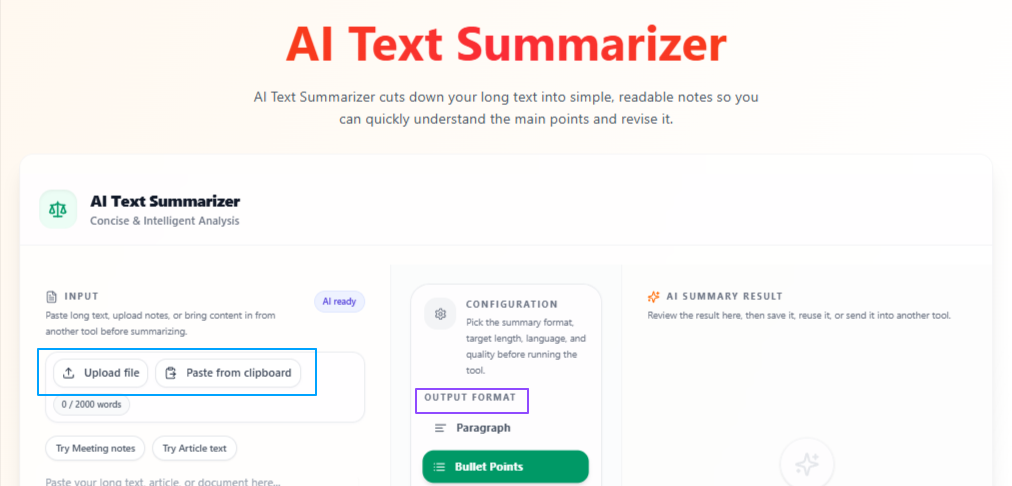
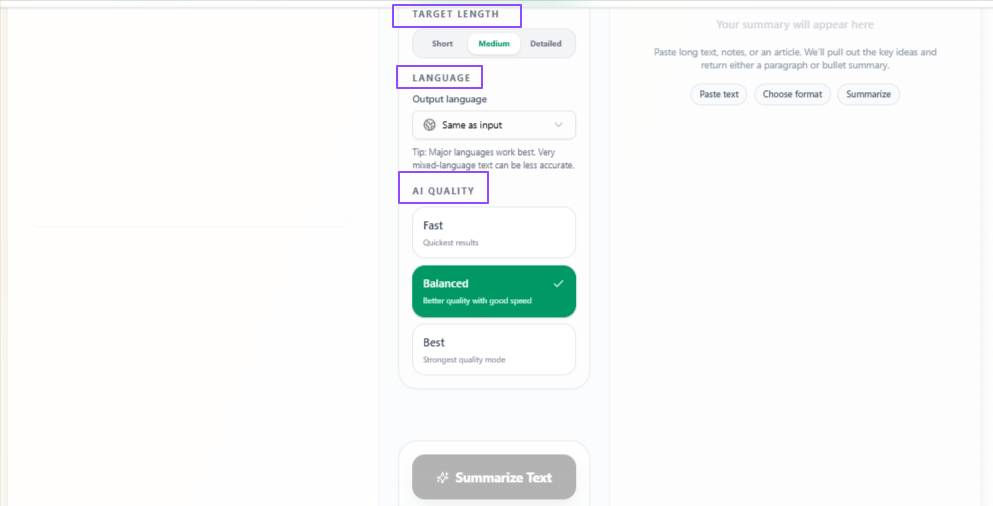
Features:
Flexible text input
Users can paste text, write directly, or upload a file as the base for summarization.
Summary format options
The output can be generated as paragraphs or bullet points depending on how the user wants to review the information.
Target length selection
Users can choose short, medium, or detailed summaries according to how much information they need.
HR content review
The tool can help summarize resumes, policies, reports, employee notes, interview feedback, meeting content, and other HR documents.
Quick information understanding
The summary helps users understand the main points without going through the full content line by line.
Language flexibility
The output language stays the same as the input by default, but users can also select another language if needed.
Quality control
Users can choose Fast for quick output, Balanced for a mix of speed and quality, or Best for deeper and more focused results.
Tips to remember
Upload or paste complete content for a more useful summary.
Use bullet points when you want quick scanning.
Use paragraphs when you want a smoother summary for reading or sharing.
Choose short for quick review, medium for balanced detail, and detailed for deeper understanding.
Use Balanced for regular HR content review.
Use Best when summarizing important policies, reports, or candidate documents.
Conclusion
Overall, these use cases show how HR teams and recruiters can use VoiceCraftTool to handle the practical work around hiring, interviews, employee feedback, meetings, follow-ups, and document review in a more organized way. From writing clear job descriptions and preparing better interviews to creating professional performance reviews, summarizing HR content, and turning discussions into action items, these tools help reduce manual work and keep important HR communication clearer, faster, and easier to manage.
Put this workflow to work
Use the tools directly once you finish reading, so the guide turns into action instead of just reference material.
HR and Recruiters who want a cleaner path from recordings to usable output.