Real estate professionals often handle buyer calls, seller discussions, property inquiries, and follow-up conversations during a busy workday. These calls may contain useful details about....
Real estate professionals often work with property details, client calls, buyer questions, seller notes, viewing feedback, listing content, and follow-up tasks while trying to keep every conversation and property presentation clear, accurate, and useful. Their work is not only about showing properties, but also about understanding client needs, presenting property value properly, writing better descriptions, organizing important details, and responding on time so potential opportunities are not missed.
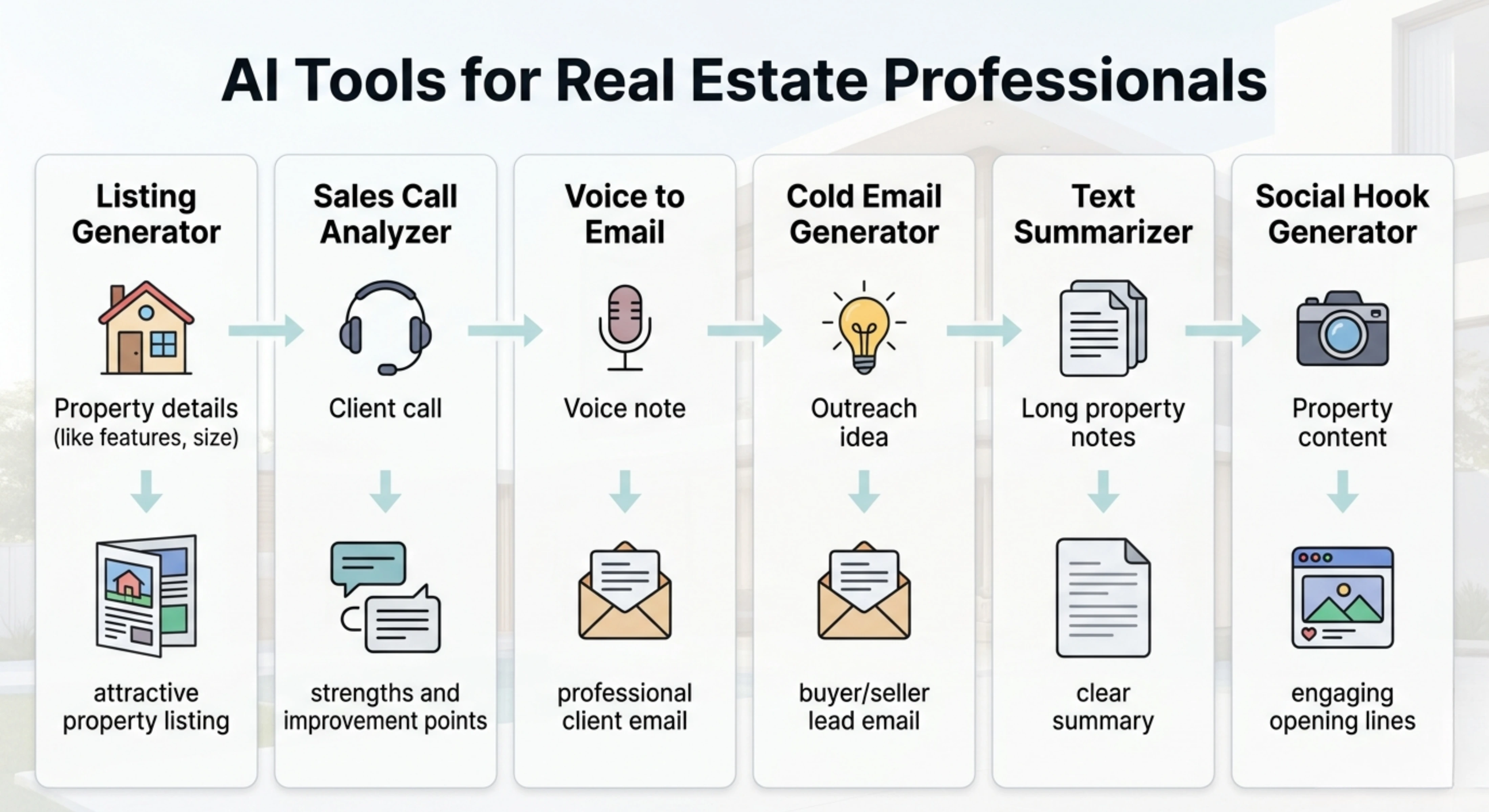
Tools Overview
Tool
What it helps with
Best use case
Real Estate Listing Generator
Turns property details into clear and buyer-focused listing content
Creating property listings, ads, and lead-focused descriptions
Sales Call Analyzer
Reviews client or sales calls and finds strengths and improvement points
Improving buyer calls, seller conversations, objections, and follow-ups
Voice Message to Email
Turns recorded voice notes into properly written emails
Sending client emails, property updates, follow-ups, and inquiry responses
Cold Email Generator
Creates professional outreach emails from rough ideas or source content
Reaching buyers, sellers, investors, landlords, or property leads
AI Text Summarizer
Shortens long property notes, documents, or client information into clear summaries
Reviewing property details, contracts, reports, and client notes faster
Social Hook Generator
Creates engaging opening lines from real estate content
Writing stronger hooks for property posts, reels, ads, and social campaigns
All the important functions for Real Estate Professionals
Turn property details into listing content that attracts better leads
Problem
Real estate professionals often have property details available, but turning those details into a clear and attractive listing can take time. A property may have strong selling points, but if the listing sounds too plain, incomplete, or generic, buyers may not quickly understand its value. This can make it harder to present the property properly and generate quality inquiries.
Solution
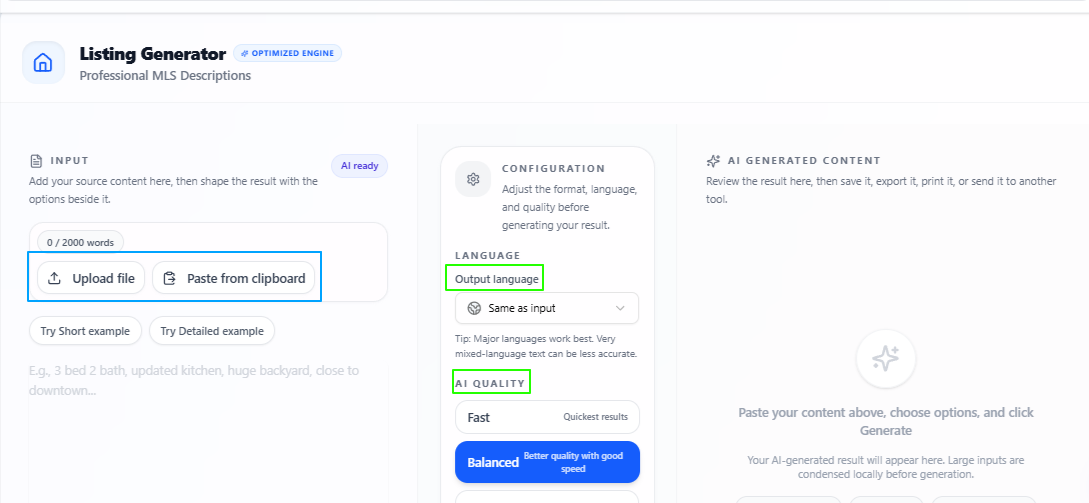
The Real Estate Listing Generator helps users turn uploaded property data into relevant and useful listing content. Real estate agents, brokers, and property teams can use it to create property descriptions that explain the important details clearly, highlight the right features, and make the listing more suitable for buyers or renters.
Features
Property data input
Users can upload real estate data and use it as the base for the listing content.
Listing content generation
The tool turns property information into clear and relevant listing copy.
Lead-focused writing
The output is written to make the property easier to understand and more appealing to interested buyers or renters.
Better property presentation
It helps organize property details such as location, size, features, price, and nearby facilities in a more useful way.
Language flexibility
The output language stays the same as the input by default, but users can also select another language if needed.
Quality control
Users can choose Fast for quick output, Balanced for a mix of speed and quality, or Best for deeper and more focused results.
Tips to remember
Upload complete property details for a stronger and more accurate listing.
Include important points like location, size, price, property type, rooms, features, and nearby facilities.
Use Balanced for regular property listings.
Use Best when preparing listings for premium, high-value, or important properties.
Review the final listing once to make sure all property details are correct.
Adjust the tone if the listing needs to feel more luxury, simple, family-friendly, or investment-focused.
Understand what worked and what needs improvement in client calls
Problem
Real estate professionals often handle buyer calls, seller discussions, property inquiries, and follow-up conversations during a busy workday. These calls may contain useful details about client interest, objections, budget, location preference, urgency, or concerns, but it can be difficult to review everything clearly after the call ends. Important points may be missed, and the agent may not always know where the conversation could have been stronger.
Solution
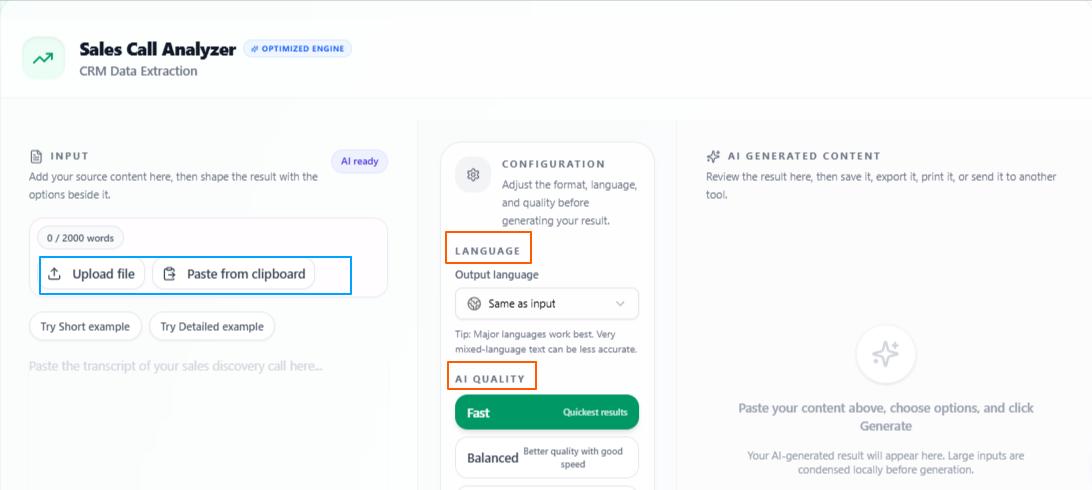
The Sales Call Analyzer helps real estate professionals review their calls from a sales and communication perspective. Users can upload a call audio file, paste a call transcription, or add a call script, and the tool analyzes the conversation to show the call’s strengths and the areas that can be improved. This helps agents understand how clearly they presented the property, handled questions, responded to objections, and moved the conversation toward the next step.
Features
Audio or text input
Users can upload a sales call audio file, paste the call transcription, or add a call script directly into the tool.
Sales-focused call analysis
The tool reviews the conversation from a professional sales perspective instead of only checking the language or grammar.
Strength detection
It highlights the parts of the call that worked well, such as clear property explanation, strong questions, useful responses, or good follow-up direction.
Improvement suggestions
It shows where the call can be improved, so the user can understand what to change in future buyer, seller, or investor conversations.
Client conversation review
The analysis can help real estate professionals notice missed details, weak closing points, unclear explanations, or objections that were not handled properly.
Language flexibility
The output language stays the same as the input by default, but users can also select another language if needed.
Quality control
Users can choose Fast for quick analysis, Balanced for a mix of speed and quality, or Best for deeper and more focused results.
Tips to remember
Use the full call transcript when you want a more complete call review.
Upload clear audio when analyzing recorded buyer, seller, or property inquiry calls.
Use Balanced for regular call reviews.
Use Best when reviewing an important client call, serious buyer inquiry, or high-value property discussion.
Review the improvement points before your next call so the feedback becomes practical.
Keep past call analysis notes to compare how your client conversations improve over time.
Turn quick voice notes into properly written client emails
Problem
Real estate professionals often need to send emails after calls, viewings, property discussions, or client inquiries, but writing every message from scratch can take time. An agent may already know what they want to say, but turning that thought into a clear, professional, and relevant email can slow down follow-ups, especially when handling multiple buyers, sellers, landlords, or investors in one day.
Solution
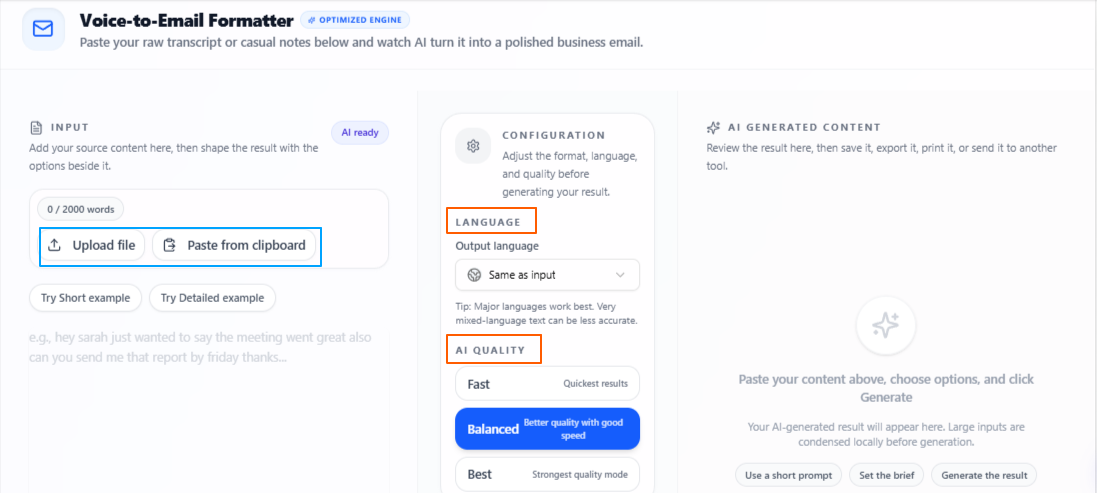
The Voice Message to Email tool helps users turn a recorded voice message into a properly written email. Real estate professionals can simply record the purpose of the email or upload a recorded file, and the tool analyzes the message to create a formatted and relevant email. This makes it easier to send property updates, follow-up messages, inquiry responses, viewing confirmations, or client communication without starting from a blank page.
Features
Voice-based email input
Users can record the purpose of the email directly or upload an already recorded voice file.
Email purpose analysis
The tool analyzes the voice message to understand what the user wants to communicate before writing the email.
Formatted email writing
The output is written as a properly structured email, making it easier to use for client communication.
Real estate follow-up support
It can help create emails for property updates, buyer responses, seller communication, viewing details, and post-call follow-ups.
Clear and relevant messaging
The generated email keeps the message focused, professional, and suitable for the purpose shared in the voice note.
Language flexibility
The output language stays the same as the input by default, but users can also select another language if needed.
Quality control
Users can choose Fast for quick output, Balanced for a mix of speed and quality, or Best for deeper and more focused results.
Tips to remember
Record the voice note clearly so the email purpose is easy to understand.
Mention the client type, such as buyer, seller, landlord, tenant, or investor.
Include key details like property name, location, viewing time, price, or next step.
Use Balanced for regular client emails and follow-ups.
Use Best when preparing emails for serious leads, premium property clients, or important negotiations.
Review the final email once before sending to make sure the property details and client information are correct.
Write stronger outreach emails for buyers, sellers, and property leads
Problem
Real estate professionals often need to reach new buyers, sellers, landlords, tenants, or investors, but writing a cold email from scratch can take time. The message needs to feel clear, professional, and relevant without sounding too generic or overly promotional. If the email does not quickly explain the purpose or value, the reader may ignore it before responding.
Solution
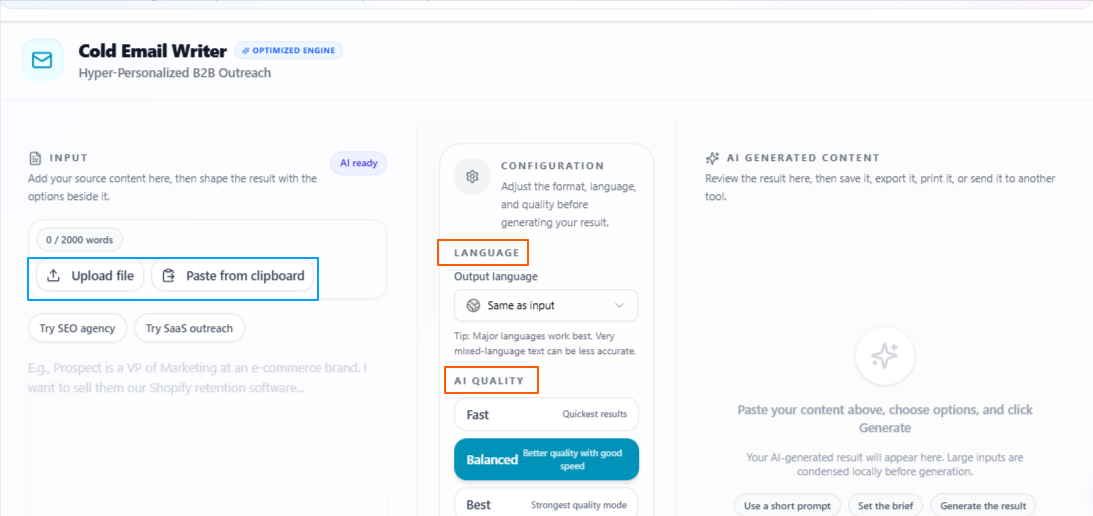
The Cold Email Generator helps real estate professionals turn rough ideas, source content, or basic outreach directions into properly written cold emails. Users can upload or paste the source content, or simply add the idea they have in mind, and the tool creates a professional email that can be used for property outreach, lead generation, client follow-ups, or real estate sales communication.
Features
Flexible input
Users can upload source content, paste existing material, or write the basic idea they have for the cold email.
Professional email writing
The tool turns rough input into a clear and properly written cold email suitable for real estate outreach.
Attention-focused opening
It helps create a stronger start so the email has a better chance of catching the reader’s interest.
Real estate outreach support
The output can be used for reaching buyers, sellers, investors, landlords, tenants, or property leads.
Sales-driven structure
The email is written with a clear purpose, helping users present a property, service, offer, or next step more effectively.
Language flexibility
The output language stays the same as the input by default, but users can also select another language if needed.
Quality control
Users can choose Fast for quick output, Balanced for a mix of speed and quality, or Best for deeper and more focused results.
Tips to remember
Add enough detail about the property, service, lead type, or offer before generating the email.
Keep the goal clear, such as booking a viewing, getting a reply, introducing a property, or starting a seller conversation.
Use Balanced for regular real estate outreach emails.
Use Best when writing emails for high-value properties, serious investors, or important client opportunities.
Review the final email once to make sure it sounds natural and matches your communication style.
Personalize the opening line before sending when contacting a specific buyer, seller, landlord, or investor.
Summarize long property details and client notes into clear points
Problem
Real estate professionals often deal with long property documents, client notes, viewing feedback, market details, reports, and written communication. Reading through everything manually can take time, especially when the user only needs the main points for a quick decision, follow-up, listing update, or client response. Important details can also become harder to find when the content is too long or scattered.
Solution
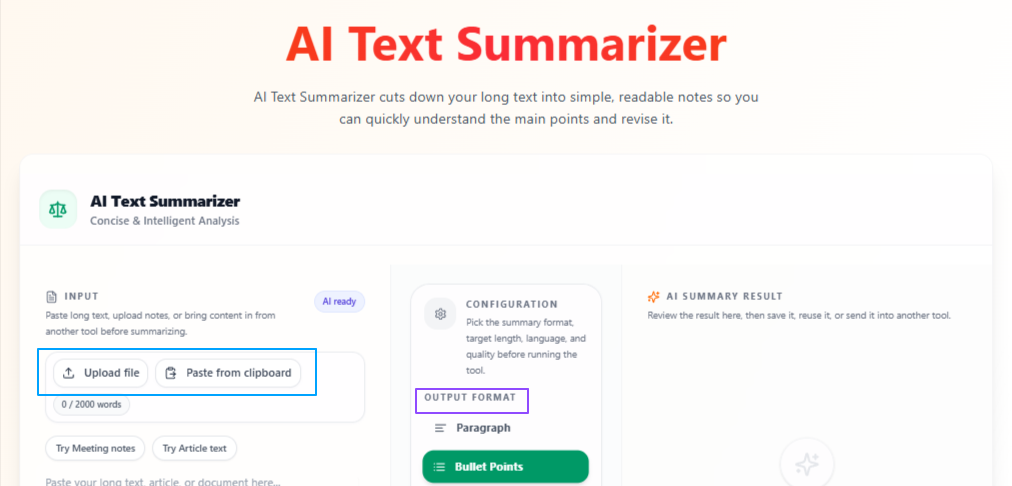
The AI Text Summarizer helps real estate professionals turn long text, pasted content, written notes, or uploaded files into shorter and clearer summaries. Users can choose whether they want the output in paragraphs or bullet points, and they can also select the target length as short, medium, or detailed. This makes it easier to review property information, client requirements, reports, and real estate notes without reading everything again from start to finish.
Features
Flexible text input
Users can paste text, write content directly, or upload a file that they want to summarize.
Paragraph or bullet output
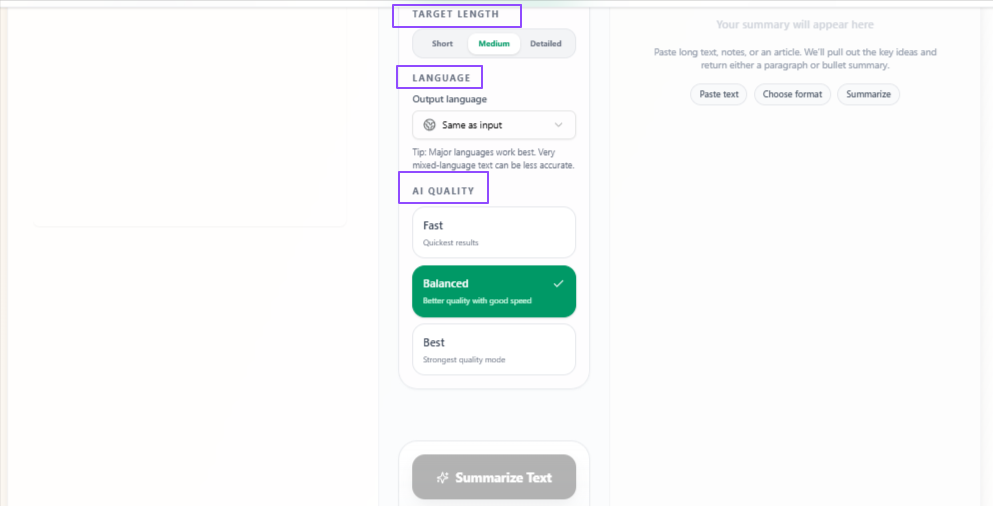
The summary can be generated in paragraph form or bullet points depending on how the user wants to review the content.
Target length control
Users can choose short, medium, or detailed summaries based on how much information they need.
Real estate content review
The tool can help summarize property details, client notes, inspection points, viewing feedback, reports, and written communication.
Clearer information handling
It makes long or scattered content easier to understand by focusing on the main points.
Language flexibility
The output language stays the same as the input by default, but users can also select another language if needed.
Quality control
Users can choose Fast for quick summaries, Balanced for a mix of speed and quality, or Best for deeper and more focused results.
Tips to remember
Use complete property notes or documents when you want a more useful summary.
Choose bullet points when you need quick scanning or task-based review.
Choose paragraph format when you want a smoother explanation for client or internal use.
Use short summaries for quick checks and detailed summaries for important documents.
Use Balanced for regular notes, reports, and property information.
Use Best when summarizing contracts, premium property details, or important client requirements.
Create stronger opening lines for property posts and real estate campaigns
Problem
Real estate professionals often create content for property posts, reels, ads, listing promotions, open house announcements, or market updates. Even when the property or message is useful, a weak opening line can make people scroll past the content before they notice the main value. This can reduce attention on listings, campaigns, and lead-focused content.
Solution
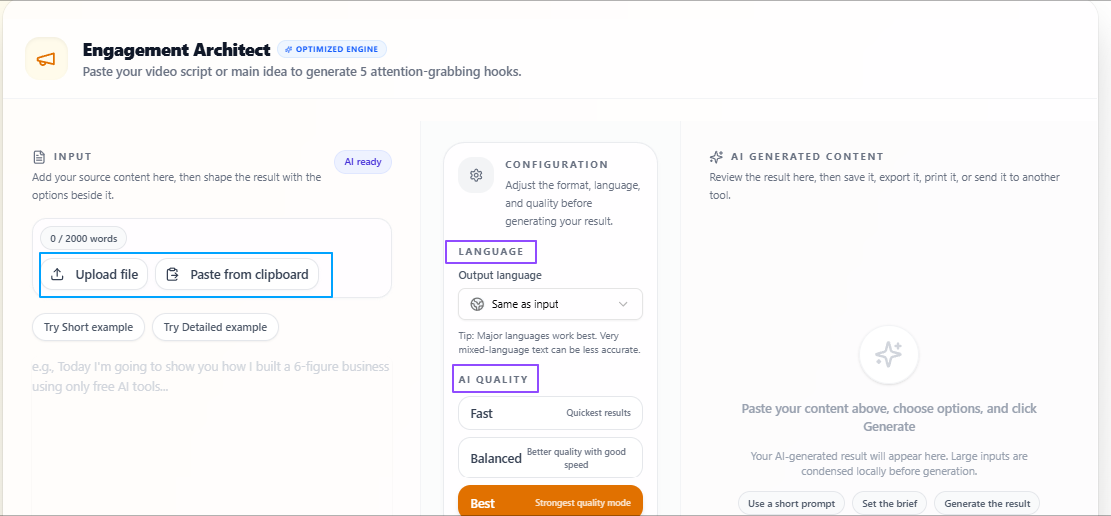
The Social Hook Generator helps real estate professionals create more engaging hook options from their existing content. Users can upload a content script file or paste the content directly, and the tool analyzes it to suggest relevant opening lines. This makes it easier to start property posts, ads, reels, and social campaigns with a line that feels clear, engaging, and connected to the message.
Features
Flexible content input
Users can upload a content script file or paste their content directly into the tool.
Content analysis
The tool analyzes the provided content before suggesting hook options.
Relevant hook suggestions
It creates hook ideas that match the property, topic, message, and purpose of the content.
Real estate campaign support
The output can help with property posts, listing promotions, open house content, reels, ads, and local market updates.
Engaging opening lines
The tool focuses on creating stronger starts that can help real estate content catch attention more quickly.
Language flexibility
The output language stays the same as the input by default, but users can also select another language if needed.
Quality control
Users can choose Fast for quick output, Balanced for a mix of speed and quality, or Best for deeper and more focused results.
Tips to remember
Paste enough content so the hooks stay relevant to the property or campaign message.
Use hooks that match the platform where the content will be posted.
Use Balanced for regular property posts, reels, and campaign ideas.
Use Best when creating hooks for premium listings, paid ads, or important property launches.
Test more than one hook when possible to see which one gets better attention.
Review the final hook to make sure it does not overpromise or sound unnatural.
Conclusion
Overall, these use cases show how real estate professionals can use VoiceCraftTool to handle the daily work around property listings, client calls, outreach emails, follow-ups, long notes, and social content in a more organized way. From turning property details into clearer listings and reviewing client conversations to writing emails, summarizing important information, and creating stronger hooks for property campaigns, these tools help reduce the extra manual effort behind real estate communication so agents, brokers, and property teams can present information clearly, respond faster, and manage opportunities with better focus.
Next step
Put this workflow to work
Use the tools directly once you finish reading, so the guide turns into action instead of just reference material.


 communication.