AI Interview Questions & Answers Generator 2026 | Smart Prep
May 7, 2026
9 min read
Most people walk into interviews underprepared, not because they lack skills, but because they never got a chance to actually practice. Reading through lists of common questions is one thing. Answering them out loud, on the spot, under pressure is something completely different.
AI has changed how job seekers prepare. Instead of passively skimming resources, you can now generate realistic interview questions for your specific role, practice answering them, and review structured responses to understand what good answers actually look like. This article covers how that works and how to get the most out of it.
Types of Interview Questions You Can Practice with AI
1- Behavioral Questions
These are questions like "Tell me about a time you handled conflict at work" or "Describe a situation where you had to meet a tight deadline." Interviewers use them to understand how you've actually behaved in real situations, not how you think you'd behave.
AI tools can generate dozens of variations of these based on your industry and seniority level, which helps you stop relying on the same two or three prepared stories.
2- Technical Questions (Role-Based)
For developers, data analysts, designers, or any technical role, generic prep simply doesn't cut it. You need questions specific to the stack, tools, or concepts relevant to your position.
AI generators can target these directly. A frontend developer gets different questions than a backend engineer, and that specificity makes the practice actually useful.
3- Situational and Problem-Solving Questions
These put you in a hypothetical scenario: "What would you do if a client rejected your proposal at the last minute?" They test your thinking process more than your past experience.
Practicing these with AI helps you build a consistent way of structuring your responses so your reasoning comes across clearly under pressure.
Use AI Interview Helper by VoiceCraftTool for Interview Questions & Answers
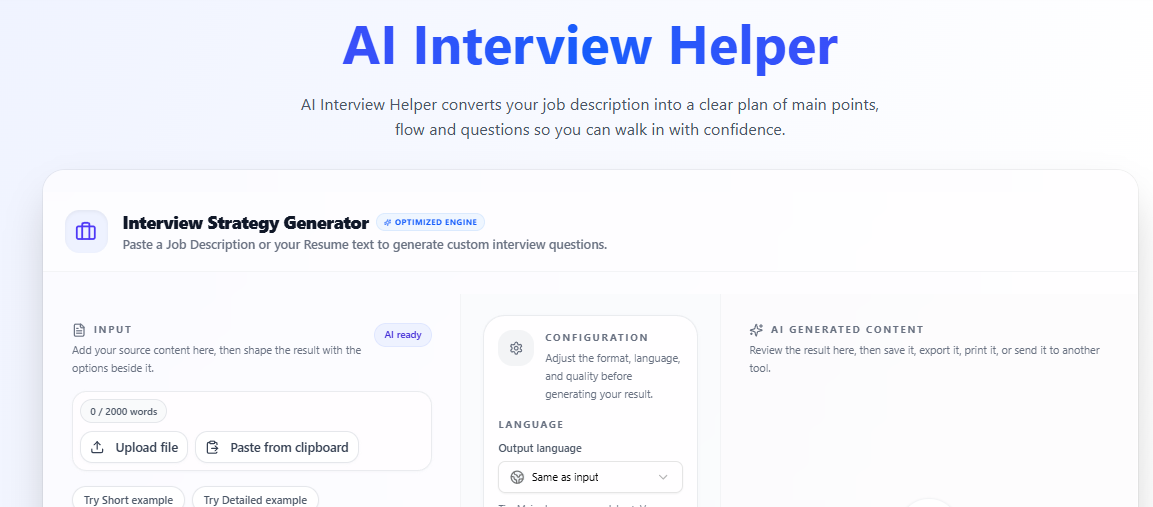
Once you understand the gap that exists in traditional prep and what a good AI tool should do, AI Interview Helper by VoiceCraftTool fits naturally into that space.
It was built specifically for job seekers who want structured, role-based practice without spending hours setting things up. You don't need to configure anything or build custom prompts. You tell it your role, and it gets to work.
Key Features of AI Interview Helper:
Role-Based Question Generation
Generates interview questions based on your job description or resume, making the practice highly relevant to the role you’re applying for.
Interview Strategy & Talking Points
Creates a structured interview plan with key talking points so you know exactly what to highlight during your answers.
STAR-Method Answer Frameworks
Provides structured answer guidance using proven formats like STAR, helping you deliver clear and impactful responses.
Focus on High-Impact Questions
Identifies the most likely and challenging questions you may face, so your preparation is focused and efficient.
Mock Practice Integration
Allows you to practice answers using real talking points and combine it with voice-based tools for realistic rehearsal.
Job-Specific Customization
Each input (job description or role) generates a completely different set of questions and strategy, ensuring tailored preparation every time.
Privacy-First, Browser-Based Usage
All processing happens in your browser, meaning your resume and data stay private and are not stored externally.
What Makes It Useful for Real Interview Prep
The features connect directly to outcomes that matter.
You understand how strong answers are structured
You speak more clearly instead of sounding scattered
You reduce hesitation during real interviews
When you see how a well-structured answer is built, you start to internalize that structure and apply it to your own responses. Over time, your answers stop sounding scattered and start sounding confident.
You get comfortable handling different question styles
You improve with repetition instead of guessing
Repeating practice sessions with different question variations also reduces the "blank mind" problem. The more angles you've seen a topic from, the less likely you are to freeze when something unexpected comes up.
How to Use AI Interview Helper (Step-by-Step)
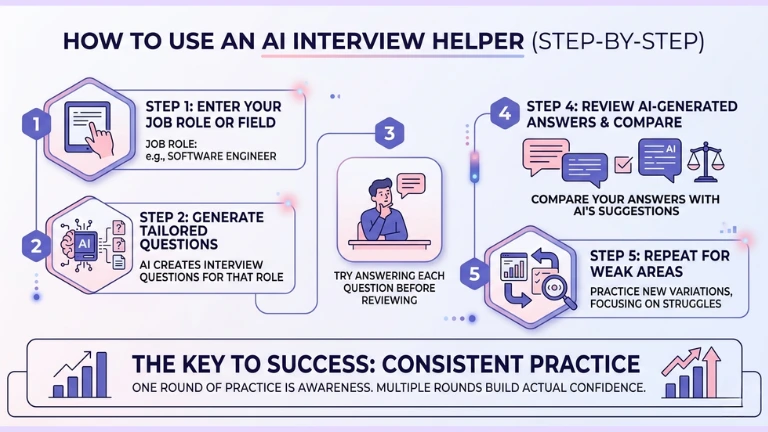
Using the tool is straightforward, but how you approach each step makes a real difference. The goal isn’t just to generate questions, it’s to practice in a way that actually improves how you think and respond under pressure.
Step 1: Enter Your Job Role or Field
Start by adding your job title, role, or target field into the tool so it can tailor everything to your specific interview needs.
Step 2: Generate Role-Based Interview Questions
Let the tool create a set of questions that match your role. These will reflect what you’re likely to face in a real interview.
Step 3: Practice Your Answers First
Go through each question and answer it on your own before checking anything. This helps you think under pressure, just like in an actual interview.
Step 4: Review, Compare, and Repeat
Check the AI-generated answers, compare them with yours, and repeat the process with new variations, especially for areas where you struggled.
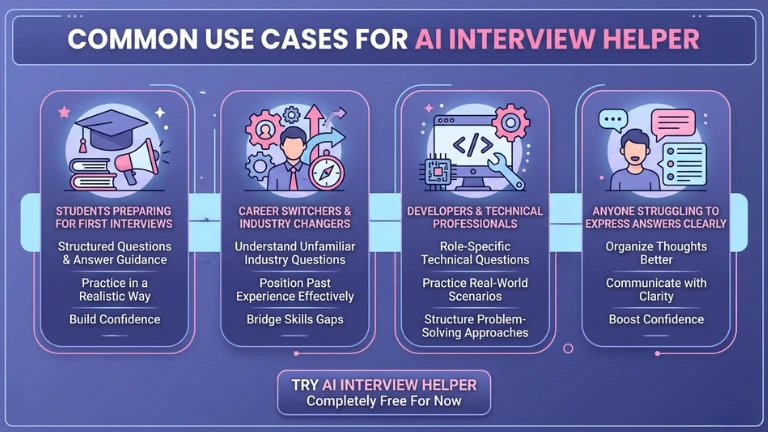
Students Preparing for Their First Interviews: If you’re stepping into your first professional interview, it can be hard to know what to expect or how to answer confidently. This tool gives you structured questions and answer guidance so you can practice in a realistic way instead of guessing.
Career Switchers and Industry Changers:Moving into a new field often means facing unfamiliar interview questions. AI Interview Helper helps you understand what interviewers in that industry typically ask and shows you how to position your past experience in a way that fits the new role.
Developers and Technical Professionals:Technical interviews require more than generic preparation. You need role-specific questions that reflect real-world scenarios. This tool helps you practice those targeted questions and structure your answers clearly, whether it’s explaining concepts or walking through problem-solving approaches.
Anyone Who Struggles to Express Answers Clearly: Some people know exactly what they want to say but struggle to deliver it smoothly during an interview. By practicing with structured questions and sample answers, you can organize your thoughts better and communicate them with more clarity and confidence.
If you’ve ever known the answer but couldn’t get it out properly during an interview, structured AI practice is built for exactly that problem. You must be one of these, that's why you’re reading it, let’s try AI Interview Helper, completely free for now.
Common Mistakes to Avoid
Copying AI-generated answers word for word Interviewers can usually tell when an answer sounds rehearsed instead of based on real experience. Use them to understand structure, not memorize lines.
Skipping out-loud practice If you’re only reading questions and thinking through answers, you’re not preparing for real interview conditions where you need to speak clearly.
Ignoring your specific role and relying on generic questions This leaves you unprepared for role-specific or technical parts that actually matter.
Using the tool passively Just generating questions without actively answering and reviewing them won’t improve your performance. Treat each session like a real interview attempt.
Conclusion
Interview preparation has always been about repetition and familiarity, but what most people lack is realistic practice.
AI tools make that practice structured and role-specific, helping you build clearer, more confident answers. Instead of just reading, you actually practice the way interviews happen.
How do I generate role-specific AI interview questions?
Enter your exact job title (e.g., "Digital Marketing Specialist SaaS") or paste a job description into a browser-based tool like AI Interview Helper. It scans for industry keywords and seniority, then outputs 10 to 20 tailored behavioral, technical, and situational questions. This is far more relevant than generic lists from LeetCode or Glassdoor. Practice first without peeking at samples to simulate real pressure.
Are AI-generated sample answers good enough for real interviews?
Yes, but only as frameworks, not scripts. Tools using STAR (Situation, Task, Action, Result) structure responses to highlight impact, like "Drove 30% traffic growth via SEO tweaks." Compare your out-loud answers to these, refine for your voice, and repeat variations to avoid sounding rehearsed. This builds confidence without memorization pitfalls.
VoiceCraftTool Interview Helper vs. other AI prep tools, which is best?
VoiceCraftTool excels for privacy-first, free browser use with instant role customization and mock integration, unlike paid platforms like Revarta ($49/mo) or Interviewing.io (live sessions at $225+). It's ideal for quick SaaS/digital marketing prep targeting US roles, skipping setup hassles of ChatGPT prompts. Users on Reddit praise its high-impact question focus over generic alternatives.
Does practicing with AI tools reduce hesitation in actual interviews?
Absolutely. Repetition with varied questions (e.g., "Handle a client rejecting your SaaS proposal") trains structured thinking under time limits. Record yourself via tool integrations, review filler words like "umm," and iterate. Reddit threads confirm 2 to 3 sessions cut "blank mind" freezes by 70%, outperforming passive reading.
Can AI interview tools handle technical questions for non-dev roles like marketing?
Yes, they adapt. A digital marketing input yields questions like "Optimize CTR for AI-driven ad campaigns" or "Measure ROI on SaaS tools." Specify your stack (e.g., Google Analytics, HubSpot) for precise scenarios. This beats generic prep, helping career switchers position transferable skills confidently.
Is uploading my resume to AI interview tools safe for privacy?
Browser-based options like VoiceCraftTool process everything locally, with no cloud storage or data sharing, keeping your SaaS resume details private. Avoid tools requiring uploads to third parties. Check for "client-side only" badges. This addresses top Quora concerns amid 2026 regs like the EU AI Act.
How many practice rounds with AI tools before an interview?
Aim for 3 to 5 sessions per role: Round 1 for awareness, 2 to 3 for weak spots (e.g., behavioral stories), and final for full mocks. Focus on 8 to 10 high-impact questions daily. Users report peak readiness after this, turning scattered answers into polished, executive-level responses for founder-targeted SaaS interviews.
Did you find this helpful?
Share this article with your friends and colleagues.