7 Ways to Use AI for Writing Performance Reviews | Free Tool Use Guide
It can take some time to write performance reports, especially if you have multiple employees to assess. You need to clearly highlight their achievements, and professionally, recognize their skills, and point out problems that need work.
A good performance review should include more than a summary of an employee's work. It should contain measurable results, real examples, and helpful constructive feedback that enables staff members to recognize their own development.
AI for Writing Performance Reviews can help you to organize your notes and improve your phrasing. This post will teach you how to use a free performance review tool, write effective reviews, and build helpful AI prompts.
What Is AI for Writing Performance Reviews?
AI is used to write, create and organize performance more easily. You can provide information about an employee's responsibilities, achievements, strengths, and opportunities for development.
These details are used by the AI tool to produce a structured draft. After that, you can modify the material to make sure it accurately reflects the employees actual performance.
For Example, you may include notes about teamwork, finished projects, and missed deadlines. These points can be arranged by AI into professional feedback.
7 Ways to Use AI for Writing Performance Reviews
1. Open the Performance Review Tool
Start by opening the VoiceCraft Performance Review Tool first.
When you already have information about the employee's work, it can use the tool to turn them into a clear and professional performance review.
Before using the tool, collect important notes about the employees performance during the review period. This will help you to provide clear and specific information rather than depending just on general statements.
2. Enter the Employee's Information
Start by adding employee information, including their position, duties, and review period. Include only the information that is required.
For example, instead of simply saying that an employee is good at teamwork, describe how the worker helped a group effort or assisted in finishing a crucial assignment.
3. Add Achievements and Strengths
List the employees main achievements from the review period. You can include complete projects, achieved goals, enhanced procedures, or positive customer feedback.
Use quantifiable accomplishments whenever you can. For instance, instead of just stating that an employee is productive, note that they finished 12 projects on schedule.
Numbers must always be precise and backed up by real documents. Use specific examples of the employee's contributions if precise numbers are not available.
4. Include Areas for Improvement
An employee's areas for improvement should be explained in a helpful performance evaluation. Instead of personal criticism, feedback should concentrate on behavior relating to the workplace.
Rather than expressing "bad communication," for instance, you may write "Provide regular project updates and communicate potential delays earlier."
This method clarifies the problem and helps the worker understand how they may make improvements.
5. Generate Your Performance Review
Use the tool to create your review after you have entered the necessary data. Organize your notes into formal language and create a well organized draft.
Give the AI clear instructions about the performance review you need for better outcomes. You can modify these three examples.
Prompt 1: Manager Review
Write a professional performance review for a marketing executive Using the information applied to highlight the worker achievements, teamwork, and areas for improvement. Make sure your feedback is clear, specific, and balanced.
Prompt 2: Self-Review
Transform my notes into a clear and natural employee self-review. Use a natural tone to highlight my achievements, difficulties, and places. Do not add anything that I have not provided.
Prompt 3: Constructive Feedback
Rewrite this performance review in a kind and professional tone. Describe the particular problem and offer a workable solution. Keep the original meaning and avoid personal comments.
6. Review and Edit the Draft
Before using an AI generated review, read it carefully and compare it with your original notes. Remove any incorrect information or unnecessary comments.
Make sure, the review reflects the employees actual work. Avoid general information that could apply to anyone.
For example, substitute "excellent team player" with a specific example of how the employee supported colleagues or contributed to a project.
7. Finalize Your Review
Make sure the review is understandable, fair, and relevant after editing the draft. Support the employees strength with real examples, while improvement areas should contain real help.
Maintain an employee's actual role, responsibilities, and contributions. You should follow your own organization's final process.
Best AI for Writing Performance Review: What to Look For
The best AI tool for writing performance reviews depends on your needs. Choose a tool that is simple to use, generates clear drafts, and well organized drafts, and allows you to edit the content.
Before entering employee information, you should also review any usage restrictions and privacy guidelines.
Above all, pick a technology that facilitates your writing process without judging an employee's performance.
If you're looking for the tool, you can use it to arrange your notes and produce a performance review. Before sharing the review, check that all the information is accurate, clear, and suitable for your company's review process.
Check our easy to use tool to write performance reviews,
AI Performance Reviews by VoiceCraftTool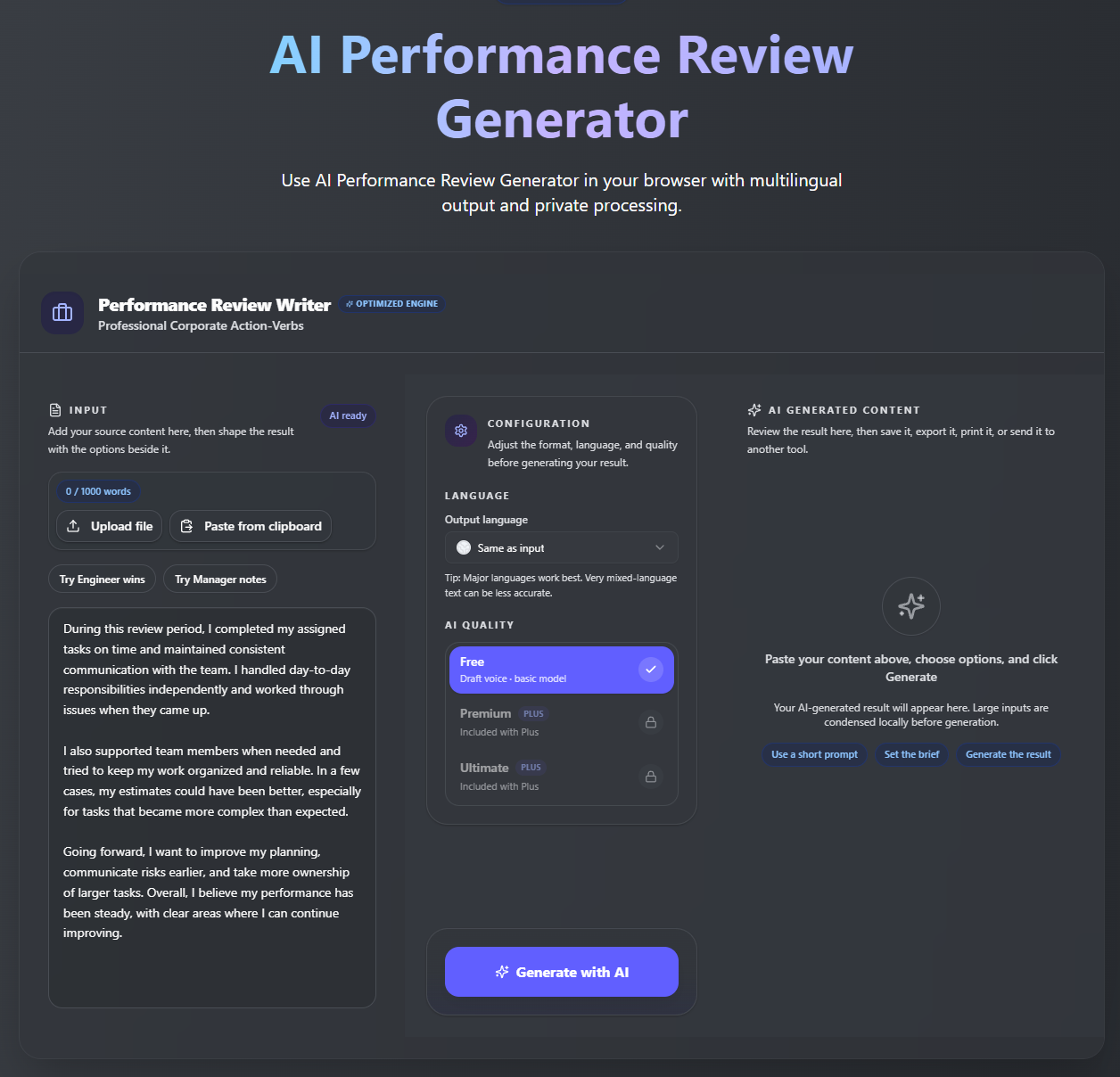
Example of an AI-Generated Performance Review
Here's a simple example of how notes can be turned into a professional review.
Employee Information:
- Role: Marketing Executive
- Achievement: Managed social media campaigns
- Strength: Teamwork and organization
- Improvement area: Project communication
Sample Performance Review:
"The employees showed excellent organizational skills while managing social media tasks during the review period. They completed their duties and worked well with other team members.
Project communication is one area. Regular updates and early notification of possible delays can help you to improve teamwork and keep projects on track.
This example shows how brief comments can develop into organized feedback. When possible, include specific examples or measurable results to make the review more accurate.
Benefits of Using AI to Write Performance Reviews
AI can make writing performance reviews easier and save time. It can enhance employee feedback.
Here are some practical benefits:
- Saves writing time: AI creates a draft, so you do not have to write everything from the beginning.
- Improves organization: Feedback can be arranged into sections such as achievements, strengths, and development areas.
- Improves Writing: AI can turn unclear sentences into easier and professional language.
- Makes feedback easier to read: It can organize information into a review that is easier to read and edit.
These benefits depend on the information you provided. The final review still needs to reflect the employees actual work.
Tips for Getting Better Results
To get useful results from AI, provide clear and specific information about employees' work. Think on the employee's duties, achievements, and difficulties throughout the review period before writing.
When measurable results and real examples whenever possible. When discussing areas for improvement, include practical suggestions that can help employees.
Avoid vague comments that do not explain what the employee did well or what they need to improve.
Feedback produced by AI may sound general or include information that is not provided. Verify that the draft carefully and make changes where needed. Then modify it to represent both your personal insights and the employee's genuine voice.
Confidential employee information may be included in performance reviews.Always follow your companies data privacy policies and refrain from sharing unnecessary personal information with AI tools.
Conclusion
AI can make Writing Performance Reviews easier by helping you organize feedback and prepare a clear draft. It can help with structure and wording, but should still add specific examples.
Try to Include the employees achievement and result. Describe improvement areas in a positive and friendly way. Make sure your feedback is fair and personable. You may write a review that is clear, useful, and relevant to the employee, before sharing the review.
Take care of tips to get better results and start using the free Performance Review Tool now. Easy and efficient to use!
Frequently Asked Questions
1. What is AI for Writing Performance Reviews?
It means using AI tools to draft, organize, or improve employee performance reviews. You provide relevant information, and the tool helps turn it into structured feedback.
2. Can AI write a complete performance review?
Yes, AI can create a complete draft from the information you provide. You should check the content to make sure it is accurate and relevant.
3. What is the best AI for writing performance review content?
The right tool depends on your needs. Look for ease of use, clear writing, editing options, and suitable privacy practices.
4. Can AI help with negative performance feedback?
Yes, AI can help phrase difficult feedback respectfully and constructively. Provide specific examples and make sure the final wording is fair.
5. Is it safe to enter employee information into an AI tool?
It depends on the tool's privacy practices and your organization's policies. Avoid entering confidential information unless you are authorized to do so.