6 Best AI Voice Recorder with AI Transcription in 2026
Imagine you’re in a meeting or lecture, trying to keep up, but your notes fall behind. Later, you’re stuck replaying recordings and typing everything again. In 2026, modern voice recorders handle this for you, turning speech into clean text instantly.
This article covers what matters most, the best options available and how to choose the right tool. The right pick can save you hours every week.
Why People Search for Best AI Voice Recorder in 2026
Most people land on searches for the best voice recorder with AI transcription because manual note-taking feels too slow now. They want something that works in real situations without adding more work at the end of the day.
Here are the main groups who benefit most:
- Professionals juggling back-to-back meetings who need clean, searchable notes
- Students recording lectures and looking for quick review material
- Journalists and content creators capturing interviews on the go
- Anyone tired of replaying audio files just to write down what was said
The problem is simple. Traditional recorders only capture sound. Many apps still struggle with accents, background noise, or multiple speakers. What people really want is something dependable that fits into a busy routine without extra tools or a complicated setup.
Key Features to Look for in an AI Voice Recorder in 2026
What separates a basic tool from a great one is how it handles the output. The best options do not leave you with raw transcripts. They organize the content, separate speakers, and clean up unnecessary filler so your notes feel natural to read. In 2026, the right tool should feel simple. You press record, stop when you are done, and your notes are already structured without extra effort.
Transcription Accuracy
Accuracy is the foundation of everything. A reliable tool should handle background noise, different accents, and group conversations without breaking the flow of text. If this part is weak, the rest of the features lose their value.
Speaker Identification
In meetings and interviews, knowing who said what is critical. Good tools automatically label speakers so your notes stay clear and easy to follow, even when multiple people are involved.
Language Support
Many users switch between languages during conversations. The recorder should support the languages you actually use, not just a limited set, so your transcripts remain useful in real scenarios.
Processing Speed
Speed affects how practical the tool feels. A good recorder delivers transcripts within minutes, allowing you to review, edit, or share notes without waiting around.
Export Options
Your notes should move easily into your workflow. Whether you use documents, email, or note apps, the tool should offer simple export options without adding extra steps.
Privacy Control
Recording conversations often involves sensitive information. A strong tool gives you clear control over where your data is stored and how it is handled, so you are not left guessing.
Choosing the Right Tool for Your Use
Not every recorder fits every situation. Some tools are designed as small physical devices and work best for in-person meetings, interviews, or field work where stability matters most.
Others run in your browser or on your laptop, making them better for online meetings and quick recording sessions during your day.
The right choice depends on how you record most often. When the tool fits your routine, it becomes part of your workflow instead of something you have to think about.
6 Best AI Voice Recorder Tools in 2026
Choosing the right tool depends on how and where you record. Some are built for in-person use with dedicated hardware, while others work better for online meetings and quick sessions. Here are six strong options worth considering in 2026.
1) AI Voice Recorder by VoiceCraftTool
(Best Free AI Voice Recorder Online with Transcription)
- Type: Software (Web-based)
- Best For: Quick recordings, browser-based use, and free access
- Main Strengths: Secure, easy to use without setup, instant recording and transcription
- Drawbacks: Depends on internet access, fewer advanced features compared to paid tools
- Pricing: Free to use
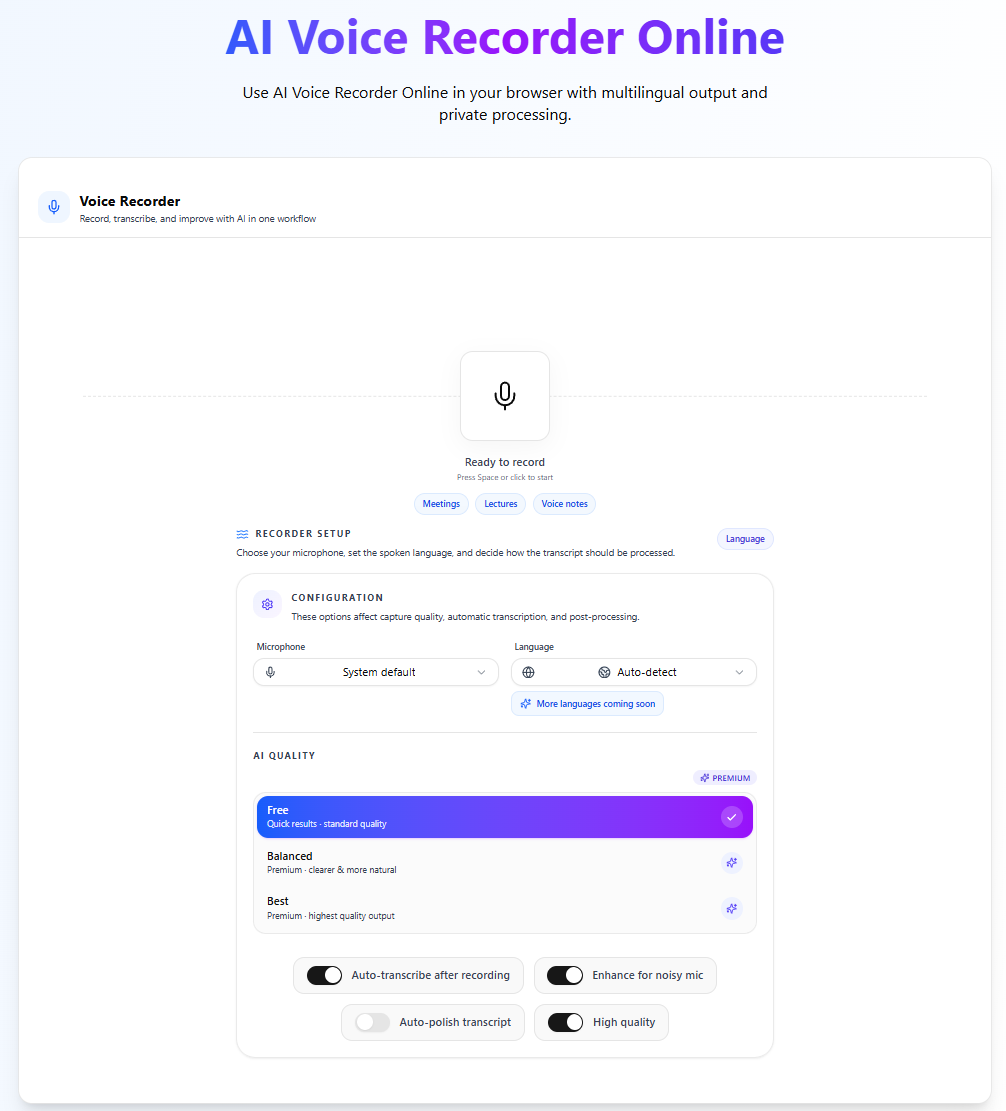
AI Voice Recorder by VoiceCraftTool is a simple and accessible option for everyday use. It works directly in your browser, making it ideal for quick recordings without installing anything. If you need a free and straightforward solution, this is a strong starting point.
2) Plaud Note Pro
- Type: Hardware
- Best For: In-person meetings and interviews
- Main Strengths: Compact design, long battery life, reliable speaker labeling
- Drawbacks: Requires a companion app to unlock full features
- Pricing: One-time device purchase with optional app subscription
Plaud Note Pro is a solid choice if you prefer a physical device that you can carry anywhere. It performs well in real conversations and delivers structured notes without much effort.
3) soundcore Work
- Type: Hardware
- Best For: Mixed use (live conversations + calls)
- Main Strengths: Lightweight, supports multiple languages, flexible usage
- Drawbacks: Cloud-based features may raise privacy concerns for some users
- Pricing: Subscription required for advanced features
soundcore Work is designed for flexibility. It works well across different environments, especially if you switch between in-person meetings and online calls.
4) Comulytic Note Pro
- Type: Hardware
- Best For: Budget-conscious users
- Main Strengths: Simple setup, reliable core features, clear pricing
- Drawbacks: Limited advanced features like smart summaries
- Pricing: Mostly one-time cost
Comulytic Note Pro focuses on doing the basics well. It is a practical option if you want dependable recording and transcription without paying for extra features you may not need.
5) Otter.ai
- Type: Software
- Best For: Online meetings and team collaboration
- Main Strengths: Can auto-join meetings, fast search within transcripts, real-time notes
- Drawbacks: Performance can drop in noisy environments
- Pricing: Free plan available, paid plans start monthly
Otter.ai is widely used for remote work. It integrates well with meeting platforms and makes it easy to capture and review conversations without manual effort.
6) Notta
- Type: Software
- Best For: Mixed device usage (phone and computer)
- Main Strengths: Handles accents well, clean editing interface, good transcription accuracy
- Drawbacks: Limited recording time on the free plan
- Pricing: Free plan available, flexible monthly subscriptions
Notta is a balanced option for users who move between devices. It offers a smooth experience for recording, editing, and organizing transcripts.
Top AI Voice Recorders with AI Transcription Compared
Several tools lead the pack this year for different reasons. Here is a clear side-by-side look at all six popular choices based on real-world performance.
| Tool | Type | Best For | Main Strengths | Drawbacks | Pricing Note |
|---|---|---|---|---|---|
| AI Voice Recorder by VoiceCraftTool | Software (Web-based) | Quick recordings, browser use | No setup, instant access, simple transcription | Requires internet, fewer advanced features | Free to use |
| Plaud Note Pro | Hardware | In-person meetings | Compact design, long battery, good speaker labels | Needs companion app for full use | One-time purchase + app fees |
| soundcore Work | Hardware | Mixed live and call use | Lightweight, supports many languages | Slightly less private in cloud mode | Subscription for advanced features |
| Comulytic Note Pro | Hardware | Budget-conscious users | Simple pricing, reliable basics | Fewer smart summary features | Mostly one-time cost |
| Otter.ai | Software | Online meetings | Auto-joins calls, fast search | Can struggle in very noisy rooms | Monthly plans available |
| Notta | Software | Mixed phone and computer work | Handles accents well, easy editing | Limited free recording time | Flexible monthly options |
Hardware choices often feel more private for sensitive talks. Browser-based tools win when you want zero extra devices and instant access.
The Best Online AI Voice Recorder Option Right Now
For many users, the easiest option is to skip hardware completely. An online AI voice recorder works directly in your browser, whether you are on a laptop, phone, or tablet. There is no need to download anything, charge a device, or go through extra setup steps.
You simply open the page, start recording, and your transcription is ready shortly after you finish. It handles normal background noise well and produces text that is clear enough for meetings, lectures, or quick notes. Since everything runs online, updates happen automatically and you do not have to worry about storage or file management.
Where It Works Well:
- Quick meeting notes on your laptop
- Lecture recording and fast revision
- Interviews and casual voice notes on the go
- Remote work and online calls
How It Works:
- Open the recorder in your browser
- Click record and capture your audio
- Stop recording and get your transcript
This option stands out when convenience matters most. It gives you the core benefits of a voice recorder with transcription without adding extra devices or maintenance into your routine.
Real-World Use Cases and Tips
The difference shows clearest in daily moments:
- A consultant finishes client calls with ready action items instead of scattered notes
- A student reviews lecture transcripts on the bus ride home
- A journalist searches interview text later for exact quotes
Quick habits that improve any tool:
- Keep the microphone at a natural speaking distance
- Review the first minute of a new recording to adjust settings
- Export notes right after a session while the details are fresh
These small steps turn recording into the easiest part of your day.
Try Free AI Voice Recorder NOW!AI VOICE RECORDER ONLINE
Conclusion
Choosing the right AI voice recorder in 2026 comes down to how you work. Some people prefer dedicated devices for reliable in-person recording, while others find online tools more practical for daily use. What matters most is clear audio, accurate transcription, and a setup that fits naturally into your routine.
If your goal is to save time and avoid extra effort, the best option is the one that feels simple and dependable every day. Whether it is a hardware recorder or a browser-based tool, the right choice should help you capture conversations and turn them into useful notes without slowing you down.
FAQs
1. What is the best AI voice recorder for meetings in 2026?
For meetings, the best AI voice recorder is usually the one that gives you clear transcription, speaker labels, and fast export options. Hardware recorders tend to work better in noisy in-person rooms, while software tools are often better for online meetings and collaboration.
2. What is the best AI voice recorder for lectures and students?
For lectures, the best option is one that captures long sessions reliably, transcribes accurately, and makes it easy to review text later. A browser-based or phone-based recorder is often enough for students, especially if it offers quick access and simple exports.
3. Is there a free AI voice recorder with transcription?
Yes, some AI voice recorders offer free plans or free web-based use. Free tools are usually best for short recordings and basic transcription, while paid tools typically add more storage, better editing, and stronger collaboration features.
4. How accurate are AI voice recorders in noisy environments?
Accuracy drops when background noise, echo, or overlapping voices increase. Dedicated hardware and cleaner audio setups usually perform better because speaker separation and transcription work best when the input sound is clear.
5. Do AI voice recorders support multiple speakers and speaker labeling?
Yes, many modern AI recorders support speaker identification, which labels who said what in the transcript. The feature works best when voices are distinct and the recording is clear, but it can still make mistakes in difficult audio conditions.
6. Is my audio private when I use an AI voice recorder?
Privacy depends on where the audio is processed and stored. Hardware-first tools are often seen as more private for sensitive conversations, while cloud-based tools may offer convenience but require more trust in their data handling.
7. What is the difference between a hardware recorder and an online AI voice recorder?
A hardware recorder is a dedicated device made for recording, so it is often better for in-person meetings, field work, and privacy-sensitive use. An online AI voice recorder runs in the browser or app, which makes it easier for quick access, remote work, and device flexibility.
8. Can I export transcripts to Word, PDF, or note-taking apps?
Most AI voice recorders let you export transcripts in some form, though the exact options vary by product. Before choosing a tool, check whether it supports the formats and apps you already use, because export flexibility is one of the most practical workflow features.