5 Best Text Editor for You in 2026 | Simple & AI-Powered
Apr 15, 2026
11 min read
If you search “best text editor” today, you mostly see tools built for developers like VS Code or Sublime Text. They are powerful, but not always ideal if you are just trying to write. Many people simply want a clean space to draft scripts, blog posts, or notes without dealing with coding features they will never use.
In 2026, a good text editor is not just about typing. It should open fast, stay simple, and quietly help you write better. Whether you are shaping a script, organizing ideas, or fixing awkward sentences, the right tool should support your flow, not slow it down.
Different Types of Text Editors (Quick Overview)
Not all text editors are built the same way, and that is actually a good thing. The right choice depends on how you work and what you need from it.
Basic Everyday Editors:The simplest option. Think of them as a cleaner, faster version of old Notepad. They open instantly, stay out of your way, and are perfect for quick notes, to-do lists, or anything you need to write down fast without distractions.
Rich Formatting Editors:Closer to traditional word processors. You can use headings, tables, and styled text to organize your work. Best for reports, long articles, or anything that needs a clean, structured look before sharing.
AI Writing Editors:A newer category that helps you write, not just store text. These tools suggest better phrasing, fix weak sentences, and can even restructure sections. Useful if you produce content regularly and want support while writing.
Script and Spoken-Word Editors:Built for how content sounds when read aloud. Ideal for video scripts, podcasts, and voice-over work. They help you write in a natural, spoken style rather than plain text.
The 5 Best Text Editors for You in 2026
1. Notion
Notion is the best option if you want a flexible space for everyday writing and notes that you can actually stay organized in.
Key Points:
Keeps all notes, documents, and ideas in one organized space
Flexible setup from simple notes to full content systems
Clean interface that works smoothly on desktop and mobile
It opens fast and keeps everything in one place, so you stop losing things across different apps and folders. You can write a quick note or build out a full content calendar in the same tool without switching anything. The interface is clean enough that it does not feel overwhelming, even if you just want a blank page to type on.
What really helps is that your notes do not just sit there in a pile. You can tag them, link between pages, and build simple systems around how you actually think. It works well on both desktop and mobile without losing any functionality.
Perfect for: Writers, freelancers, and creators who want a daily writing and note-taking home base that keeps life organized without being complicated.
2. Google Docs
Google Docs is the best choice for structured, formatted document work where you need to share, collaborate, or get feedback from other people.
Key Points:
Strong formatting tools for structured documents
Real-time collaboration with comments and edit tracking
Cloud-based with auto-save and easy access on any device
It handles the basics really well. Headings, bullet points, tables, page layout. But where it pulls ahead is the collaboration side. Multiple people can work in the same document at the same time, leave comments, suggest edits, and track every change without anything getting messy or overwritten.
It saves automatically and lives in the cloud, which means you are never hunting for the most recent version of a file. Works on any device, no download needed, and most people already know how to use it.
Perfect for: Teams, agencies, and anyone working on documents that go through multiple rounds of review or need to be handed off to other people before publishing.
3. Grammarly Editor
Grammarly Editor is the strongest option if your main goal is drafting and polishing written content with AI help built directly into the writing experience.
Key Points:
Improves clarity, tone, and sentence structure in real time
Goes beyond grammar with context-based suggestions
Helps content sound more polished without extra effort
It does a lot more than catch spelling mistakes. It reads your writing in context and points out where sentences are confusing, where the tone shifts, or where you have said the same thing twice in a paragraph. The suggestions feel less like corrections and more like a second reader who is paying close attention.
If you write a lot of content for audiences, like blog posts, emails, or marketing copy, the tone and clarity feedback is genuinely useful. It helps you write in a way that lands better without having to second-guess every sentence yourself.
Perfect for: Content writers, marketers, and business owners who want their writing to sound cleaner and more confident without hiring an editor for every piece.
4. Script Editor AI
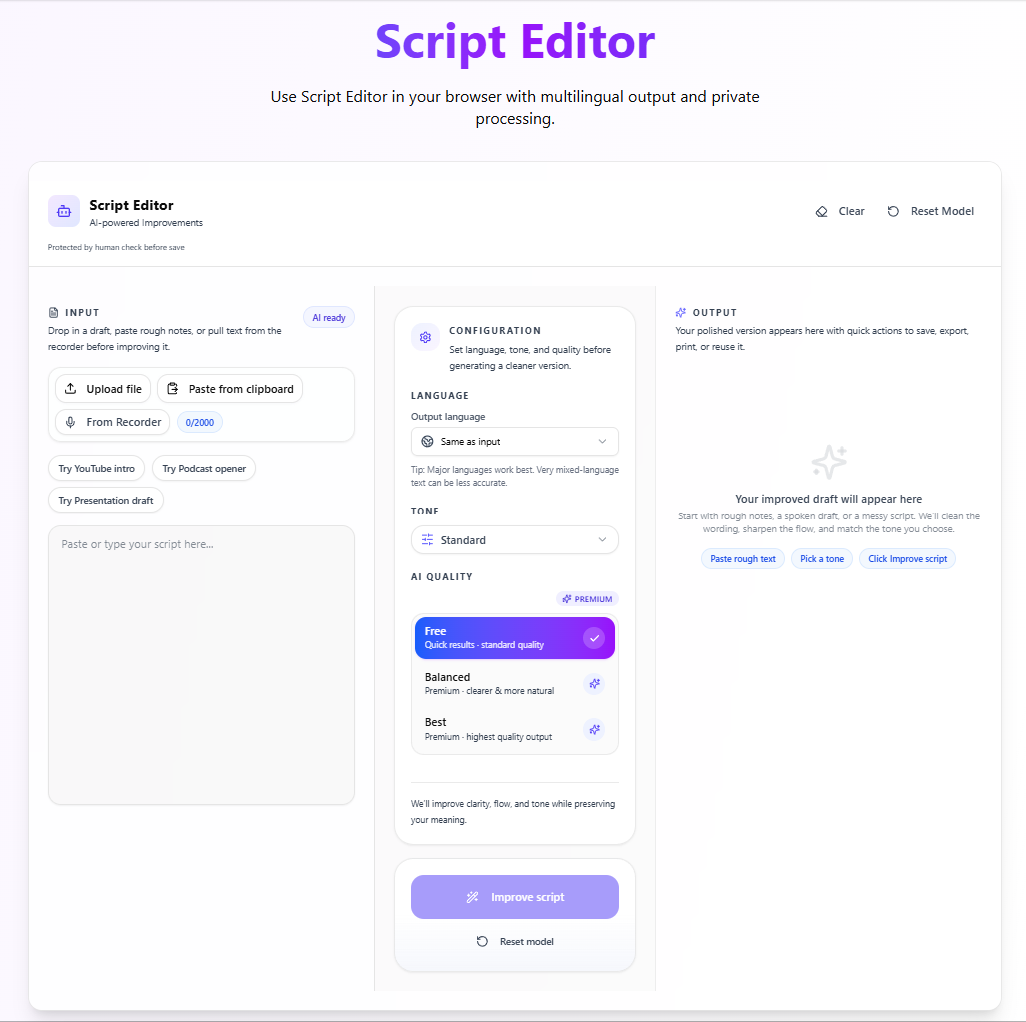
Script Editor AI by VoiceCraftTool is the one of the best tool specifically built for editing and refining text that is meant to be spoken out loud, whether that is a voice-over, a video script, or any content created for audio.
Key Points:
Optimized for writing content that sounds natural when spoken
Improves pacing, flow, and conversational tone
Saves time by catching awkward phrasing before recording
Standard text editors do not think about how your words will sound. They treat every sentence the same. Script Editor AI is built differently. It understands pacing, natural phrasing, and the difference between writing something to read versus writing something to hear. You can paste in a rough draft and come out the other side with something that flows the way real speech actually does.
For voice-over artists, the time savings are real. Instead of going back and forth between your script and a recording session to catch awkward lines, you catch them before you ever hit record. For video creators, it helps keep scripts tight and on-time without having to count words manually.
Perfect for: Voice-over artists, YouTubers, podcast hosts, and video scriptwriters who need their written content to sound natural and perform well when recorded.
5. Hemingway Editor
Hemingway Editor is the go-to for straightforward, no-distraction writing with built-in AI-style feedback that helps you keep things simple and easy to read.
Key Points:
Highlights complex sentences and readability issues instantly
Encourages simple, clear writing for wider audiences
Distraction-free interface focused purely on writing clarity
The tool highlights problem areas in your writing with colour coding. Long, dense sentences get flagged. Passive voice gets flagged. Adverbs and complex words that could be swapped for something simpler get flagged. You can see at a glance where your writing is fighting against itself.
What makes it stand out is the readability score. It tells you what level of reader can comfortably follow along, which matters a lot if you are writing for a broad audience or trying to make something accessible. The interface has barely any settings, which is part of why it works so well.
Perfect for: Anyone who writes for a general audience and wants a fast, distraction-free way to tighten up their writing and make sure it lands clearly.
How to Pick the Right Text Editor in 2026?
With so many options out there, picking the right one really comes down to being honest about how you actually work, not how you think you might work. A few things worth thinking through:
What do you write most often:Quick daily notes and ideas need a different tool than polished long-form content. Match the editor to your most common use, not your occasional one.
Do you need AI help built in: If you find yourself rewriting the same sentences multiple times or second-guessing your tone, having an AI layer in the editor itself can save a lot of back and forth.
Is your content meant to be read or heard:This is a question most people skip over. If your writing ends up in a recording session, a standard editor was not built with that in mind.
How simple do you need the interface to be:Some people work better with fewer options in front of them. If a cluttered toolbar breaks your focus, lean toward tools that keep things minimal.
Will you be working alone or with others: Collaboration features matter a lot if documents get passed between people. If it is just you, they add complexity you probably do not need.
When to Use VoiceCraftTool's AI Script Editor?
Not every writing task needs a full document editor. Sometimes you just need to take rough text and make it sound clear, natural, and ready to use. This is where Script Editor fits in.
When Writing Scripts for Videos & Voiceovers:
If your script reads fine but sounds awkward when spoken, this helps smooth the flow and adjust phrasing so it feels natural during recording.
When Cleaning Up Rough Drafts:
First drafts are often unstructured. Instead of rewriting everything, you can refine your content by improving clarity and fixing awkward or repetitive lines.
When Editing Transcripts or Raw Content:
Transcripts and quick notes usually lack structure. This helps turn them into clean, readable content while keeping the original meaning intact.
When Doing a Quick Final Pass Before Publishing:
Before sharing your content, you can use it to tighten sentences, improve flow, and catch small issues without spending too much time editing.
Conclusion
Choosing the right text editor in 2026 is less about features and more about how you actually write. Some tools help you stay organized, some make collaboration easier, and others focus on improving your writing or how it sounds when spoken. There is no single “best” option for everyone, but there is always one that fits your workflow better than the rest.
If you match the tool to your daily use, whether that is quick notes, structured documents, or spoken content, you will spend less time fighting the editor and more time getting your ideas out clearly.
FAQs
What’s the best free text editor for quick notes and daily writing in 2026?
If you want something simple and fast, Notion and Google Docs are the easiest options. Notion works better if you like organizing notes and ideas in one place, while Google Docs is great if you just want to open a document and start writing without setup.
Which AI text editor improves grammar, tone, and clarity best for bloggers?
Grammarly Editor is the strongest choice for improving tone, clarity, and overall writing quality. Hemingway Editor is also useful, but it focuses more on simplifying sentences and readability rather than deeper tone suggestions.
What is the best distraction-free text editor with AI feedback for non-coders?
Hemingway Editor stands out here. It keeps the interface minimal and highlights issues like long sentences and passive voice, helping you write clearly without adding unnecessary complexity.
Is Notion ideal for organizing notes, scripts, and ideas without overwhelm?
Yes, especially if you use it simply. While it can do a lot, it works well as a clean writing space where you can organize notes, link ideas, and build simple systems without feeling cluttered.
What is the best text editor for video scripts or podcasts that sound natural when spoken?
Script Editor AI is designed for this use case. It helps adjust phrasing, pacing, and flow so your content sounds natural when spoken, which standard editors usually do not handle well.
Is Google Docs the best option for team collaboration on documents?
For most people, yes. It allows real-time editing, comments, and version tracking, making it easy for teams to work together without confusion or file version issues.
What are good alternatives to VS Code for writers who do not need coding features?
If you find developer tools overwhelming, Notion, Grammarly Editor, and Hemingway Editor are better fits. They focus on writing, clarity, and organization instead of code-related features.
Did you find this helpful?
Share this article with your friends and colleagues.