Free AI Meeting Minutes Generator 2026 | Fast & Simple Tool
Stop taking meeting minutes manually when there’s a faster way to do it. Meetings move quickly, and trying to keep up while listening and writing at the same time rarely works.
What you’re left with are scattered notes that lose meaning later. Important decisions get overlooked, action items aren’t clearly tracked, and you end up spending extra time trying to piece everything back together. A good AI meeting minutes generator changes that. It takes your transcript or notes and turns them into clear, structured minutes in seconds, ready to share without the extra effort.
Use AI Meeting Minutes Generator by VoiceCraftTool
VoiceCraftTool's meeting minutes generator is built for one thing: taking what was said in a meeting and turning it into something actually useful.
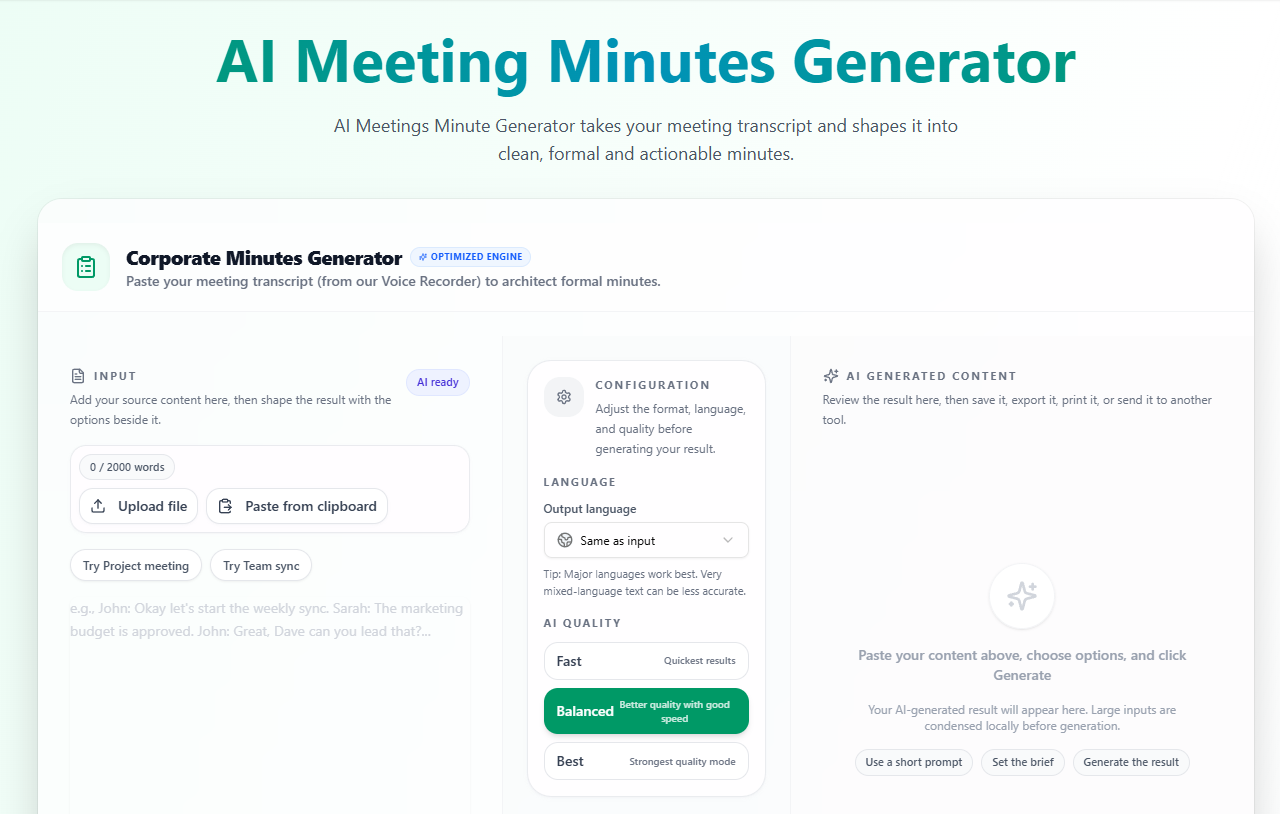
You paste in your transcript or notes, and the AI handles everything else. It pulls out the key decisions, organizes the action items, and delivers formatted minutes you can share right away. No setup needed, no learning curve.
Key Features:
Automatic Summaries
Get a clear overview of the entire meeting without going through every line again. It captures the main context so you instantly understand what was discussed.
Extract Key Decisions
Important decisions are pulled out and presented directly instead of being buried inside long paragraphs. This makes it easier to review and share outcomes.
Structured Actionable Points
Tasks are organized in a simple, structured format so nothing gets missed. You can quickly see what needs to be done and follow up without confusion.
Professional Formatting
The output is clean and properly structured, ready to share with your team or clients. There’s no need to spend extra time fixing layout or wording.
Fast Results
Generate complete meeting minutes in seconds instead of spending time writing and organizing everything manually. It helps you move on to actual work faster.
Works with Any Input
Paste a full transcript or even rough notes and the tool will still organize it into useful minutes. You don’t need perfect input to get a clean result.
Multilingual
VoiceCraftTool’s each tool supports multiple languages both for input and output. You can even input in one language and get your output in some other language.
Generate Meeting Minutes in 3 Simple Steps (How to Use)
There’s no complicated process here. You don’t need to learn anything new or set things up.
Step 1: Paste your meeting transcript or notes
Take whatever you have, whether it’s a full transcript or rough notes, and drop it into the tool.
Step 2: Let the tool process the content
It reads through everything and organizes the information into a clear structure without any manual effort.
Step 3: Get your structured minutes
Your meeting minutes are ready in a clean format. You can copy them, make small edits if needed, and share right away.
That’s it. In most cases, your minutes are ready before you’ve even closed the meeting tab.
Expected Output of Your Meeting Minutes
Once the tool is done, you're not looking at a wall of text. The output is already organized into sections you can actually use:
A short summary of what the meeting covered
The main discussion points broken down clearly
Decisions that were made, stated directly
Action items with enough context to act on them
A format that's ready to drop into an email or document
You don't have to clean it up or restructure anything. It comes out ready to share.
Using AI Meeting Minutes Tool vs Manual
Manual note-taking works, but it comes with limits. In fast discussions, it’s easy to miss details while trying to listen and write at the same time. What you end up with often needs extra time to clean, organize, and make presentable.
An AI meeting minutes tool handles that entire process for you. It captures key points, structures everything clearly, and gives you ready-to-share minutes in seconds. This saves time and keeps your documentation consistent across every meeting.
Common Use Cases
This tool fits into everyday situations where discussions lead to decisions and next steps. Instead of relying on scattered notes, you get a clear and usable record of what actually happened.
Team Meetings:
Keep track of tasks, responsibilities, and updates without missing anything during fast discussions.
Client Calls:
Create a clear written record that helps avoid misunderstandings and builds trust with clients.
Project Discussions:
Handle meetings with multiple updates and moving parts by turning them into structured minutes.
Board Meetings:
Capture decisions accurately in a clean format where clarity and documentation matter most.
Remote Collaboration:
Help team members who were not present understand what was discussed and what needs to be done next.
Quick Tips for Better Results
The tool works well on its own, but a few small things make the output even cleaner:
Use a clear transcript if you have one, auto-generated is fine
Avoid submitting notes that are too fragmented or shorthand-heavy
If your meeting had a clear agenda, that structure will come through in the output
Always give the minutes a quick review before sharing, especially for formal meetings
None of this is required. It just improves what you get back.
Conclusion
Writing meeting minutes manually slows things down and often leads to missed details and extra cleanup later. An AI meeting minutes generator solves that by turning your transcript or notes into clear, structured minutes in seconds. You get summaries, decisions, and action items already organized and ready to share.
With a simple process and consistent output, tools like VoiceCraftTool make it easier to stay focused during meetings and handle follow-ups without extra effort. Paste your notes, generate your minutes, and move on with clarity.
FAQs
What is an AI meeting minutes generator?
An AI meeting minutes generator is a tool that takes your meeting transcript or notes and turns them into clear, structured minutes. It identifies key discussion points, decisions, and action items, then formats everything so you can share it quickly without extra work.
Is your AI meeting minutes tool really free in 2026?
Yes. VoiceCraftTool offers a free AI meeting minutes generator in 2026 with no hidden charges or required sign up. You can paste your notes, generate minutes, and use the output without paying or entering card details.
Can I use rough or shorthand notes as input?
Yes. The tool works with both clean transcripts and rough notes. Even if your input is not perfectly structured, it focuses on meaning and organizes key decisions and action items into readable minutes.
How accurate are the AI generated minutes?
The tool is built to capture main decisions, discussion points, and action items reliably. For important or formal meetings, it is still a good idea to do a quick review to confirm details like names, dates, and responsibilities.
Do you store my meeting data after generating minutes?
No. Your meeting content is not stored permanently after processing. The tool is designed to handle your data securely so you can use it for team meetings, client calls, and board discussions with confidence.
Can I get minutes in a different language from my input?
Yes. The tool supports multiple languages for both input and output. You can provide content in one language and receive structured minutes in another, which is useful for multilingual teams.
How much time can I save compared to taking notes manually?
Most users save several minutes per meeting by skipping manual writing and formatting. Instead of taking notes during the call and editing afterward, you get ready to share minutes in seconds.