Compare AI Tools for Automated Meeting Minute Creation 2026
Meeting minutes should take 10 minutes, not an hour. Yet teams still struggle to piece together decisions, missed action items, and unclear notes.
AI tools help, but choosing the right one is confusing. This guide compares the top options clearly so you can pick what actually works.
Quick Comparison of AI Meeting Minutes Tools
This table gives you the snapshot view. Details follow in the next section, but if you're short on time, start here.
Key Takeaways from This Comparison
VoiceCraftTool offers the strongest overall balance for users who specifically need meeting minutes. It combines structured, ready-to-use output with simple access, minimal setup, and a free option, without adding features that may be unnecessary for someone who already has a transcript.
Most tools focus on transcription first and structure second, so you often need to clean up the output before sharing.
Fathom is great for quick personal recaps but lacks the formal structure needed for official documentation.
VoiceCraftTool is built specifically for ready-to-share structured minutes, making it different from typical transcription tools.
tl;dv works well for multilingual teams and video reviews but is less suited for written minutes documents.
Fellow is best for full meeting management, including agendas, follow-ups, and accountability, not just minutes creation.
Listing 7 Best AI Meeting Minutes Generator
1) AI Meeting Minutes Generator by VoiceCraftTool
Best For: Anyone who needs clean, formal, decision focused meeting minutes without spending time editing raw transcripts.
What gives it an advantage for meeting minutes specifically is the balance between functionality and simplicity. There is no meeting bot to configure or larger workflow to learn. For users who already have a transcript or notes, the process stays direct, and the current free access also makes it practical for individuals and smaller teams that may not need a complete meeting management platform.
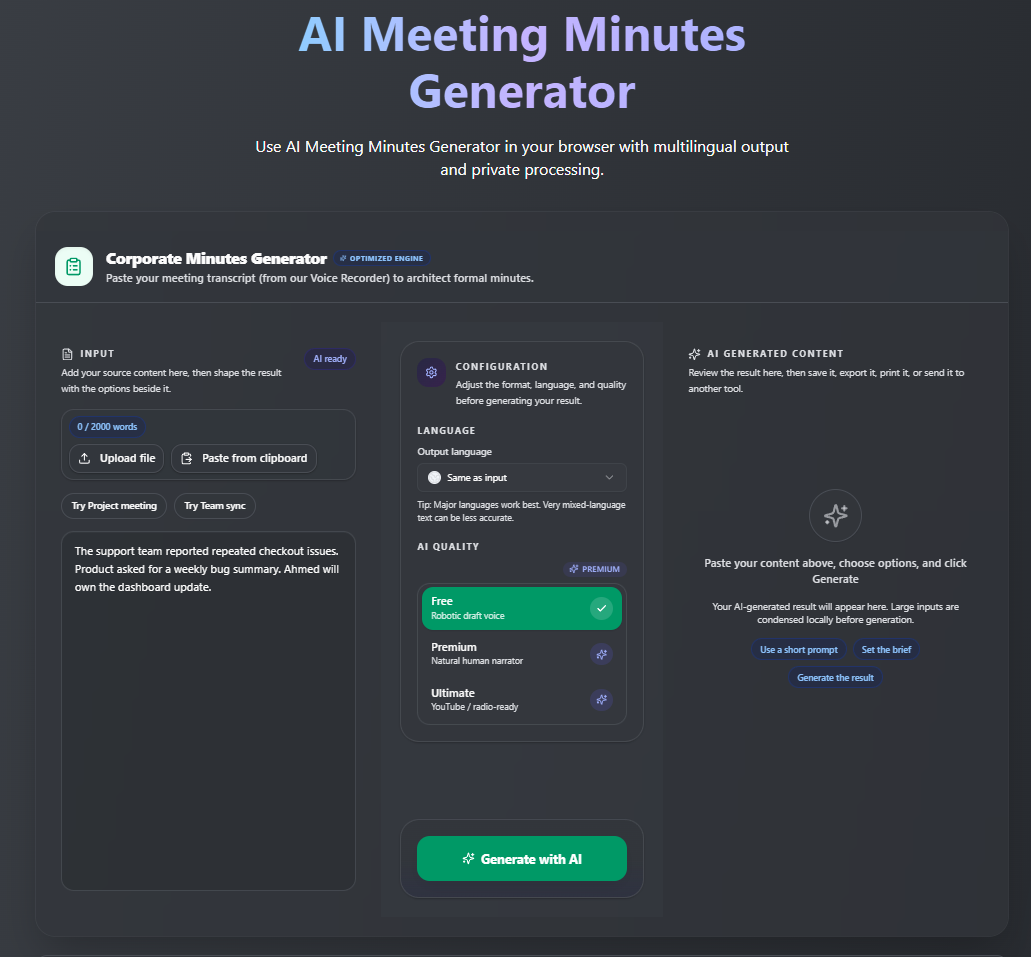
How It Works
Record your meeting or export a transcript from whichever platform you use
Paste the transcript into the tool
Generate the minutes and review before sending
Pros:
Output is immediately usable
No clutter or feature overload
Very simple with no learning curve
Built specifically for creating final meeting minutes
Accessible for users who do not need a full meeting recording platform
Strong value for users who mainly need structured minutes
Cons:
Requires a transcript before use
Needs integration for real time transcription.
Tips for Best Results
Including speaker labels in your transcript makes the output significantly more accurate. A complete transcript always produces better minutes than fragmentary notes, so the fuller your input, the better the document you'll get out. Try it now, AI Meetings Minute Generator by VoiceCraftTool.
2) Fireflies.ai
Best For: Teams that want searchable transcripts and automatic recording across multiple platforms.
Fireflies joins your meetings as a bot, records everything, and produces a transcript alongside a summary. The search feature is particularly strong. You can go back and find any moment from any meeting by searching for a keyword or speaker name.
Pros:
Broad integration support
Reliable bot attendance
Strong search functionality
Works across Zoom, Google Meet, and Teams
Cons:
Summary output is raw and needs editing for formal minutes
Free plan has limited storage and features
3) Otter.ai
Best For: People who want live transcription running during a call without much setup.
Otter is one of the most recognizable names in this space. It transcribes in real time, highlights key moments, and lets you add comments during the meeting. It integrates with Zoom natively, which makes it convenient for those already on that platform.
Pros:
Real-time transcription
Easy to start
Clean interface
Decent free tier for individuals
Cons:
Output is mostly transcript-based
Requires manual effort to create structured minutes
Becomes expensive at team scale
4) Fathom
Best For: Individual professionals who want a quick summary of their Zoom calls without any setup.
Fathom works exclusively with Zoom and is possibly the easiest tool on this list to get started with. It records, transcribes, and produces a short summary automatically after each call. The free plan is genuinely useful, which is rare.
Pros:
Extremely easy to use
Solid free plan
Fast output
Cons:
Works only with Zoom
No formal minutes structure
Limited for team-wide documentation use
5) tl;dv
Best For: Teams with international members who need multilingual support and the ability to clip and share meeting highlights.
tl;dv records and transcribes meetings across several languages and lets you create highlight clips from recordings. This is helpful when you need to share a specific moment from a call rather than a full document.
Pros:
Strong multilingual support
Video highlight clipping
Works with Zoom and Google Meet
Cons:
Focused on clips and summaries rather than structured documents
Not ideal for formal written meeting minutes
6) Fellow
Best For: Teams that want structured meeting management from agenda to follow up, not just documentation.
Fellow is less of a minutes tool and more of a full meeting management platform. It helps you build agendas before meetings, take collaborative notes during them, and track action items afterward. It integrates with project management tools like Asana and Jira.
Pros:
Great for recurring team meetings
Strong accountability and task tracking
Good integrations
Cons:
Requires more setup and process
Output is notes-based, not formal minutes
Works best only when the whole team adopts it
7) MinutesGenerator
Best For: Someone who wants to type up quick notes and get a formatted minutes document without AI transcription.
MinutesGenerator is a straightforward tool. You input the meeting details, fill in sections manually or with brief notes, and it formats everything into a proper minutes document. It's not AI powered in the same way as others, but it's fast and simple.
Pros:
Simple to use
No recording required
Clean, formatted output
Cons:
Requires more manual input
No transcription capability
Which AI Tool Should You Choose?
Best overall for creating meeting minutes:
AI Meeting Minutes Generator by VoiceCraftTool. For users whose main goal is turning an existing transcript or notes into clear, structured minutes, it offers the strongest balance of useful functionality, accessibility, ease of use, and value. It does not replace tools designed for live recording or transcription, but for the actual minutes creation stage, it requires considerably less setup.
Best for real time transcription during calls:
Otter.ai or Fireflies.ai. Both record and transcribe live, with Otter being slightly simpler and Fireflies having better search and cross platform support.
Best for quick personal meeting recaps:
AI Meeting Minutes Generator and Fathom. It requires the least effort and the free plan covers most individual use cases.
Best for structured, formal meeting minutes:
AI Meeting Minutes Generator by VoiceCraftTool. If the goal is a document you can file, share with stakeholders, or use as an official record, this is where it ends.
Best for team accountability and workflow:
Fellow. When meeting management matters as much as documentation, Fellow gives you the full system.
Best for multilingual teams or video highlights:
tl;dv and AI Meeting Minutes. Particularly useful when your team spans multiple languages or when sharing specific moments from a recording is more valuable than a full document.
VoiceCraftTool is 100% free for Now, Try AI Meeting Minutes Generator and many other amazing voice and text tools for no charges till now.
Common Mistakes When Choosing AI Meeting Tools
Choosing a transcript tool instead of a structured summary tool.
These are not the same. Many users realize this only after spending time cleaning up long transcripts.Paying for features you don’t use
Some tools are built for large teams. If you're solo or small-scale, simpler tools are often more practical and cost-effective.Expecting perfect output without review
AI gives a strong first draft, but minutes with decisions and commitments should always be checked before sharing.Choosing based on brand name alone
Popular tools like Otter and Fireflies are well known, but they may not fit every use case.
Quick Tips to Get Better AI Meeting Minutes
Use a clean, complete transcript
Use a full transcript instead of fragmented notes. The better the input, the better the output.Add speaker labels
Include names like “Sarah:” or “John:”. This helps the AI assign decisions and actions correctly.Keep meetings decision-focused
Clear discussions lead to clear summaries. Disorganized meetings produce messy minutes.Always review before sharing
Do a quick read-through before sending. A few minutes of review can prevent mistakes.
Conclusion
VoiceCraftTool's AI Meeting Minutes Generator fills a gap. It takes what you already have and turns it into a clean, professional document. No recording bots, no complicated setup, no hours of editing afterward.
If transcription is your priority, Otter or Fireflies will serve you well. If you need a proper minutes document that can be filed, shared, or used as an official record, VoiceCraftTool offers the stronger overall balance of focused functionality, accessibility, simplicity, and value.
The right tool depends entirely on what you need at the end of a meeting. A transcript is useful for reference. A structured minutes document is useful for accountability, clarity, and record keeping. These are different outputs with different tools built for them.
Explore AI Meeting Minutes Generator or try other professional and creator tools by VoiceCraftTool now for completely free.
FAQs
What’s the best free AI tool for meeting minutes?
For structured meeting minutes, VoiceCraftTool offers one of the strongest free options because it focuses directly on turning transcripts into usable minutes without requiring a larger meeting platform. Fathom and Otter.ai are also solid free options when quick recaps or live transcription are the priority, though their free plans have limitations.
Which tool works best for Zoom meetings?
Fathom is easiest for Zoom-only users with instant summaries. Fireflies.ai and Otter.ai join as bots for broader platforms including Zoom.
How accurate are action items from these tools?
VoiceCraftTool and Fellow excel at structuring decisions and tasks. Transcription tools like Otter need review for precision, especially without speaker labels.
Do they support multilingual meetings?
tl;dv leads for international teams with multi-language transcription and clips. Fireflies.ai also handles several languages well.
What’s the difference between transcripts and structured minutes?
Transcripts (Fireflies, Otter) are searchable but raw; structured minutes (VoiceCraftTool, MinutesGenerator) deliver ready-to-share docs with agendas and actions.
Are these tools safe for sensitive meetings?
Check privacy policies. Fellow suits enterprises. Always inform participants and avoid bots for confidential discussions.
How can I get better results from AI minutes?
Use full transcripts with speaker labels like "Sarah: action item", keep meetings focused, and always review outputs before sharing.