Free AI for Real Estate Listings | Simple & Proven 2026

You already know the property details, but turning them into a listing that sounds clear, polished, and worth clicking on is where the real effort usually begins. Real Estate Listing Generator by VoiceCraftTool helps make that part easier by turning rough property information into cleaner listing copy faster, and in this article, we’ll look at what the tool does, its key features, how it helps with real estate listings, and how to use it step by step.
Real Estate Listing Generator by VoiceCraftTool
Writing a real estate listing often starts with scattered notes, quick observations, or a rough draft that does not yet sound ready to publish. Real Estate Listing Generator by VoiceCraftTool is built for that stage of the work. It helps turn raw property details into clearer, more polished listing descriptions that are easier to review, refine, and place on MLS platforms or other property listing channels.
Key Features:
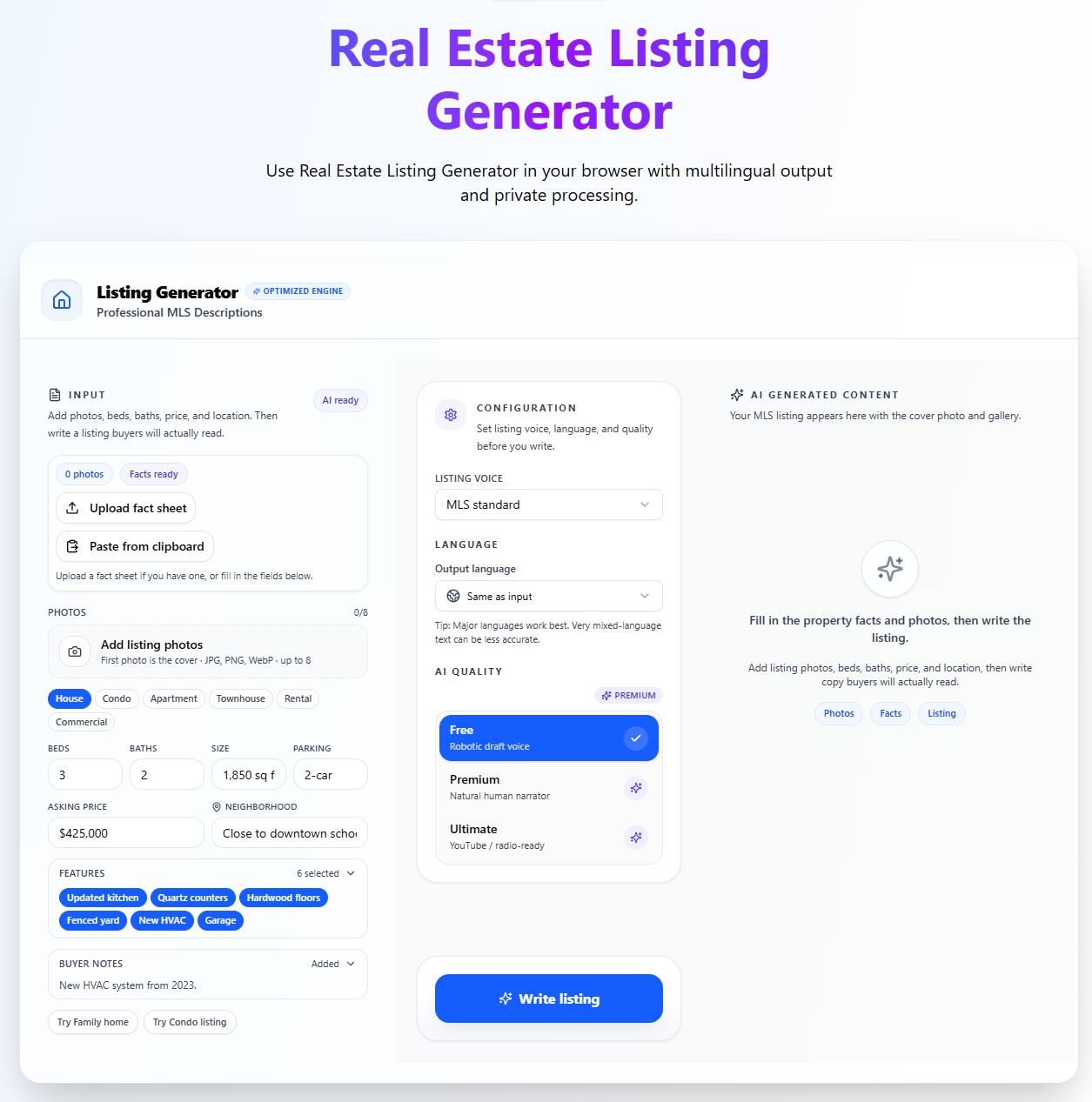
Add Property Details: You can paste your property notes, draft text, or listing details into the tool instead of writing everything manually.
Multilingual Support: The tool supports different output languages, which helps when you need listings for different audiences or markets.
Set the Output Quality: You can adjust the quality setting before generating the listing.
Generate the Listing: The tool turns your input into a clearer and more polished property description.
Review the Result: After generation, you can check the listing and make final edits where needed.
Access Saved History: You can return to previous generated listings whenever needed.
How It Helps With Real Estate Listings
It is especially useful when speed matters or when you are working on several listings at once. Instead of rewriting everything manually, the tool helps shape raw property details into cleaner listing copy that is easier to review and publish.
helps turn rough notes into clearer listing descriptions
makes property details easier to present in a polished way
helps highlight features, location benefits, and overall appeal
saves time when working on multiple property listings
gives users a faster starting point instead of a blank page
Practically explore these features by trying the tool, AI Real Estate Listing Generator.
How to Use Real Estate Listing Generator by VoiceCraftTool
A clear process of just four simple steps and a few clicks.
1. Add Your Property Details
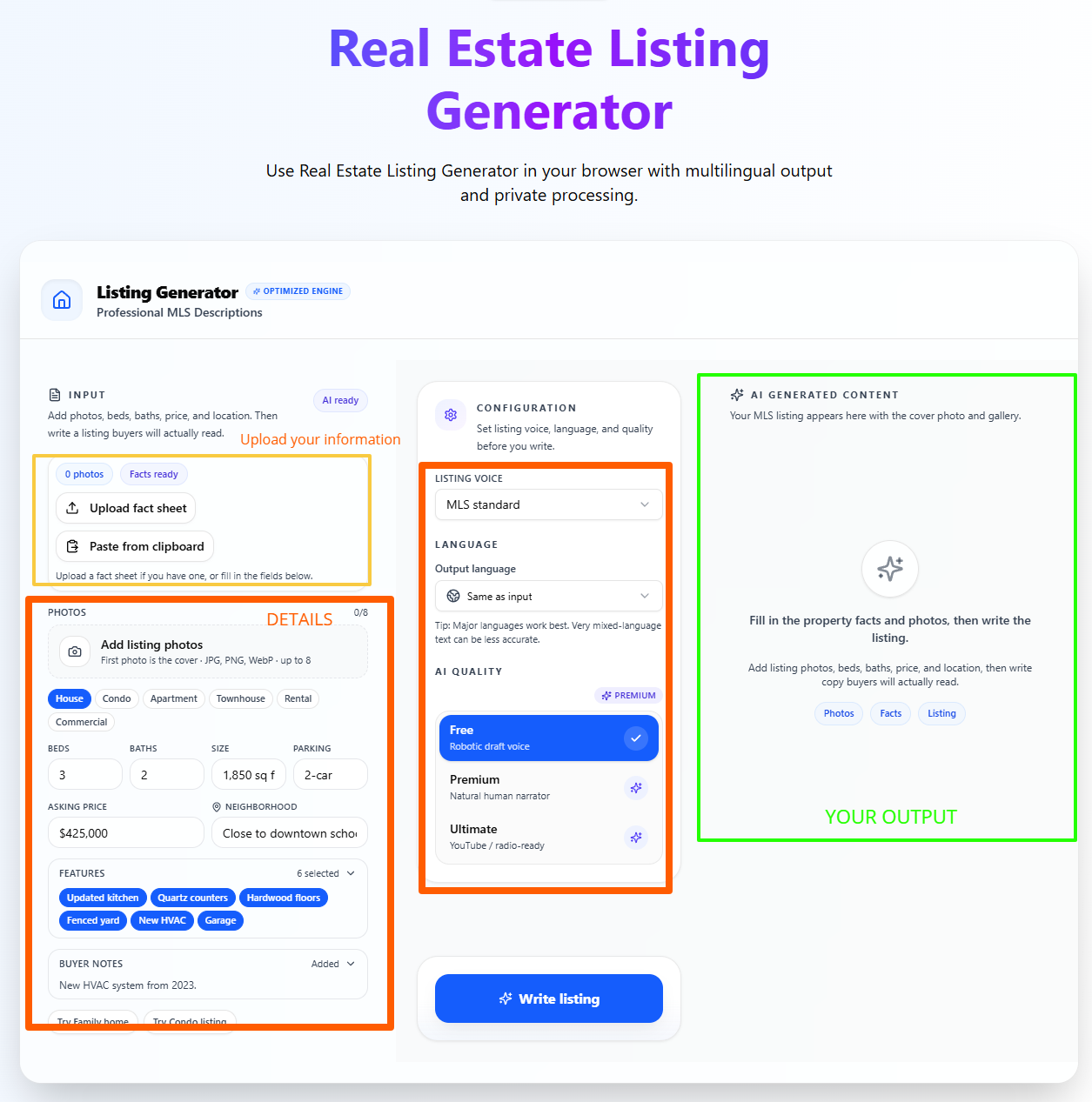
Start by pasting your property notes, key features, or draft details into the tool. This gives the tool the content it needs to build your listing description.
2. Adjust the Output Settings
Choose the language and quality settings before generating the listing. This helps shape the result based on how you want the final description to read.
3. Generate the Listing Description
Generate the listing to turn your input into clearer and more polished copy. It gives you a faster starting point than writing everything manually.
4. Review, Edit, and Use the Final Copy
Read through the result, make any final edits, and then use it for your property listing or marketing content. A quick review helps make sure everything fits the property correctly.
Tips for Better Listing Results
The quality of your listing usually depends on the quality of the details you enter. If your notes are clear and specific, the final description is more likely to sound complete, relevant, and useful.
Property specs and recent updates
Add the basics clearly, such as property type, number of bedrooms and bathrooms, size, and any recent upgrades or renovations.
Standout interior or exterior features
Include the details that make the property more appealing, such as a modern kitchen, natural light, balcony, garden, parking, or updated finishes.
Add strong location selling points
Mention nearby schools, transport access, shopping areas, parks, or anything else that helps show the value of the location.
Common Mistakes to Avoid
Keeping the input too vague: Short or unclear notes can lead to weak listing copy that misses important details.
Leaving out the best features: If standout selling points are not included, the description may feel flat or too generic.
Forgetting to review the final result: Always read through the listing before publishing to make sure it matches the property correctly and sounds right for your audience.
Common Use Cases
Real Estate Agents
Real estate agents can use the tool to turn property details into clearer listing descriptions without spending extra time writing every listing manually.
Brokers
Brokers can use it to create polished listing drafts faster, especially when managing multiple properties and needing consistent listing quality.
Property Managers
Property managers can use the tool to prepare cleaner rental or property descriptions for day-to-day listing and marketing needs.
Different Property Types
The tool can also be used across different property types, which makes it useful for users handling homes, apartments, rentals, or other real estate listings.
Important Review Tip Before Publishing
Before you publish any listing, take a moment to review the final wording carefully. The tool helps you create a strong draft, but you are still responsible for checking that the description fits Fair Housing guidelines, matches local real estate advertising requirements, and accurately reflects the property. Final editing should always stay in your hands.
Conclusion
Writing a polished real estate listing is not always about knowing what to say. It is often about turning property details into clear, well-structured copy that is easy for buyers or renters to read. As covered in this article, Real Estate Listing Generator helps make that process simpler by helping users create stronger listing drafts faster, improve the quality of their input for better results, and follow an easy step-by-step process before doing a final review.
Try the tool, Real Estate Listing Generator by VoiceCraftTool, NOW and explore all the features and a simple workflow yourself for creating the real estate listings that actually sell.
FAQs
Is a real estate listing generator worth using?
A real estate listing generator is worth using when you want to turn rough property details into clearer listing copy without spending too much time writing from scratch. It can give you a faster starting point, especially when you need polished draft descriptions for regular listing work.
What details should I enter for better listing results?
For better results, include the key property details clearly. That usually means property type, bedrooms, bathrooms, size, upgrades, standout features, and strong location points such as schools, transport, shopping, or nearby attractions. Clear input usually leads to a stronger final listing.
Can it save time when writing multiple listings?
Yes, this is one of the main reasons people use it. Instead of manually rewriting every description, the tool helps users move faster from notes to a cleaner draft, which is especially useful when handling several listings at once.
Will I still need to edit the final description?
Yes, a final review is still important. The tool can help create a strong draft, but you should still check the wording, accuracy, compliance, and local real estate requirements before publishing the listing.
Can it work for different property types?
Yes, the tool can be used across different property types. It is useful for users handling homes, apartments, rentals, and other real estate listings where clear and polished description writing is needed.
Can it help if my notes are rough or incomplete?
It can help improve rough notes, but the quality of the result still depends on the details you provide. If the input is too vague or leaves out the best features, the final listing may feel weak or too general.