French Text to Audio | Convert French Text into AI Speech
Apr 22, 2026
8 min read
If you've ever typed out French content and then wished you could just hear it spoken back to you, you're not alone. Whether it's a language lesson, a script, a blog post, or even a few sentences you want to double-check your pronunciation against, turning written French into audio is something a lot of people need.
And until recently, doing that without recording your own voice or hiring someone meant stitching together awkward, robotic-sounding tools that butchered the language. That's changed quite a bit. AI-powered text to audio has gotten genuinely good, especially for a language like French where tone, rhythm, and liaison matter a lot.
What to Look for in a French Text to Audio Tool
Not every tool handles French well. Here's what actually matters when you're picking one.
Non-robotic Voice:
French has a distinct musicality. A good tool should handle liaison (where words blend into each other), silent letters, and intonation without making the audio sound choppy or over-enunciated. If it sounds like it's reading one word at a time with a pause in between, it's not going to cut it.
Multiple Voice Options:
French is spoken differently in France, Canada, Belgium, and Switzerland. A tool worth using gives you options, whether that's different regional accents, different genders, or different vocal styles. One voice for an entire language is a limitation, not a feature.
Adjustable Speed & Pitch:
Language learners especially benefit from slowing audio down. A tool that lets you control pace without distorting the voice quality is genuinely more useful.
Download Support:
Listening in the browser is fine for quick checks, but if you're producing content or saving pronunciation guides, you need to be able to download the audio file, ideally in a common format like MP3 or WAV.
Simple Process:
You shouldn't need a tutorial to paste text and hit play. The fewer the steps, the better.
Text to Audio AI tool by VoiceCraftTool
VoiceCraftTool's Text to Audio feature is built for exactly this kind of use. You paste French text, pick a voice, adjust a few settings if needed, and get a clean audio output. It's browser-based, so there's no software to install, and it handles French specifically, meaning the voices are trained to produce accurate pronunciation rather than anglicized guesswork.
The tool sits inside a broader voice and text toolkit, but the text to audio function works as a standalone feature. You don't need an account to try it for the first time, and the interface is stripped down enough that you can get from text to audio in under a minute.
Key Features of VoiceCraftTool
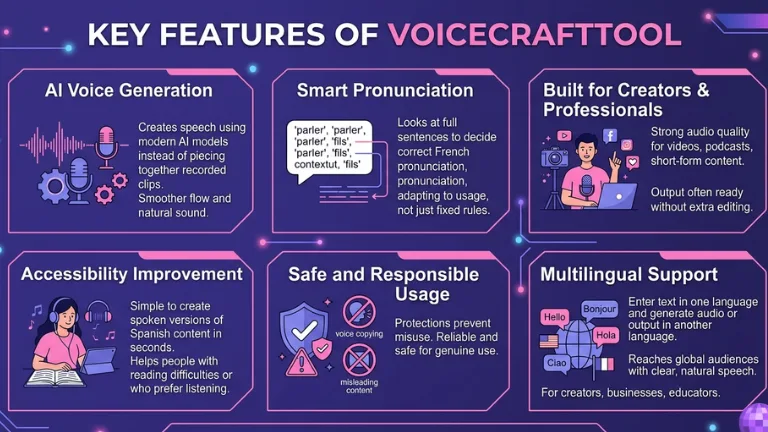
AI Voice Generation
VoiceCraftTool creates speech using modern AI models instead of piecing together recorded clips. This results in smoother flow between words and a more natural sound overall.
Smart Pronunciation
In French, pronunciation can change depending on how a word is used. The tool looks at the full sentence to decide the correct way to say each word, rather than using a fixed rule every time.
Built for Creators & Professionals
The audio quality is strong enough for real use in videos, podcasts, and short-form content. In most cases, the output can be used directly without extra editing.
Accessibility Improvement
Converting written text into speech helps people who find reading difficult or prefer listening. VoiceCraftTool makes it simple to create spoken versions of Spanish content in seconds.
Safe and Responsible Usage
The platform includes protections that prevent misuse, such as copying real voices or creating misleading content. This helps keep the tool reliable and safe for genuine use.
Multilingual Support
VoiceCraftTool is not limited to Spanish only. Users can enter text in one language and generate audio or output in another language, making it useful for creators, businesses, educators, and teams who want to reach different audiences with clear, natural-sounding speech.
How to Use VoiceCraftTool to Convert French Text to Audio
Here's how the process works, step by step.
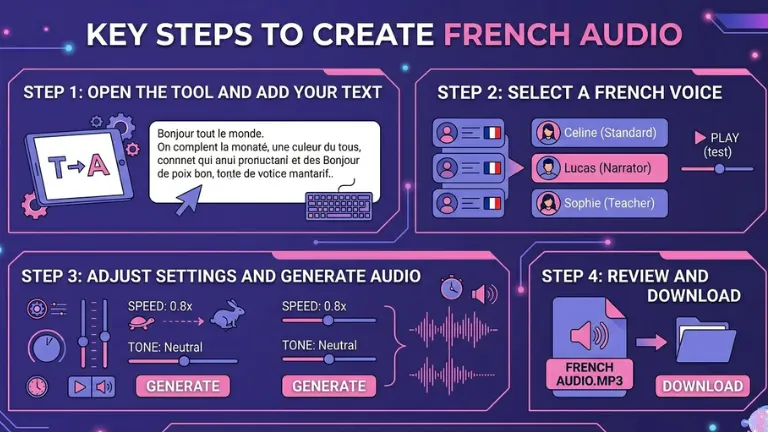
Step 1: Open the Tool and Add Your Text
Go to the Text to Audio section of VoiceCraftTool. Once you’re there, paste or type your French text into the input field. It works for both short sentences and longer content.
Step 2: Select a French Voice
Browse the voice options and filter for French. You’ll find different accents and styles, so choose one that fits your purpose. If you’re unsure, test a couple before finalizing.
Step 3: Adjust Settings and Generate Audio
Set the playback speed or tone if needed. Slower speeds help with learning, while natural speed works best for content. Then click generate and listen to the result directly in your browser.
Step 4: Review and Download
Play the audio to make sure everything sounds right. If you’re satisfied, download the file in your preferred format and use it wherever needed.
A few things that make a real difference in output quality:
Punctuation matters more than you think.Commas and periods tell the AI where to pause. If you strip punctuation out of your text, the output often sounds rushed or runs sentences together. Keep your punctuation clean before pasting.
Avoid mixing languages in one block.If your text has English words in an otherwise French passage, the voice may handle them awkwardly. Either transliterate them into French phonetics or keep the blocks separate.
Short chunks for testingIf you're trying to decide between voices, paste a single sentence and generate audio from each option. Comparing long passages is slower and harder to evaluate.
Use natural sentence structureOverly formal or telegraphic writing sometimes comes out sounding stilted. If the audio sounds odd, try rephrasing the sentence more naturally and run it again.
Common Use Cases
Pronunciation practice for learnersType out a word, a phrase, or a full dialogue and hear it spoken back by a native-style voice. Repeat, compare, adjust.
Voiceovers for French video contentInstead of recording yourself or hiring a native speaker for a short explainer video, generate the voiceover text directly and lay it over your footage.
French e-learning contentCourse creators building French lessons can produce consistent audio across all their materials without scheduling recording sessions.
Accessibility for French websites and blogsAudio versions of written content help users who prefer listening or who have difficulty reading.
Social media audio clips. Short French quotes, captions, or posts can be turned into audiograms or audio stories quickly.
Conclusion
Converting French text to audio used to mean either recording yourself or dealing with robotic, barely usable output. That's not really the situation anymore. With AI voices that actually handle French properly, producing natural-sounding audio from written content is fast and straightforward.
VoiceCraftTool's Text to Audio feature is a practical choice for this, whether you're a learner, a creator, or just someone who needs to hear how something sounds before publishing it. Paste your text, pick a voice, and you're done.
Frequently Asked Questions
Is the French pronunciation accurate?
For the most part, yes. The AI voices used in VoiceCraftTool are trained on French language data, so they handle standard pronunciation well, including liaison, silent letters, and nasal sounds. Regional accents vary in availability, but core French pronunciation is solid.
Can I use it for Canadian French?
Depending on the voice options available, yes. Look for voices labeled as Quebec or Canadian French in the voice selector. Not all tools distinguish between accents, so check the available list when you open the tool.
What's the character or word limit?
The tool handles both short and long-form text, though very lengthy documents may need to be split into sections for best results. There's no strict cut-off for typical use cases like articles or scripts.
Can I download the audio?
Yes. Once generated, the audio file can be downloaded directly from the tool. MP3 is the most common export format.
Do I need an account to use it?
You can try the tool without creating an account. Some features or higher usage limits may require signing up, but the core text to audio function is accessible right away.
Does it work on mobile?
Yes. VoiceCraftTool is browser-based, so it works on mobile devices without any app download needed.
Can I use the audio commercially?
Check the usage terms on the VoiceCraftTool site for specifics. Many AI audio tools allow commercial use, but it's worth confirming before using generated audio in paid or monetized projects.
Did you find this helpful?
Share this article with your friends and colleagues.