How AI Summarize Legal Documents | Simple Guide & Free Tool
Legal documents are not written for the average reader. They are long, packed with formal language, and structured in ways that make it genuinely hard to find the parts that actually matter to you. Whether it is a lease, a service contract, or a set of terms and conditions, most people spend way more time reading than they should just to get a basic understanding of what they are agreeing to.
This is exactly where AI summarization tools have become useful. Instead of reading through ten pages to find three key points, you can get a plain-language breakdown in a fraction of the time.
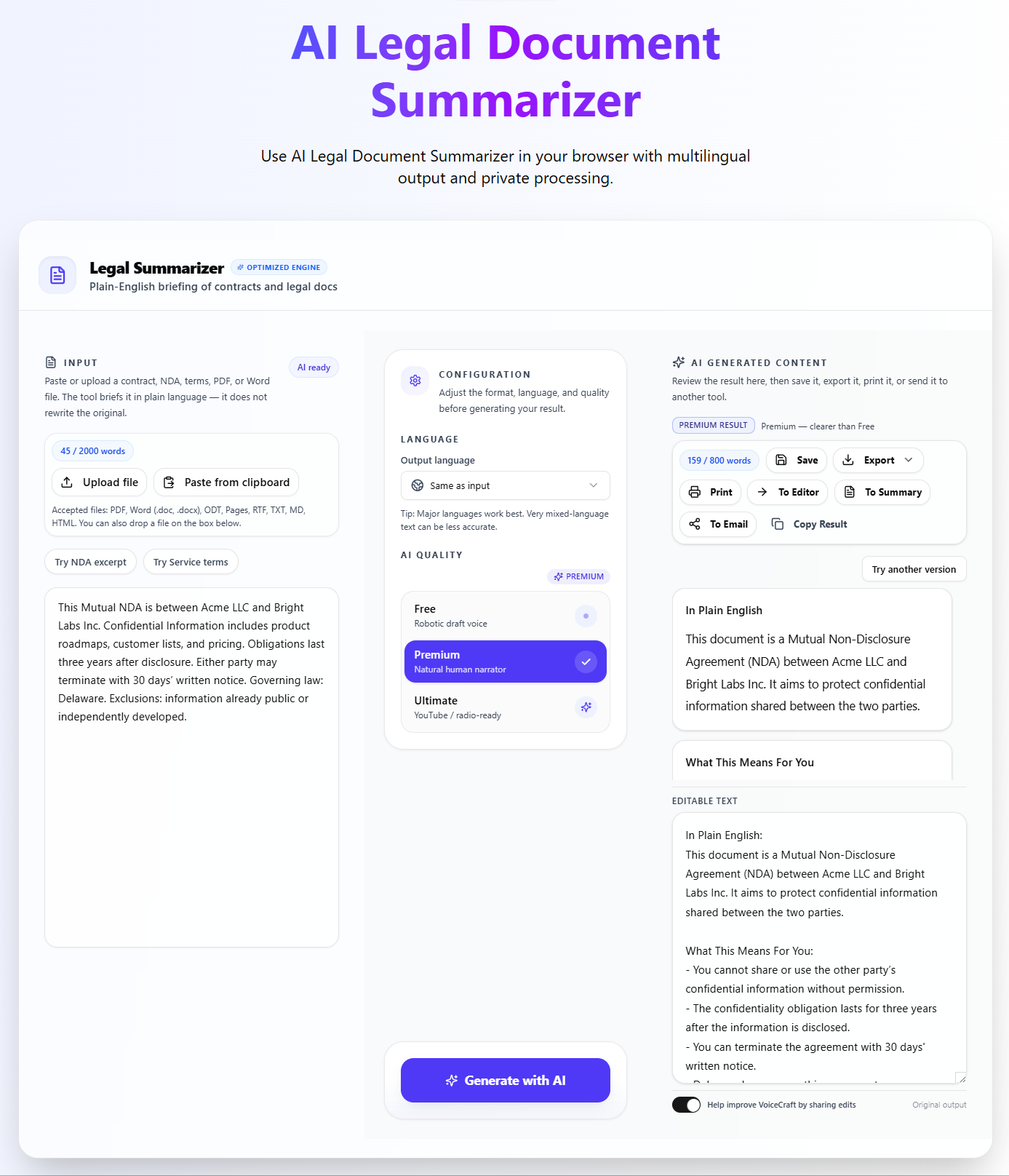
If you want to try this while reading the guide, AI Legal Document Summarizer by VoiceCraftTool is a free option built specifically for this purpose. It is simple to use and does not require any technical background.
How AI Legal Document Summarizer by VoiceCraftTool Helps
The value of the tool is not that it replaces legal review. Its value is that it helps users get oriented quickly, reduce reading fatigue, and focus faster on the sections that matter most. For people who feel stuck when opening a long legal document, that first layer of clarity can save time and make the review process feel much more manageable.
Key Features:
Short & Clean Summaries
One of the most useful parts of the tool is that it helps reduce long and formal legal writing into a more digestible version. Instead of starting with pages of heavy wording, users can begin with a summary that gives them the main idea first.
Easy Review
Many users are not lawyers, but they still need to work with legal documents. This tool helps make the text easier to approach by simplifying the reading process and giving users a clearer starting point.
Multiple Document Types
The tool can support users working with many kinds of legal content, including agreements, contracts, leases, policies, terms, and internal legal paperwork. That makes it practical for both personal and business use cases.
Multilingual Support
Legal documents are not always written in one language, especially for global users and cross-border work. This feature helps users work more comfortably with legal text in different languages, making the tool more useful for a wider range of document review needs.
Simple to Use
A legal summarizer should save effort, not create more of it. AI Legal Document Summarizer by VoiceCraftTool is positioned as a simple and accessible option for users who want quick help understanding legal text.
Free Starting Point
Many users searching this topic are not ready for a complex or expensive legal tech platform. They usually want a fast, simple, and useful entry point. VoiceCraftTool fits that need by offering a practical way to start reviewing legal documents with AI.
Explore these features practically by trying the tool for free, AI Legal Document Summarizer by VoiceCraftTool
What Types of Legal Documents Can AI Summarize?
AI summarization works across a wide range of document types. Some of the most common include:
Business contracts and service agreements
Lease and rental agreements
Non-disclosure agreements (NDAs)
Terms and conditions documents
Employment contracts and offer letters
Privacy policies
Vendor agreements
Compliance or internal legal policy documents
Freelance or consulting agreements
The quality of the summary depends on how complete and readable the original document is. Scanned images or poorly formatted PDFs may not produce as clean an output as properly structured digital text.
How AI Summarize Legal Documents by VoiceCraftTool (Step by Step)
The process is straightforward and does not require any legal knowledge to use.
Step 1: Add the Legal Document
Copy and paste your legal text into the tool or upload the document if that option is available. Make sure the text is readable and complete before you submit it.
Step 2: Let the AI Process the Text
The AI reads through the document, identifies the structure, and picks out the sections and language that carry the most significance. This happens quickly.
Step 3: Review the Summary Output
Read through what the tool returns. You will typically see a shorter version of the document that highlights the main points, obligations, and conditions. This is your starting point, not your final answer.
Step 4: Check Important Clauses Before Using It
Go back to the original document and verify the sections the summary flagged. Pay attention to numbers, dates, names, penalties, and any language around termination or liability. The summary helps you know where to look.
Just follow these 4 simples steps with some clicks and in a few moments, AI legal document summarizer by VoiceCraftTool
Best Practices When Using AI Legal Document Summarizer by VoiceCraftTool
Using the tool well means treating it as part of your review process, not the whole of it. A few practical habits make the experience more reliable:
Use clean, complete text. Incomplete documents produce incomplete summaries.
After reading the summary, go back and check names, dates, dollar amounts, and deadlines in the original.
Look specifically at termination conditions, liability language, and any penalty clauses. These are easy to overlook and important to verify.
Compare the summary to the original before forming any conclusions or taking action.
Use the output to prepare better questions if you plan to consult a professional. It helps you use their time more efficiently.
Common Use Cases:
AI Legal Document Summarizer by VoiceCraftTool is not just for one type of user. It tends to be most helpful for:
Business owners reviewing supplier contracts, service agreements, or client terms
Freelancers who regularly deal with project agreements and NDAs
Operations or admin staff handling vendor paperwork and compliance documents
Students working through legal case material or academic policy documents
Individuals reviewing leases, insurance documents, or consumer agreements
Small teams without in-house legal support who still need to understand what they are signing
If you regularly encounter documents that take too long to read and feel too dense to navigate quickly, this kind of tool fits your workflow. Try the tool for free.
Important Tips to Remember
Use a summary to get a quick first understanding of what the document is about.
Use it to spot key terms, obligations, deadlines, restrictions, and payment-related points faster.
Use it to prepare better questions before speaking with a lawyer or legal expert.
Use it for first-pass review when dealing with a high volume of paperwork.
Do not treat a summary as legal protection or a replacement for professional legal advice.
Be more careful with contracts that involve major financial, legal, or long-term consequences.
Get professional review for disputes, litigation, compliance-sensitive documents, or unclear obligations.
Do not rely only on the summary when one party has much more leverage than the other.
Always review more closely when you are unsure about your rights, responsibilities, or risks.
A summary can help you understand a document faster, but it does not replace careful legal review.
Conclusion
AI has made it easier to get through legal documents without needing a law degree or hours of free time. The core value is straightforward: faster first review, plain-language clarity, and a clearer sense of what to focus on before you read more carefully.
AI Legal Document Summarizer by VoiceCraftTool offers a free, simple way to do exactly that. It is designed for people who need to understand long legal text without getting lost in it, and it works across a wide range of document types.
That said, a summary is always a starting point. The tool helps you read smarter, not skip reading entirely. For anything that carries real risk or consequence, use the summary to get oriented and then give the original document the attention it deserves.
You can explore our multiple tools for many useful purposes, AI Tools by VoiceCraftTool
FAQs
Is it safe to use AI to summarize legal contracts?
It can be useful for a quick understanding of a contract, but it should not be treated as a substitute for legal review. You should still check important parts in the original document, especially liabilities, deadlines, payment terms, and termination clauses.
Can AI accurately summarize long legal documents like leases or NDAs?
Yes, it can work well for long documents such as leases, NDAs, agreements, and terms documents, especially when the text is clear and digital. If the file is poorly scanned or badly formatted, the output may be less reliable and may need extra review.
What is a good free tool for summarizing legal documents?
AI Legal Document Summarizer by VoiceCraftTool is a strong free option for users who want a simple way to review legal documents faster. It is especially useful for people who want readable summaries without dealing with a complicated process.
How do I use AI to summarize a contract step by step?
Start by pasting or uploading the contract into the tool. Let it process the document and generate the summary. Then read the summary carefully and compare the most important sections in the original contract, especially penalties, obligations, dates, renewal terms, and termination conditions.
Can it catch important details like termination clauses or risks?
It can help bring attention to important parts of a document, including termination terms, obligations, and possible risks. Still, it is not perfect, so careful human review is important when the document carries real legal or financial consequences.
Can non-lawyers use it for business or freelance contracts?
Yes, it can be very useful for non-lawyers who want a first understanding of business, freelance, or client-related contracts. It helps make the document easier to approach, but professional guidance is still the safer route for important agreements.
What are the limitations of free legal summarizers?
Free tools are useful for speed, clarity, and first-pass understanding, but they can still miss subtle wording, legal nuance, or document-specific meaning. They are best used as a support tool, not as the final word on a legal document.