How to Prepare Interview with AI | Step by Step Guide 2026
You study hard but still freeze in the interview room. Most people read questions, memorize answers, and feel ready, until the real interview begins and everything goes blank. This is not a knowledge problem. It is a practice problem. Reading answers is very different from speaking them under pressure. The pause, the pressure, and the need to respond clearly without a script are what trip people up.
AI interview practice changes this. You simulate real interviews, speak your answers, get feedback, and improve on your own time. This guide shows you exactly how to use an AI interview helper to get genuinely ready.
What You Need from an AI Interview Tool for Your Interview Prep
Before jumping into any tool, it helps to know what "good" looks like. Not every AI interview tool is built the same way, and some are more useful than others depending on how you use them.
This is what a solid AI interview helper should give you for your strong preparation for a winning interview.:
Real Interview Simulation:
Questions should feel structured and role relevant, not random. A good tool mirrors how actual HR or technical interviews flow, so your practice maps to reality.
Voice Based Practice:
Typing answers is convenient but it will not prepare you for speaking. The tool should let you respond out loud so you actually build speaking confidence, not just writing fluency.
Instant Feedback on Your Answers:
After each answer, you need to know what worked and what did not. Good feedback covers things like answer structure, clarity of thought, and whether you actually addressed the question.
Questions Matched to Your Role and Level:
A fresher applying for a marketing role needs different questions than a senior software engineer. The tool should adapt to who you are and what you are applying for.
No Pressure, Unlimited Repetition:
This is one of the biggest advantages of AI practice. You can redo sessions without judgment, without scheduling, and without anyone keeping score.
AI Interview Helper by VoiceCraftTool (Suitable Option to Practice)
If you are looking for a practical, no fuss way to actually practice, the AI Interview Helper by VoiceCraftTool covers the core of what you need.
It is built for people who want to practice without overthinking the setup. You pick your role, start the session, and the AI walks you through it like a structured interview. No complicated onboarding, no technical requirements.
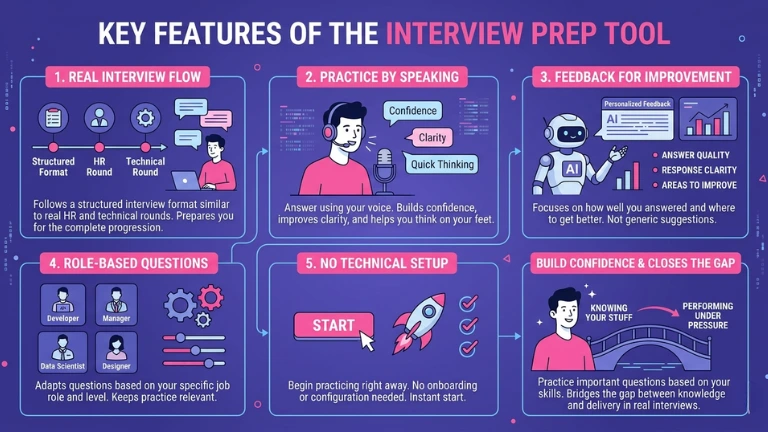
Key Features:
Real Interview Flow
The tool follows a structured interview format similar to real HR and technical rounds. This helps you get used to how interviews actually progress, not just isolated questions.
Practice by Speaking
You answer using your voice, which is what truly matters in interviews. This builds confidence, improves clarity, and helps you think on your feet.
Feedback for Improvement
Instead of generic suggestions, the AI focuses on how well you answered the question, how clear your response was, and where you can improve.
Role based Questions
The tool adapts questions based on your job role and level, so your practice stays relevant to the positions you are applying for.
No Technical Setup
You can begin practicing right away. There is no onboarding, no configuration, and nothing to figure out before you start.
It will not replace thorough preparation, but it closes the gap between knowing your stuff and being able to say it under pressure. You can practice all the important questions and answers according to your role and skills and it will build a great confidence in you for your real interview practically.
How to Use AI Interview Helper (Step by Step)
This is where the actual preparation happens. Follow these steps and treat each session like it counts.
Step 1: Select Your Role and Interview Type
Start by entering the job role you are applying for. Then choose the type of interview you want to practice: HR and behavioral, technical, or a mix. Being specific here makes the questions far more useful.
Step 2: Start the AI Interview Session
Once the session begins, the AI starts asking questions in sequence. Do not treat this like a casual chat. Sit up, respond as you would in a real interview, and resist the urge to type your answer first or pause the session midway. The simulation only works if you treat it seriously.
Step 3: Answer Using Your Voice
Speak your answers out loud. Do not recite something you memorized. Focus on sounding clear and organized rather than perfect.
This is the most important step most people skip because it feels awkward. That awkwardness is exactly what you need to work through before the real interview.
Step 4: Review the Feedback and Repeat
After each answer, go through the feedback. Look at what the AI flags: did you stay on topic, was your answer structured, did you actually answer what was asked. Make adjustments and run the session again.
One session is not enough. Two or three sessions on the same role will show you clear improvement.
Real Life Use Cases
AI interview practice is not just for one type of person. Here is how different people are using it right now.
Fresh Graduates: Students stepping into their first interviews often struggle not with knowledge but with how to present themselves. Practicing with an AI helps them find a natural way to talk about their skills without sounding rehearsed.
Job Switchers: Someone moving from one industry to another often has great experience but frames it wrong for a new audience. Repeated AI sessions help them learn how to position past work in a way that fits the new role.
Non Native English Speakers: Interview fluency in a second language takes specific practice. AI tools offer a low stakes space to build that fluency without fear of judgment, which makes a real difference over time.
Last Minute / Quick Preparation: Sometimes you land an interview with 48 hours notice. Running two or three focused AI sessions in that window is far more effective than speed reading interview guides.
Do Not Make These Mistakes During Practice
Getting the most out of AI interview practice means avoiding a few common traps.
Memorizing the AI's suggested answers: The point is to find your own words, not to repeat what the AI generates. Memorized answers fall apart the moment a follow up question hits.
Skipping voice practice entirely. Typing your answers might feel productive, but it trains the wrong skill. If your interview is verbal, your practice needs to be too.
Not reading the feedback. Most people do one session, feel okay about it, and move on. The feedback is where the actual improvement happens. Do not skip it.
Treating one session as enough. A single run through tells you where you stand. Repeated sessions are what actually build confidence and fluency.
Conclusion
Preparing for an interview is not just about knowing the right answers, it is about being able to express them clearly under pressure. That is where most people struggle. AI interview practice helps bridge that gap by turning preparation into real speaking practice, with structured questions, feedback, and repetition that actually builds confidence.
If you focus on speaking, reviewing feedback, and repeating the process, you will notice a clear difference in how naturally your answers come out. Instead of going into an interview hoping it goes well, you walk in already practiced. That shift alone is what makes the biggest difference.
FAQs
Best AI Tools for Interview Practice?
Top free or affordable options like VoiceCraftTool, Interviewsby.ai, and ChatGPT with voice mode perform well for 2026. Prioritize voice-based tools with role-specific questions and instant feedback. VoiceCraftTool stands out for no setup simulations that mirror real HR and technical interview flows.
Does AI Mock Interview Practice Actually Work?
Yes, it helps bridge the gap between knowing answers and delivering them under pressure. Users on Reddit report 70 to 80 percent confidence gains after 3 to 5 voice sessions, especially for freshers and non native speakers. It is more effective than memorization because it builds real speaking fluency through repetition.
How to Use AI for Step by Step Mock Interviews?
Pick your role and interview type such as software engineer or HR round
Start a voice session and answer aloud seriously
Review feedback on structure and clarity
Repeat two to three times Treat it like a real interview. Do not type or pause. This helps simulate real pressure.
Voice Based AI Practice for Speaking Confidence?
This is essential for verbal interviews. Typing will not prepare you. Tools like VoiceCraftTool allow you to speak your answers and then evaluate clarity, focus, and filler words. Non native speakers benefit the most. Practicing 20 to 30 minutes daily helps you sound more natural without relying on scripts.
Role Specific Questions in AI Tools?
Good tools like VoiceCraftTool adapt to your role and experience level. Freshers get basic behavioral questions while experienced candidates get more advanced technical ones. Adding your job title or job description improves accuracy and makes practice more relevant.
Common Mistakes in AI Interview Prep?
Avoid memorizing AI generated answers as they fail during follow up questions. Do not skip voice practice or ignore feedback. One session is not enough. Many users also treat it casually. Sit properly, time yourself, and repeat weak answers at least three times for real improvement.
Last Minute AI Prep for Interviews?
AI tools are highly effective for short timelines like 48 hours. Run two to three focused sessions using your job description. This is far more effective than reading guides because it improves both answers and delivery. Job switchers especially benefit from this by learning how to present their experience clearly.