Spanish Text to Audio | Turn Spanish Text into AI Voice
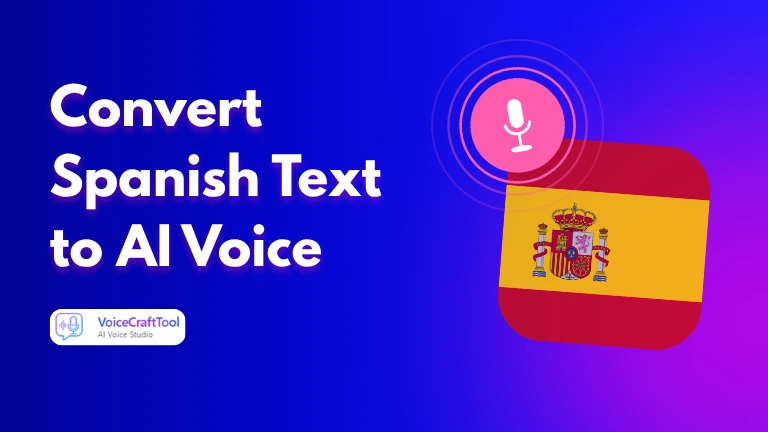
Spanish is one of the most widely spoken languages, and the need for clear, natural audio is growing fast. Whether you are learning pronunciation, creating content, or reaching Spanish-speaking audiences, having text read aloud correctly makes a real difference.
AI tools make this simple. You paste your Spanish text, choose a voice, and get natural audio in seconds. This guide shows how it works, what to look for, and how to get better results.
Key Features to Look for in a Spanish Text to Audio Tool
The difference between a useful tool and a frustrating one usually comes down to a few specific things. Here is what actually matters when you are choosing:
Natural Voice Flow
Spanish has a rhythm and stress pattern that is distinct from English. A good tool should handle this naturally, with words connecting the way a real speaker would say them, not sounding read out one syllable at a time.
Accent and Dialect Support
Spain Spanish and Latin American Spanish are not the same. The pronunciation of letters like 'c' and 'z' differs, and the overall rhythm shifts between regions. A tool worth using should offer at least two distinct options so you can match the voice to your audience.
Multiple Voice Options
Beyond accents, having a choice of voice styles adds flexibility. A formal voice suits business or educational content. A warmer, conversational tone works better for social media or learning materials.
Gender and Speed Controls
The ability to select a male or female voice and adjust speaking speed is more useful than it sounds. Learners benefit from slower output. Creators need a pace that fits their content. These controls make the tool work across different situations.
Speed and Simplicity of the Interface
The tool itself should not slow you down. A clean interface that generates audio quickly, without requiring you to navigate multiple settings screens, is worth prioritising over one packed with features you will rarely use.
Try Spanish Text to Audio AI Tool by VoiceCraftTool
VoiceCraftTool is a free option that covers the basics and does them well. If you need reliable Spanish audio without setting up an account or installing anything, it is a practical place to start. The interface is clean, the output comes back quickly, and the voices handle Spanish pronunciation without the robotic quality you get from older tools.
It supports both Spain Spanish and Latin American Spanish, which makes it usable for a wider range of projects. Whether you are producing content for a Mexican audience or creating educational material with a Castilian accent, the accent selection is there.
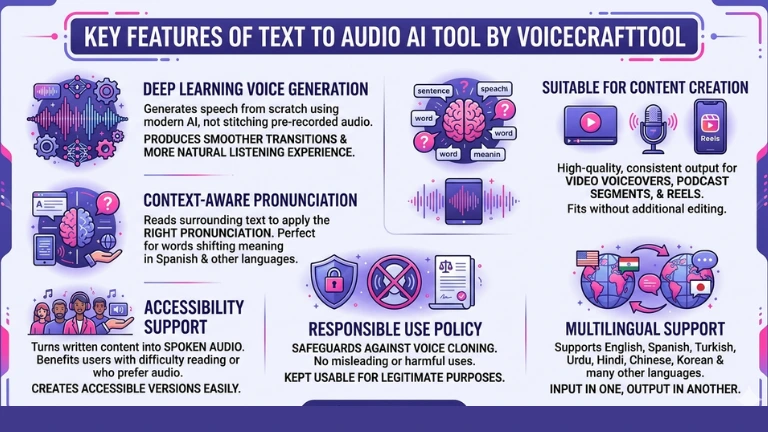
Key Features of VoiceCraftTool:
Deep Learning Voice Generation:
VoiceCraftTool generates speech from scratch using modern AI rather than stitching together pre-recorded audio. This produces smoother transitions between words and a more natural listening experience.
Context-Aware Pronunciation:
Spanish has words that shift meaning and pronunciation based on context. The tool reads the surrounding text to apply the right pronunciation, rather than applying a fixed sound to each word regardless of meaning.
Suitable for Content Creation:
The output quality is consistent enough for video voiceovers, podcast segments, and reels. AI voice content is widely used across these formats, and VoiceCraftTool produces audio that fits without additional editing in most cases.
Accessibility Support:
Turning written content into spoken audio benefits users who have difficulty reading or who prefer audio. VoiceCraftTool makes it easy to create accessible versions of any Spanish text quickly.
Responsible Use Policy:
The tool has safeguards against voice cloning of real individuals and does not support uses that could mislead or harm. This keeps the tool usable for legitimate purposes without the risks that come from unmoderated AI voice generation.
Multilingual Support:
VoiceCraftTool supports multiple languages in each of its tools. More than Spanish, you can work with English, Turkish, Urdu, Hindi, Chinese, Korean and many other languages. You can give input in one and get output in another language.
How to Convert Spanish Text to Audio with VoiceCraftTool (Simple Steps)
The process takes under a minute and does not require any technical background.
Step #1
Open VoiceCraftTool and go to the VoiceCraftTool Text to Audio page in your browser. No account is needed and nothing needs to be downloaded or installed before you begin.
Step #2
Paste your Spanish text and copy the Spanish text you want to convert and paste it into the input box. The tool handles both short phrases and longer paragraphs without any changes to your workflow.
Step #3
To choose your voice and accent select the accent that suits your audience, Spain Spanish or Latin American Spanish, and pick a voice style. Male or female, formal or conversational, depending on what your content calls for.
Step #4
Click the generate button and In a few seconds your audio is ready to play directly in the browser. You can listen to it, re-generate with a different voice, or download it as a file to use in your project.
That is the full process. VoiceCraftTool does not add unnecessary steps between you and usable audio.
Use Cases of VoiceCraftTool’s Text to Audio AI
Spanish text to audio is practical across more situations than most people expect when they first look into it.
Learning the language
Pronunciation is one of the hardest parts of learning Spanish, and hearing words spoken correctly while reading them is one of the most effective ways to improve.
Learners convert vocabulary lists, dialogue examples, and reading passages into audio to practise at their own pace. It removes the reliance on finding a native speaker every time you want to check how something sounds.
Content Creation
Creators working in Spanish-speaking markets regularly need voice overs for YouTube videos, Instagram reels, and podcast content. Recording clean takes time, equipment, and editing. A text to audio tool produces a usable voiceover from a script in seconds, which is fast enough to fit into most production workflows.
Education and Teaching
Teachers preparing Spanish lessons use these tools to add spoken audio to worksheets, vocabulary exercises, and classroom presentations. It is a faster alternative to recording each example manually, and the output is consistent enough for educational use.
Business and Localization
Brands and businesses reaching Spanish-speaking customers sometimes need audio for product pages, explainer videos, customer support scripts, or internal training materials. Text to audio fills that gap without the cost or scheduling involved in a proper recording session.
Spain Spanish vs Latin American Spanish: What You Should Know
Both are the same spoken language at their core, but there are real differences in pronunciation and regional expectation. Matching the right accent to the right audience matters more than many people realise.
If your audience is in a specific region, matching the accent to that region will make your content feel more natural to listeners. If you are producing for a general Spanish-speaking audience, a neutral Latin American voice is the safer default because it is the more widely understood option.
Tips for Better Spanish Audio Output
A few adjustments to how you prepare your text can noticeably improve the quality of what you get back.
Use Spanish punctuation correctly: Punctuation tells the AI where to pause and how to pace delivery. A missing comma or period can cause a sentence to sound rushed or flat. Writing your text with proper punctuation before pasting it in makes a real difference.
Keep sentences at a natural length: Very long sentences without pauses can throw off pacing. If you have a sentence that runs long, splitting it into two shorter ones usually produces cleaner audio.
Do not mix Spanish and English in the same input: If your text switches between the two languages, the tool may not handle the transitions smoothly. Process each language separately and combine the audio files if you need bilingual output.
Match the voice to the content type: A slower, more deliberate voice suits language learning materials where clarity matters more than pace. A natural conversational speed works better for video content that needs to feel dynamic.
Test with a short sample first: Before converting a long script, paste a paragraph and listen. If the pronunciation sounds off or the pacing is uneven, adjust your text or switch to a different voice before processing the whole thing.
Now You’re Good to Go and Effectively Try the VoiceCraftTool’s Text to Audio AI.
Common Pros and Cons of Spanish Text to Audio Tools
These tools have improved considerably, but a clear-eyed view of what they do well and where they fall short helps you use them more effectively.
Pros:
Quick and accessible: You can go from text to usable audio in under a minute without any equipment or technical skills.
Consistent output quality: Unlike recording yourself, the voice does not vary between sessions. What you hear the first time is what you will hear every time with the same settings.
Useful across multiple contexts: From language learning to business content, the same tool serves different needs without requiring any changes to how you use it.
Cost-effective: Getting voiceover audio without hiring a speaker or booking studio time saves money, especially for ongoing or high-volume content needs.
Cons:
Emotional nuance is limited: AI voices read text accurately but do not carry the emotional weight that a human speaker can bring. Irony, humor, and warmth are harder to convey through generated audio.
Regional dialect depth is not always there: Most tools offer Spain Spanish and a general Latin American option. Specific regional accents within Latin America, such as Argentine or Colombian, are not always available.
Complex or uncommon vocabulary can cause errors: Names, technical terms, and words borrowed from other languages do not always get the right pronunciation. A quick listen before using the file is always worth doing.
Free tier limits apply: Most free versions have a character cap per conversion or a daily limit. For high-volume use, a paid plan is usually necessary.
Conclusion
Spanish text to audio has taken something that used to require time, equipment, and other people, and made it a task that takes seconds. The quality of modern AI voices means the output is genuinely usable across learning, content creation, education, and business without needing any post-processing or editing in most cases.
Picking the right tool comes down to accent support, voice naturalness, and how simple the interface is to use. VoiceCraftTool handles the core requirements without overcomplicating things, which makes it a reliable starting point. If you need clear, natural Spanish audio fast, this is one of the more straightforward ways to get it done.
FAQs
Does it support both Spain Spanish and Latin American Spanish accents?
Yes, quality tools including VoiceCraftTool offer both options. You can select the accent before generating so the output matches your audience. For most tools, Latin American Spanish is the default, so switching to Spain Spanish requires a manual selection.
Can I convert a long Spanish script into audio?
Most tools support longer inputs, though free versions often have a character limit per conversion. For longer scripts, splitting the text into sections gives you more control over pacing and makes it easier to re-generate individual parts if something sounds off.
Is it free to use?
Many tools, including VoiceCraftTool, offer a free tier that covers basic use. Paid plans unlock higher character limits, more voice options, and download functionality. For occasional use, the free version is usually enough to get started.
Can I download the audio as a file?
Yes. Download options are standard in most text to audio tools. The file is typically available as an MP3 or WAV, which can be dropped directly into video editors, presentations, or any other project without additional conversion.
Is it helpful for learning Spanish pronunciation?
Yes, this is one of the most practical applications. Hearing words and sentences spoken correctly while looking at the written text reinforces pronunciation and helps learners build the connection between how Spanish looks and how it sounds. It is particularly useful for practising words that are hard to intuit from spelling alone.
What happens if the tool mispronounces a word?
For common words, mispronunciation is rare in good tools. For names, technical terms, or foreign words embedded in Spanish text, it can happen. The easiest fix is to respell the word phonetically or break it into syllables in the input so the tool reads it the way you want it to sound.