Many job hunters prepare for interviews with general questions, but those questions do not always match the actual role they are applying for. A job description may....
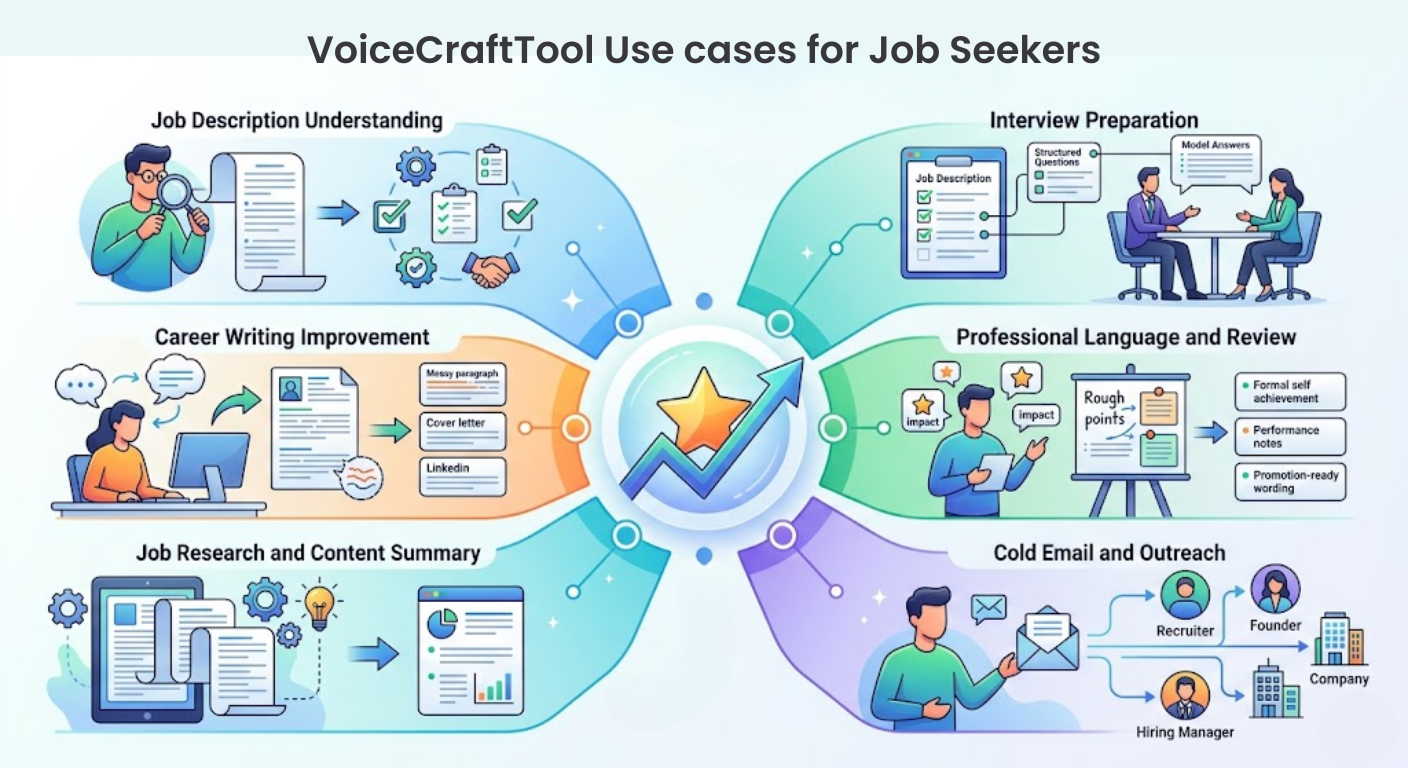
Job searching often requires more than sending a resume. Job seekers need to understand job descriptions, prepare for interviews, write clear outreach messages, improve professional wording, summarize role requirements, and present their experience in a way that matches each opportunity. VoiceCraftTool helps organize and improve this process by supporting different parts of job preparation, from interview practice and cold emails to rewriting, summarizing, and refining career-related content.
Tools Overview
Tool
Purpose
Best use case
Interview Helper
Helps job seekers prepare according to the actual job description.
Practicing interview questions, answers, and role-based preparation.
Cold Email Generator
Helps write professional outreach messages for job opportunities.
Contacting recruiters, hiring managers, founders, or companies directly.
Performance Review Generator
Helps turn rough achievements into polished professional wording.
Preparing self-reviews, career summaries, promotion notes, or resume points.
Text Summarizer
Helps understand long job-related content quickly.
Summarizing job descriptions, company details, interview notes, or role requirements.
Paraphrasing Tool
Helps improve and rewrite career-related text clearly.
Refining resumes, cover letters, LinkedIn sections, and professional emails.
All the important functions for a Job Seeker
Prepare for interviews according to the actual job description
Problem
Many job seekers prepare for interviews with general questions, but those questions do not always match the actual role they are applying for. A job description may include specific skills, responsibilities, tools, experience levels, and expectations, and it can be difficult to understand which points need more focus before the interview.
Solution
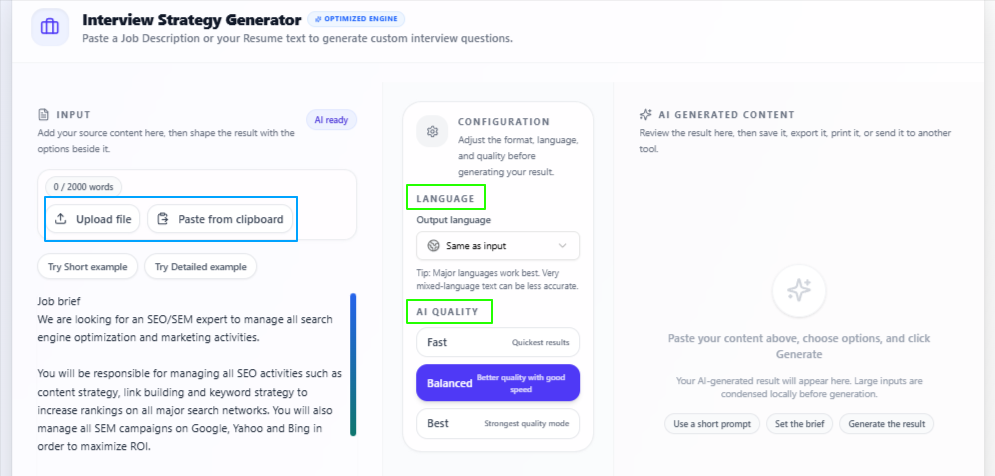
Add the job description for the role you are applying to, and AI Interview Helper tool helps turn it into useful interview preparation material. It reviews the role requirements, responsibilities, and important details in the description, then creates interview guidelines, possible questions, and sample answers that are more closely connected to that specific job.
Features:
Role-based interview questions
Creates interview questions based on the job description and role requirements.
Sample answers for preparation
Gives answer examples to help users prepare clear and relevant responses.
Interview preparation guidelines
Highlights the main skills, responsibilities, and areas to focus on before the interview.
Same-language output by default
Keeps the output in the same language as the input unless changed by the user.
Choose a different output language
Allows users to prepare interview material in another selected language.
Quality control options
Lets users choose the preparation depth according to their time and need.
Choose the right processing mode
Fast gives quick results, Balanced gives good quality with speed, and Best gives deeper preparation.
Tips to remember
Paste the complete job description for better interview preparation.
Add the job title, company name, and important role details if available.
Use Best mode when preparing for an important interview.
Review the answers and adjust them according to your real experience.
Do not memorize every answer word by word. Use the output to understand the direction and prepare natural responses.
Write professional outreach emails for job opportunities
Problem
Many job seekers find it difficult to contact recruiters, hiring managers, founders, or companies directly. They may know what role they want, but writing a clear and professional cold email can be confusing, especially when the message needs to sound confident, relevant, and not too generic.
Solution
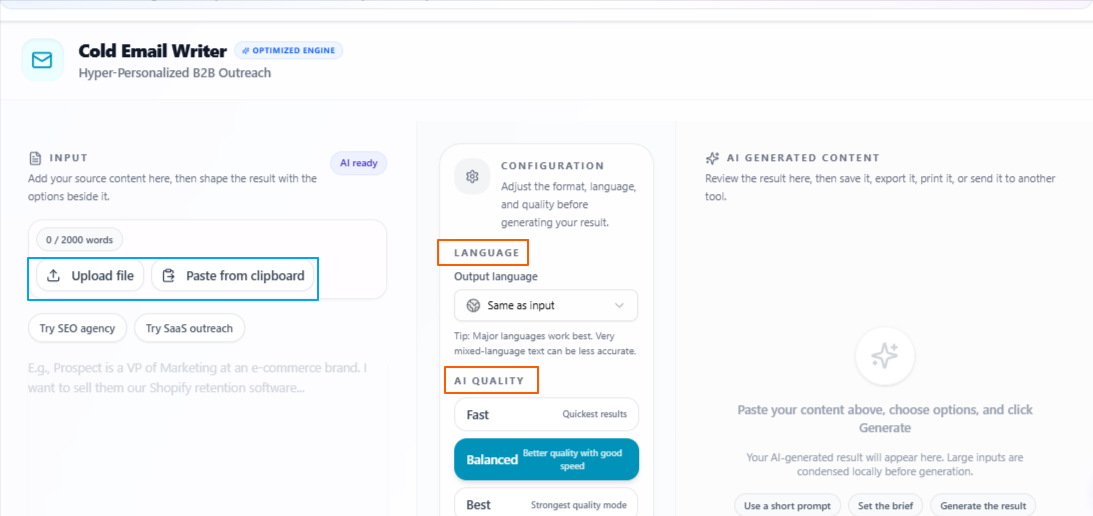
Add your career details, target role, company information, or rough email idea, and the Cold Email Generator helps turn it into a polished cold email. It creates a professional message that can be used for job inquiries, recruiter outreach, networking, freelance opportunities, or follow-ups related to job applications.
Features:
Cold email from rough ideas
Turns basic thoughts or rough notes into a proper professional email.
Recruiter outreach writing
Helps create emails for recruiters, hiring managers, founders, or company teams.
Career-focused messaging
Keeps the email connected to the user’s skills, experience, and job goal.
Professional tone
Creates clear and respectful emails that feel suitable for formal job communication.
Same-language output by default
Keeps the output in the same language as the input unless the user changes it.
Choose a different output language
Allows users to write job outreach emails in another selected language.
Quality control options
Lets users choose the writing depth according to time, purpose, and importance.
Choose the right processing mode
Fast gives quick email drafts, Balanced gives good quality with speed, and Best gives more focused and polished outreach emails.
Tips to remember
Add the target role, company name, and recipient details if available.
Include your key skills, experience, or strongest career point.
Keep the email short, clear, and easy to read.
Use Best mode for important recruiters, companies, or senior-level opportunities.
Review the email before sending and personalize it for each company or role.
Turn work achievements into professional career language
Problem
Many job seekers have useful work achievements, feedback, responsibilities, or project results, but they may not know how to present them in a formal and polished way. Rough points can sound too simple, unclear, or incomplete when they are used in resumes, professional summaries, self-reviews, or career documents.
Solution
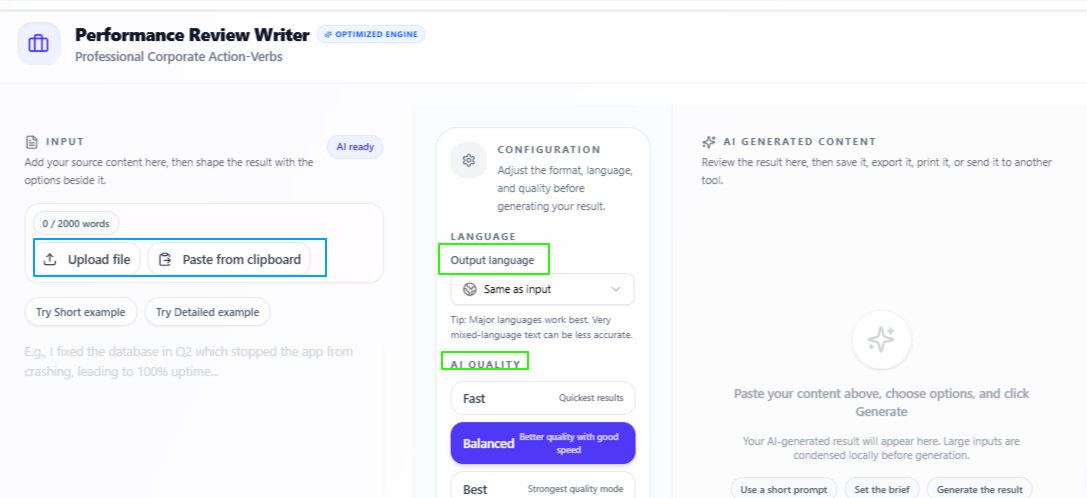
Add your work points, achievements, feedback, or performance details, and the Performance Review Generator helps turn them into refined professional wording. It can be used to create formal review-style content, improve achievement descriptions, and prepare career material that sounds more suitable for professional use.
Features:
Rough points into refined reviews
Turns simple notes or rough work details into polished professional feedback.
Career achievement writing
Helps present work results, strengths, responsibilities, and progress more clearly.
Formal professional tone
Creates wording that fits resumes, self-reviews, promotion notes, and formal documents.
Upload or paste content
Allows users to add their data by uploading files or pasting details directly.
Same-language output by default
Keeps the output in the same language as the input unless the user changes it.
Choose a different output language
Allows users to create professional review content in another selected language.
Quality control options
Lets users choose the writing depth according to time, purpose, and detail needed.
Choose the right processing mode
Fast gives quick results, Balanced gives good quality with speed, and Best gives more focused and polished review content.
Tips to remember
Add clear work achievements, responsibilities, and project results.
Include numbers, outcomes, or measurable impact where possible.
Use it to improve resume points, self-review notes, or promotion-related content.
Use Best mode when preparing content for an important application or formal review.
Review the final wording and make sure it matches your real experience.
Understand long job content easily
Problem
Job seekers often need to read long job descriptions, company pages, interview notes, role requirements, or career documents before applying. This can take time, especially when the important points are hidden inside lengthy text and the user needs to quickly understand what matters most.
Solution
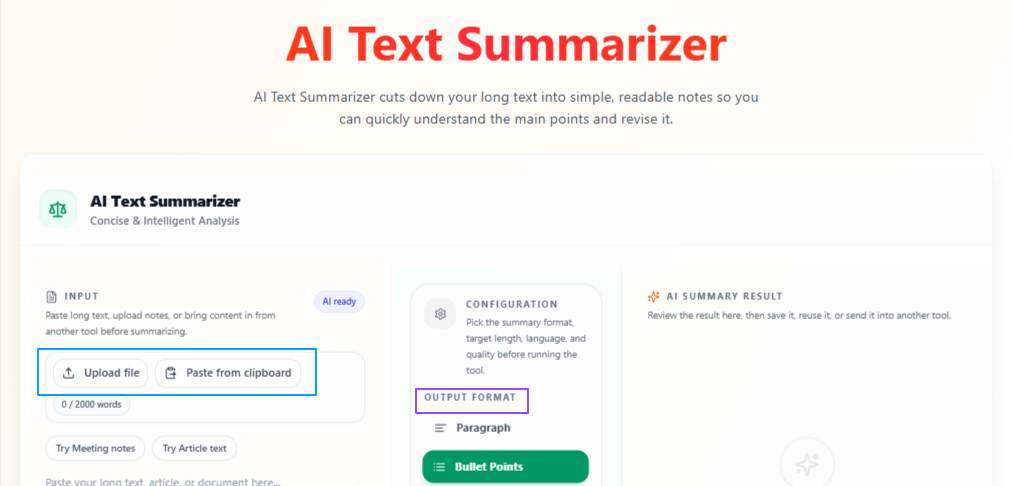
Add the job description, company details, interview material, or any job-related text, and the AI Text Summarizer tool turns it into a clear summary. The output can help job seekers understand the main requirements, responsibilities, skills, and key points without reading the full content again and again.
Features:
Summarize pasted or uploaded content
Allows users to paste text, write content directly, or upload a file for summarization.
Paragraph or bullet format
Lets users choose whether they want the summary in paragraph form or bullet points.
Short, medium, or detailed length
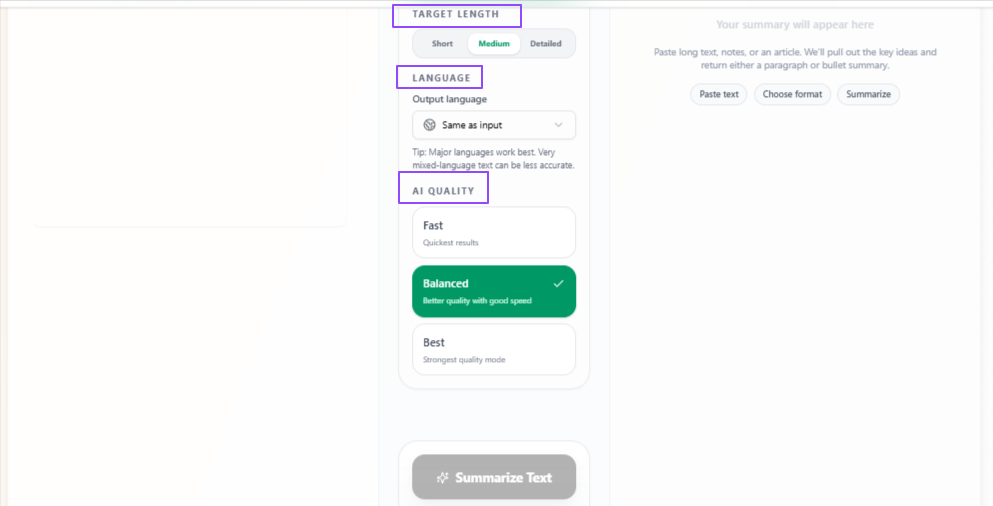
Gives control over how brief or detailed the final summary should be.
Job description summary
Helps job seekers quickly understand role requirements, responsibilities, and required skills.
Same-language output by default
Keeps the summary in the same language as the input unless the user changes it.
Choose a different output language
Allows users to summarize job-related content in another selected language.
Quality control options
Lets users choose the summary depth according to time, purpose, and detail needed.
Choose the right processing mode
Fast gives quick summaries, Balanced gives good quality with speed, and Best gives more focused and carefully prepared summaries.
Tips to remember
Paste the complete job description for a more useful summary.
Use bullet points when you want quick role requirements or interview notes.
Use detailed length when summarizing complex job posts or company information.
Use Best mode when preparing for an important application or interview.
Review the summary and compare it with the original content before applying.
Improve career writing without changing the main meaning
Problem
Job seekers often write resumes, cover letters, LinkedIn summaries, emails, or professional statements in rough wording. The meaning may be correct, but the text can feel unclear, repetitive, too simple, or not professional enough for job applications and recruiter communication.
Solution
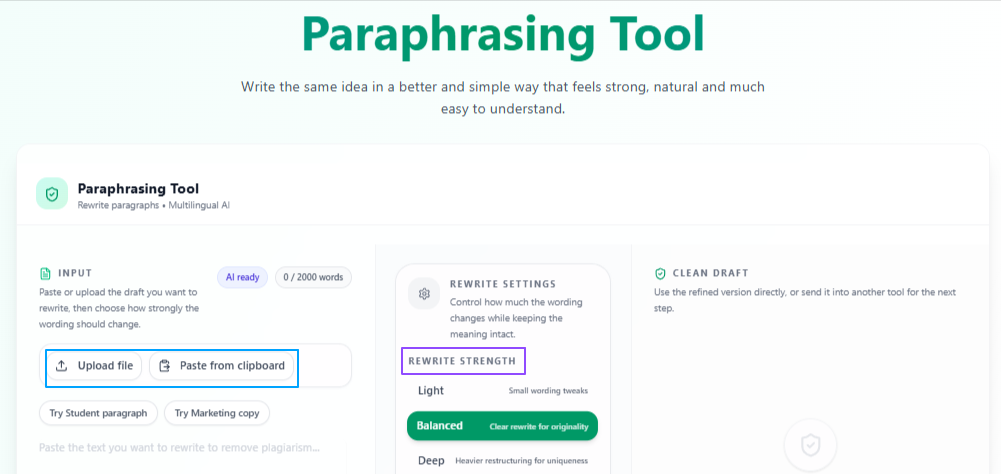
Add the text you want to improve, and the Paraphrasing Tool rephrases it into clearer and more polished wording. It can help job seekers refine career-related content while keeping the original idea, whether they need small wording improvements or a deeper rewrite for better flow and presentation.
Features:
Rephrase pasted or uploaded content
Allows users to paste text, write content directly, or upload a file for rewriting.
Keep or change output length
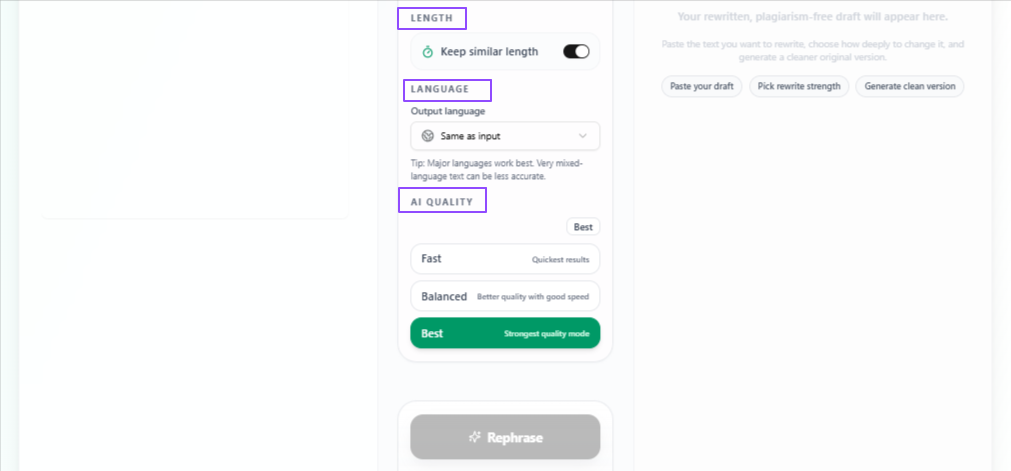
Lets users keep the same length or vary the length according to their writing need.
Light rewriting strength
Makes small wording changes while keeping the original structure mostly the same.
Balanced rewriting strength
Improves the text with moderate changes for clearer and smoother wording.
Deep rewriting strength
Restructures the content more strongly when the text needs a bigger improvement.
Same-language output by default
Keeps the rewritten content in the same language as the input unless the user changes it.
Choose a different output language
Allows users to rewrite career-related content in another selected language.
Quality control options
Lets users choose the rewriting quality according to time, purpose, and detail needed.
Choose the right processing mode
Fast gives quick rewrites, Balanced gives good quality with speed, and Best gives more focused and polished rewriting.
Tips to remember
Use Light mode when the text only needs small improvements.
Use Deep mode when the content feels weak, rough, or poorly structured.
Add complete resume sections, emails, or cover letter text for better rewriting.
Review the final text to make sure it still matches your real experience.
Use Best mode for important applications, LinkedIn sections, or recruiter messages.
Conclusion
Together, these tools help job seekers handle different parts of the application process with more clarity and structure. From understanding job descriptions and preparing interview answers to writing outreach emails, improving career wording, summarizing long information, and refining professional content, each tool supports a specific step where job seekers often need better organization, clearer language, and more confidence before applying or communicating with employers.
Next step
Put this workflow to work
Use the tools directly once you finish reading, so the guide turns into action instead of just reference material.