7 Best AI Lecture Note Taker Tools in 2026 | Students Special
If your professor talks fast, you already know the panic. You are trying to write everything down, but by the time you finish one sentence, three more are gone. You leave class with half a page of scattered notes and a recording you never actually go back to listen to.
This is where AI lecture note takers come in. These tools take your lecture content, whether it is a live recording, an audio file, or a rough transcript, and turn it into something you can actually study from.
What Students Need in AI Lecture Notes
Students do not just need a transcript of everything said in class. They need notes that are clear, useful, and easy to revise later. A good AI lecture notes generator should turn long or messy lecture content into study material that actually helps before exams.
Here is what students usually need from these tools:
Clear summaries: long lectures should be turned into focused points without losing the main ideas
Organized sections: notes should be grouped by topic, not shown as one long block of text
Important terms and definitions: key concepts should be easy to find and review
Exam-friendly notes: the output should help with revision, not just repeat the lecture word for word
Support for rough input: students should be able to use audio, transcripts, or messy notes and still get something readable
Quick review format: notes should be simple enough to scan before class, quizzes, or exams
Room for personal edits: students should still be able to add their own examples, teacher comments, and corrections
Best AI Lecture Note Taker Tools in 2026
1) VoiceCraftTool Lecture Note Taking AI
Best for: Simple lecture-to-notes generation with student-ready summaries to learn and revise.
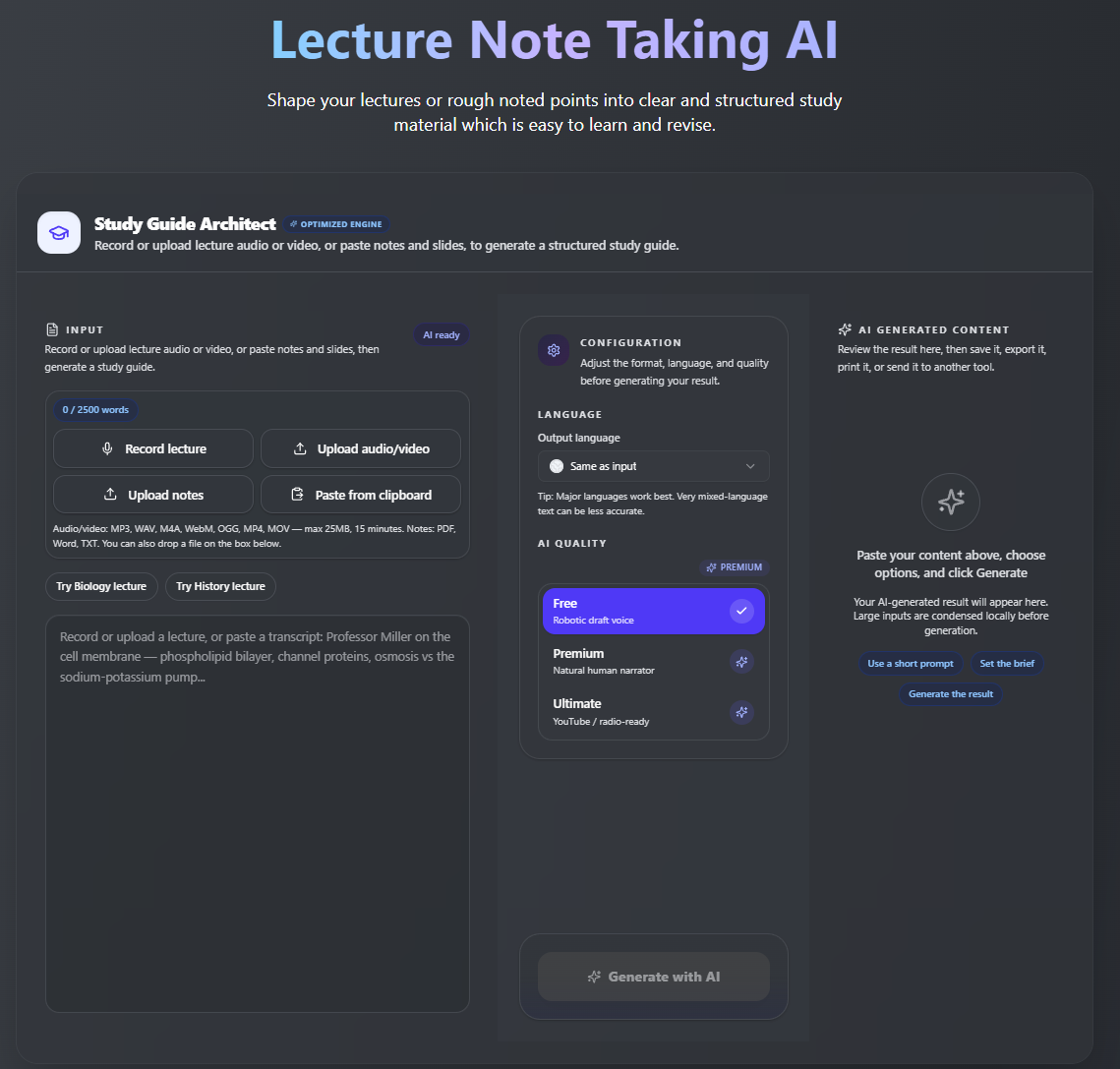
It is built specifically for lecture content rather than business meetings, so the output reads more like study notes than a meeting recap. Clean formatting and fast turnaround.
Key Features:
Lecture to Study NotesRecord a lecture or paste a transcript, then turn it into clean, structured study notes.
Key Terms SummaryGet the main terms, concepts, and important points pulled out for quick revision.
Probable Exam QuestionsGenerate possible exam-style questions so students can test what they remember.
Messy Notes CleanupPaste rough class notes and convert them into a clearer study guide.
Multilingual SupportInput lecture content in one language and generate notes in another language for easier study.
Useful for Online LearningWorks well for YouTube lectures, course transcripts, webinars, and long recorded classes.
Revision-Friendly OutputUse the notes for exam prep, flashcards, study groups, or your digital notebook.
Possible limitation: Newer tool, so it may have fewer integrations compared to more established platforms.
Explore the tool practically by clicking here, AI Lecture Note Taker by VoiceCraftTool
2) Otter.ai
Best for: Live transcription during class or recorded discussions
You can record during a live lecture and get a searchable transcript right after. The free plan covers a reasonable number of minutes per month.
Key features:
Real-time lecture transcription
Speaker identification
Searchable lecture transcripts
Basic lecture summaries
Audio recording support
Works for in-person classes
Works for online sessions
Possible limitation: Summaries can sometimes feel surface-level, so you may need to read through the full transcript for detail-heavy subjects like science or law.
3) Notion AI
Best for: Students who already organize notes inside Notion
If your whole study system lives in Notion, adding AI on top of that is a natural fit. No switching between apps.
Key features:
Summarize pasted class notes
Restructure rough notes into a cleaner format
Expand short notes with more detail
Organize study material inside Notion
Keep class notes, summaries, and tasks in one workspace
Useful for students already using Notion for study planning
Possible limitation: It works on text you already have. It does not transcribe audio, so you still need a separate tool for that step.
4) Fireflies.ai
Best for: Recorded online lectures and classes held in Zoom, Teams, or Google Meet
If most of your classes happen on video call platforms, Fireflies fits in naturally. It stores and organizes past session notes so you can search across them.
Key features:
Joins online meetings automatically
Records lectures, webinars, or group sessions
Creates meeting transcripts
Generates short summaries
Helps review group project discussions
Useful for seminar-style online classes
Keeps past session notes searchable
Possible limitation: Designed more for a professional setting, so the summary style sometimes reads like a business debrief rather than study notes.
5) Fathom
Best for: Online class summaries and video lecture notes
Free to use with solid quality. Works quietly in the background during live online classes without much setup.
Key features:
Records video meetings
Summarizes online classes or sessions
Highlights important moments
Creates clean session summaries
Generates action points after the session
Helps students review live video lectures faster
Possible limitation: Focused on video calls specifically, so it is not useful for pre-recorded lectures or in-person class audio.
6) Google Gemini
Best for: Turning existing transcripts, rough notes, or pasted lecture content into organized study material.
Gemini is useful when students already have lecture text and want to turn it into clearer notes, quick summaries, or revision points.
Key features:
Summarizes lecture transcripts
Rewrites rough notes into a cleaner format
Explains difficult concepts in simpler words
Creates bullet-point study notes
Helps generate practice questions
Works well with pasted class material or course content
Possible limitation: You need to provide the content first. It works best when you already have a transcript, copied notes, or lecture material to paste in.
7) ChatGPT
Best for: Creating flexible study notes, explanations, flashcards, and practice questions from existing lecture content.
ChatGPT is flexible. Students can ask for notes in the style they prefer, such as short summaries, detailed explanations, flashcards, or exam-style questions.
Key features:
Turns transcripts into study notes
Creates summaries and topic breakdowns
Explains complex topics in simpler language
Generates flashcards and quiz questions
Rewrites notes in different formats
Helps students review concepts step by step
Possible limitation: It does not replace a lecture recorder by itself. For best results, students should use it after they already have a transcript, recording text, or rough notes.
Comparing the Best Options
This is a simple comparison of the best AI lecture note taker tools for students. Use it to quickly see which tool fits your study style, input type, and lecture setup.
This table is not about finding one perfect tool for everyone. If you need lecture notes from audio, VoiceCraftTool or Otter.ai may fit better. If you already have a transcript, ChatGPT or Gemini can help turn it into summaries, flashcards, and clearer study material.
What to Choose?
With all the options above, the right choice really comes down to how you study and where your lectures happen.
Choose VoiceCraftTool if you want a straightforward lecture-to-notes tool built for students
Choose Otter.ai if you need live transcription during class with searchable output
Choose Notion AI if your notes already live in Notion and you just need AI support layered on top
Choose Fireflies.ai if most of your classes run through Zoom or Google Meet
Choose Fathom if you attend live online classes and want a free, simple recording summary
Choose ChatGPT or Gemini if you already have a transcript and need flexible summarization or explanation
No single tool wins for every student. Pick the one that fits where you are already working.
Tips for Using These Tools
Using an AI lecture note taker is helpful, but the way you use it affects the quality of the notes you get back. A few small habits can make the output much clearer and easier to study from.
Start with clear lecture content: use a good recording, typed notes, or a class transcript if one is available
Give the tool enough context: mention the subject, topic, and type of notes you want
Ask for a useful format: request headings, key points, definitions, summaries, or exam-style questions
Review the output yourself: check names, dates, formulas, examples, and subject-specific terms
Use the notes for active revision: turn summaries into flashcards, practice questions, or quick review sheets
Keep your own understanding involved: use the tool to organize learning, not to replace learning
The best results come when students use AI tools as a study helper, then review and personalize the notes in their own words. Try it now, AI Lecture Note Taker by VoiceCraftTool, free to start.
AI Lecture Notes vs Manual Notes
This is not a competition. Both have a place, and the students who get the most out of AI tools are the ones who use them alongside manual notes, not instead of them.
The practical approach most students find useful: write rough notes during the lecture, then use an AI tool after class to clean, fill in gaps, and organize everything. You get the memory benefit of writing and the clarity of structured AI output.
Common Mistakes Students Should Avoid
These tools save time when used well, but the notes still need a quick check before you rely on them.
Not Reviewing the Notes
AI notes can miss words, context, or small details. Always read them once before studying.
Using Poor Audio
Noisy or unclear recordings can lead to weak notes. A clearer recording gives better results.
Missing Diagrams and Formulas
If your teacher explains something on the board, add it manually. AI tools may not capture visual details.
Ignoring Teacher Hints
If your professor says something is important for the exam, mark it yourself.
Waiting Until the Last Night
Use AI notes after each lecture, not only before the exam. It makes revision much easier.
Conclusion
The best AI lecture note taker is the one that fits how you actually study. If you prefer a simple tool built around turning lectures into clean notes, VoiceCraftTool's Lecture Note Taking AI is worth starting with. If you need live transcription, Otter.ai is a strong option. And if you already have transcripts and just need flexible study support, ChatGPT or Gemini will serve you well.
Whatever tool you choose, remember that AI does the organizing. The actual understanding still has to come from you. Use these tools to spend less time rewriting notes and more time genuinely learning the material. Click here and try it practically yourself, AI Lecture Note Taker by VoiceCraftTool
FAQs
What is the best AI lecture note taker for students?
It depends on your setup. VoiceCraftTool works well for straightforward lecture-to-notes needs. Otter.ai is strong for live transcription. ChatGPT and Gemini are great if you already have a transcript and need flexible study support.
Can AI generate lecture notes from audio?
Yes. Tools like VoiceCraftTool and Otter.ai can take an audio file or live recording and turn it into transcribed, summarized notes. Quality depends on recording clarity and the tool you use.
What is an AI lecture notes generator?
It is a tool that takes lecture content in audio, video, or text form and produces organized study notes, summaries, and key points using AI. The goal is to save students time after class.
Are AI lecture notes accurate?
Generally reliable for most content, but not perfect. Subject-specific terms, names, and numbers are the areas most prone to errors. Always review the output before using it to study.
Can I use AI lecture notes for exam revision?
Yes, and many students do. They work best when combined with your own review. Use the AI notes as a base and then add your own understanding, examples, and corrections on top.
Is an AI lecture note taker better than manual notes?
Neither is better on its own. Manual notes help with memory during the lecture. AI notes help with organization and coverage after the lecture. Together they are more effective than either one alone.
Can AI lecture note tools summarize long lectures?
Yes. Most tools handle long recordings well. A two-hour lecture can usually be summarized into focused key points within a few minutes of processing.