How to Repurpose Content in 2026 | Simple & Proven Method
Creating content isn’t the hard part anymore. The real problem is most content gets used once and then forgotten. A single piece could become multiple posts, videos, or emails, but that potential is often left unused.
This guide shows a simple, repeatable way to turn one piece of content into multiple formats without starting from scratch.
What Content Repurposing Actually Means (Quick take)
Before getting into the steps, one quick distinction worth making.
Repurposing is not reposting. Sharing the same caption on Instagram and Twitter is reposting. Repurposing means taking the core idea from one format and rebuilding it in a different format suited to a different platform or audience.
A blog post repurposed into a LinkedIn carousel is not the same text posted on LinkedIn. It is the same idea, repackaged so it works visually and fits how LinkedIn audiences scroll and consume.
This matters because every platform has its own rhythm. Short punchy sentences on Twitter. Storytelling hooks on LinkedIn. Visual structure on Instagram. Audio-friendly flow on podcasts. Repurposing respects those differences instead of ignoring them.
In 2026, audiences exist across more surfaces than ever. A strategy that only lives on one platform is a strategy that leaves most of its potential reach untouched.
Two Ways to Repurpose Content
1) Manual Repurposing
Manual repurposing means reading your existing content, pulling out the ideas that matter, and rewriting them by hand in a new format.
This gives you full creative control. You decide what gets emphasized, what gets trimmed, and how the tone shifts across platforms.
Full control over tone and messaging
Flexible adaptation for different platforms
Strong alignment with your voice
For creators who care deeply about nuance, this works well. The downside is time. Repurposing one long-form article across formats can take hours, and doing that consistently becomes difficult.
2) AI-Assisted Repurposing
AI tools now handle the structural work of repurposing: identifying key points, generating format variations, adjusting tone, and producing multiple outputs from a single input.
Quickly extracts and structures key ideas
Generates multiple format variations in seconds
Adapts tone for different platforms
This does not mean handing everything over to automation and publishing whatever comes out. The best results come from using AI to handle the first draft, then applying your own judgment on what to refine, cut, or improve.
Many creators now follow this combined approach: generate variations with AI first, then refine instead of starting from zero. Tools like the AI Content Repurposing tool by VoiceCraftTool are designed for this part of the workflow, which is covered in more detail below.
Use AI Content Repurposing by VoiceCraftTool
From your input, it generates multiple content variations based on your input. Instead of writing each format one by one, you get a set of drafts that can be used for posts, summaries, or scripts across platforms.
As you move into platform-specific content, the tool adjusts tone and structure depending on the format you choose. This helps align each piece with its intended use without needing to rewrite everything yourself.
Key Features
Long-form into shorter formats:
Input a full blog post, transcript, or script, and generate structured outputs like posts, captions, and summaries.
Adapts tone and structure for different platforms:
Outputs are shaped based on context, reducing the need for manual rewriting.
Multiple formats from one input:
Create LinkedIn posts, Twitter threads, video scripts, and summaries from a single piece of content.
Works with existing content:
Use blogs, transcripts, or notes you already have without needing to create new material.
Maintains consistency across outputs:
Keeps the core message aligned while producing multiple variations.
Explore AI Content Repurposing NOW!
How to Use AI Content Repurposing by VoiceCraftTool (Step-by-Step)
Step 1: Input Your Base Content
Paste your blog, script, or transcript into the tool. It pulls out key ideas in a structured way, saving the time you would spend manually reading and highlighting.
Step 2: Generate Content Variations
The tool creates multiple outputs from your input, such as posts, summaries, and scripts, giving you a starting point for each format instead of writing from scratch.
Step 3: Select and Adapt for Platforms
Choose the format you need, and the tool adjusts tone and structure accordingly. A LinkedIn post, for example, will differ naturally from a short video script.
Step 4: Review and Refine
Go through the generated drafts, edit where needed, and finalize them based on your voice and audience.
The workflow itself stays the same. The difference is how quickly you move through each step. Use this tool effectively with these simple steps now on AI Content Repurposing by VoiceCraftTool
How the Workflow Looks With and Without a Tool
The difference becomes clearer when you look at how the process actually plays out in practice. Both approaches follow the same goal, but the way you move through each step changes.
The steps themselves do not change. You are still selecting content, shaping it, and preparing it for different platforms. What changes is the speed, the effort required, and how much of the repetitive work is handled for you.
Real Examples of Content Repurposing
These are practical before-and-after scenarios showing how one piece turns into several.
Blog Post to Multiple Formats
A 1,500-word blog post on productivity habits becomes:
Three LinkedIn posts, each covering one key habit with a short story or insight
A Twitter thread walking through all the habits in quick punchy points
A short YouTube script summarizing the top three with personal commentary
An email to subscribers framing the habits as a weekly challenge
Podcast Episode to Multiple Formats
A 45-minute podcast episode on marketing strategy becomes:
Short audiogram clips of the strongest three to four minutes
A written summary article covering the main points for people who prefer reading
Pull quotes formatted as graphics for Instagram and LinkedIn
A LinkedIn post sharing the one most counterintuitive takeaway from the episode
Video to Multiple Formats
A 10-minute YouTube video on content planning becomes:
A caption thread on Instagram walking through the process visually
A blog post expanding on the points with more detail and examples
An email sharing the video with a written summary for subscribers who do not watch
A short TikTok or Reel pulling the most surprising or useful 60 seconds
Where Most Repurposing Workflows Break Down
Most people start with good intentions and fall off somewhere in the middle. These are the most common places where the workflow collapses.
Time required for manual rewriting. Writing four formats from one piece by hand takes long enough that most people only do it occasionally, not consistently. Consistency is what makes repurposing actually build a content library over time.
Inconsistency across formats. When you rewrite the same idea multiple times across different days, the message drifts. The LinkedIn version says something slightly different from the Twitter version. Your audience across platforms gets a muddled picture.
Difficulty scaling output. When your content output grows, manual repurposing does not scale with it. Producing one piece per week is manageable. Producing four per week is not, without a system or tool support.
Structured workflows reduce the first two problems. Combining those workflows with a tool like AI Content Repurposing by VoiceCraftTool addresses the third by making the process faster without adding more people or hours.
Best Practices for Effective Repurposing
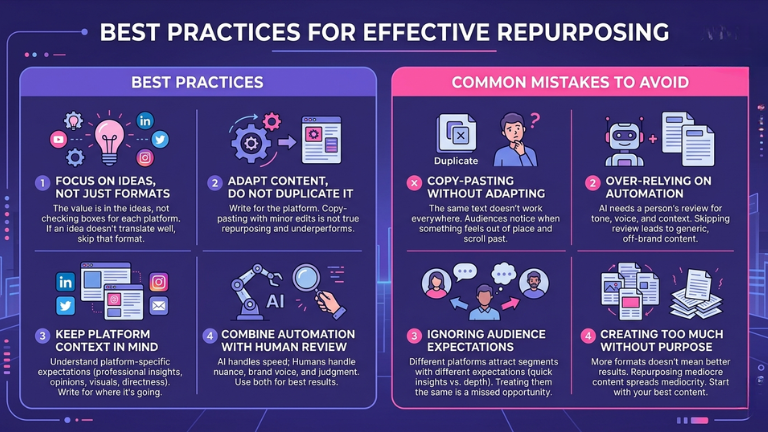
Focus on ideas, not just formats.
The value in repurposing is in the ideas, not in checking a box for each platform. If an idea does not translate well to a format, skip that format for that piece.
Adapt content, do not duplicate it.
Every output should be written for its platform. Copy-pasting with minor edits is not repurposing. It is a shortcut that usually underperforms on every platform it touches.
Keep platform context in mind.
LinkedIn audiences engage with professional insights and storytelling. Twitter works for opinions and quick takes. Instagram favors visuals and short emotional hooks. Email is personal and direct. Write for where the content is going, not where it came from.
Combine automation with human review.
AI tools handle structure and speed well. Human review handles nuance, brand voice, and judgment calls well. Use both for the best results.
Common Mistakes to Avoid
Copy-pasting without adapting:
This is the most common mistake. The same text does not work equally well everywhere. Audiences notice when something feels out of place for a platform and they scroll past it.
Over-relying on automation:
AI-generated content still needs a person to read it and make sure it sounds right, matches your voice, and makes sense in context. Skipping the review step leads to generic or off-brand content going out under your name.
Ignoring audience expectations:
Different platforms attract different audience segments with different expectations. Your Twitter followers may want quick insights. Your email subscribers may want more depth. Treating them the same way is a missed opportunity.
Creating too much without purpose:
More formats does not always mean better results. Repurposing five formats from a piece that was mediocre to begin with just spreads mediocrity further. Start with your best content.
Take care of these important points and use VoiceCraftTool’s AI Content Repurposing tool now!
Conclusion
Content repurposing is not a workaround or shortcut, it is how smart creators stay consistent across platforms without burning out. The process is simple: start with strong base content, extract the key ideas, map them to different formats, adapt for each platform, and publish consistently.
Done right, one piece of content can turn into many. Where this once took hours of manual effort, tools like AI Content Repurposing by VoiceCraftTool now handle the repetitive structure, allowing you to focus on refining and making decisions that require a human touch, so your content reaches people across multiple formats and platforms without starting from scratch each time.
FAQs
What is content repurposing?
Content repurposing means taking an existing piece of content and rebuilding it in a different format for a different platform or audience. It is not reposting the same content in the same format. It means adapting the core ideas so they work natively wherever they are published.
Is manual or AI repurposing better?
Neither is strictly better on its own. Manual repurposing gives you more control over voice and nuance but takes significantly more time. AI-assisted repurposing is faster and more scalable but needs human review to stay on-brand and contextually accurate. Most effective workflows combine both.
How many formats should one piece be turned into?
There is no fixed number. A strong long-form piece can reasonably generate five to ten shorter formats. A short piece might only work well in two or three. Focus on which formats naturally suit the ideas in the content rather than hitting a number for its own sake.
Does repurposing help SEO?
It can, indirectly. Repurposing content into blog posts, articles, or written summaries creates additional indexed pages and increases the surface area for organic search. It also drives traffic back to original content when cross-linked properly. However, repurposed content needs to be genuinely adapted and useful, not duplicate content, to benefit search performance.
What tools can help with content repurposing?
Several tools exist for different parts of the process. For generating multiple content formats from a single input, adapting tone across platforms, and producing structured variations quickly, the AI Content Repurposing tool by VoiceCraftTool handles those steps within one workflow. It works with existing content like blogs, transcripts, and scripts and outputs usable drafts across formats without requiring a separate tool for each one.