
User Guide for Students
Many students understand a lecture at the time, but later when they sit for revision, their notes are incomplete, scattered, or not clear enough to study....

Students often have to manage lectures, long reading material, assignments, revision, and academic writing all at once. Because of that, a lot of study time is not only spent on learning, but also on organizing notes, rewriting content, simplifying difficult material, and improving written work before submission.
VoiceCraftTool helps students make that process easier and more manageable. Instead of handling everything manually, they can use it to turn lectures into structured notes, shorten long text into clear takeaways, improve wording, reduce plagiarism, and review important writing like admission essays. It also helps students work with different formats, such as turning videos into text or written content into audio, so studying can fit better into the way they learn.
Tools Overview
Major Use-cases for the students
1) Turn your lectures into revisable study notes
Students’ problem
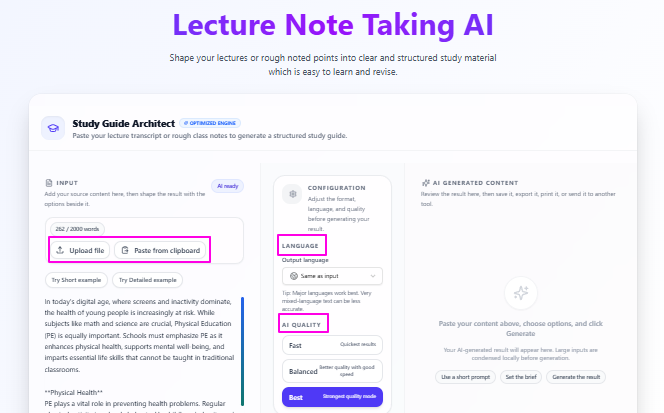
Many students understand a lecture at the time, but later when they sit for revision, their notes are incomplete, scattered, or not clear enough to study properly. Sometimes the lecture is saved in different forms like rough written points, audio recordings, or videos, and going through all of that again takes too much time and effort.
Solution
Lecture Note Taker AI helps solve this by turning raw lecture content into cleaner and more structured study notes, so instead of spending extra time fixing messy material, students can directly focus on understanding, learning, and revising the important points in a much simpler way.
Features for students
Multiple input types: You can add your lecture content in the form of text, video and audio.
Clean notes for study: You will get the important points and manage stuff to learn and revise.
Easy to use: The tool is beginner-friendly with very simple usage & interface..
Quality options: You can choose the output quality as Fast, Balanced, or Best.
“Balanced” for daily use: Good mix of speed and quality.
“Best” for better output: More polished final notes.
Multilingual support: You can use the tool in different languages and even can set some other language for output as well..
Tips to remember
Use Balanced when you want good results without waiting too long.
Use Best when the lecture is important and you want smooth clean notes.
Always review the final notes once, especially for technical terms or subject names.
For very long lectures, working in smaller parts can make the output more organized.
Set the input and output language carefully before generating the notes.
2) Improve your admission essay with your own voice
Students’ problem
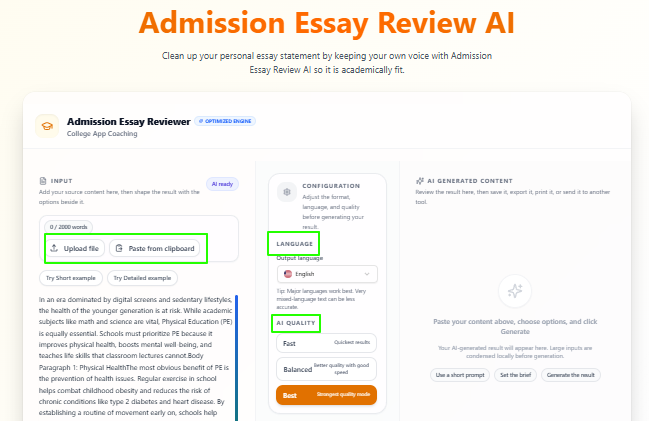
Many students know what they want to say in their admission essay, but they struggle to present it in a clear, polished, and academically suitable way. Sometimes the writing feels too simple, too messy, or not strong enough for submission, and reviewing the whole essay again and again can become stressful.
Solution
Admission Essay Review AI helps students by reviewing their essay on academic grounds, showing where the writing needs improvement, and providing a better refined version, so the essay becomes clearer, stronger, and more suitable for submission while still keeping the student’s original voice and message.
Features for students
Academic essay review: Reviews the essay based on academic writing quality.
Improved essay output: Provides a better and more polished version of the essay.
Keep your voice: Improves the writing without removing your personal style.
Quality control: Lets you choose the output quality as needed.
Multilingual support: Can be used in different languages.
Go to editor: Continue editing the essay further if needed.
Summarize option: You can move to the summarize tool to shorten the essay.
Continue option: You can directly print the reviewed essay, can send the essay directly through email, and can save or export the final essay easily.
Tips to remember
Always read the improved version once and make sure it still sounds like you.
Use higher quality output when the essay is important for final submission.
Do not rely only on improvement, also check whether the essay answers the admission purpose well.
Use the editor option if you want to make final personal changes yourself.
Before printing, exporting, or emailing, review names, facts, and personal details carefully.
3) Lengthy text material into short & clear revision points
Students’ problem
Students often have to go through long chapters, articles, research material, and notes, but not every time they need the full text. During revision especially, reading everything again takes too much time, and it becomes difficult to quickly find the main ideas that actually matter.
Solution
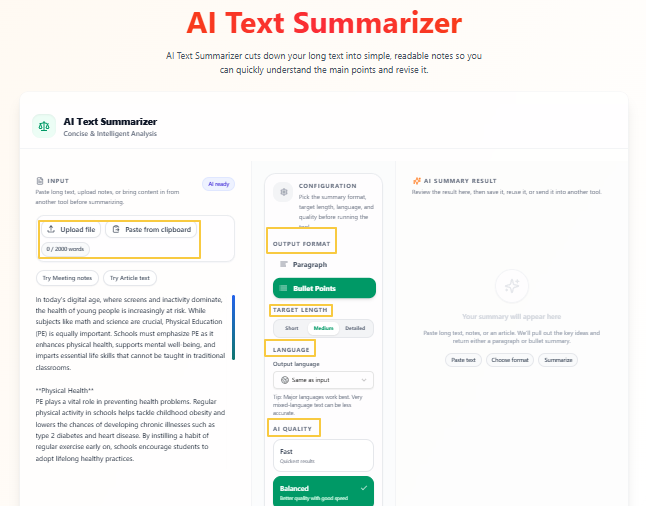
Text Summarizer helps students by cutting long text into shorter and clearer points, so they can understand the main idea faster, revise in less time, and handle lengthy study material in a much more manageable way without going through every line again.
Features for students
Simple to use: The tool is clear and easy to use.
Quality control: You can choose Fast, Balanced, or Best.
Output format options: You can get the result in paragraph or bullet points.
Target length control: You can choose short, medium, or detailed output.
Multilingual support: The tool supports different languages.
Flexible language setting: Output language can match the input or be changed.
Revision-friendly output: Makes long text easier to review and revise.
Tips to remember
Use bullet points when you want quick revision notes.
Use paragraph format when you want a smoother summary to read.
Choose short for very quick understanding and detailed when you need more context.
Medium is usually a good option for daily study use.
Use Balanced when you want decent quality with good speed.
Review the summary once if the text includes technical or subject-specific terms.
4) Remove plagiarism from your assignments & projects
Students’ problem
Students sometimes end up with writing that feels too close to the source, too repetitive, or not original enough in wording. This can happen during research, rewriting, note conversion, or draft improvement, and fixing that manually can take a lot of time while still not feeling fully safe or natural.
Solution
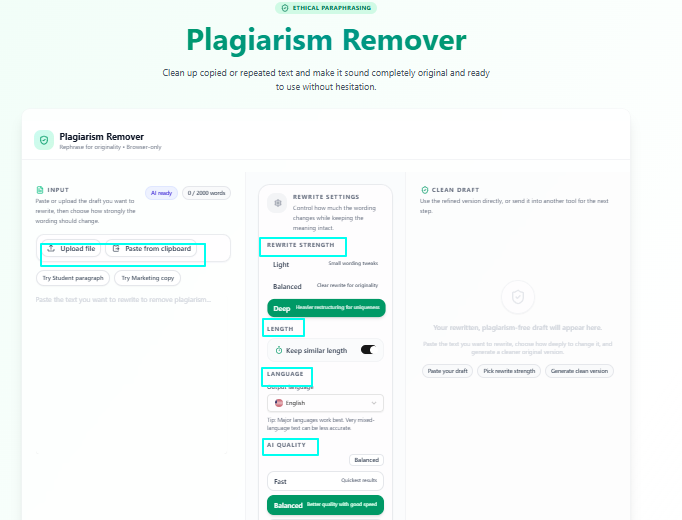
Plagiarism Remover helps students by rewriting copied, repeated, or overly similar text into a more original version, so the writing feels cleaner, safer, and more natural while keeping the main meaning intact and making the final draft better prepared for academic use.
Features for students
Controlled rewriting: Rewrites text while keeping the main meaning.
Rewrite strength options: You can choose Light, Balanced, or Deep.
Deep mode available: Useful when stronger rewriting is needed.
Length control: You can keep the original length if needed.
Language support: The tool works in different languages.
Quality control: You can choose Fast, Balanced, or Best.
Simple process: The tool is easy to use and clear in workflow.
Reset option: You can quickly clear and start again.
Tips to remember
Use Light when only small wording changes are needed.
Use Balanced when you want clearer rewriting with natural flow.
Use Deep when the text feels too close to the original source.
Keep the same length option on when you do not want the text size to change much.
Always read the final version once to make sure the meaning is still correct.
Do not use it to hide weak understanding. Make sure you still understand what the text is saying.
5) Rewrite your ideas in a better way
Students’ problem
Students often know what they want to say, but the writing does not always come out clearly. Sometimes a sentence sounds too simple, awkward, repetitive, or hard to understand, and this becomes a problem in assignments, answers, notes, and academic writing where clarity matters a lot.
Solution
Paraphrasing helps students rewrite their existing text in a clearer, smoother, and more natural way, so their ideas become easier to understand without changing the actual meaning, and the final writing feels more polished for study or submission.
Features for students
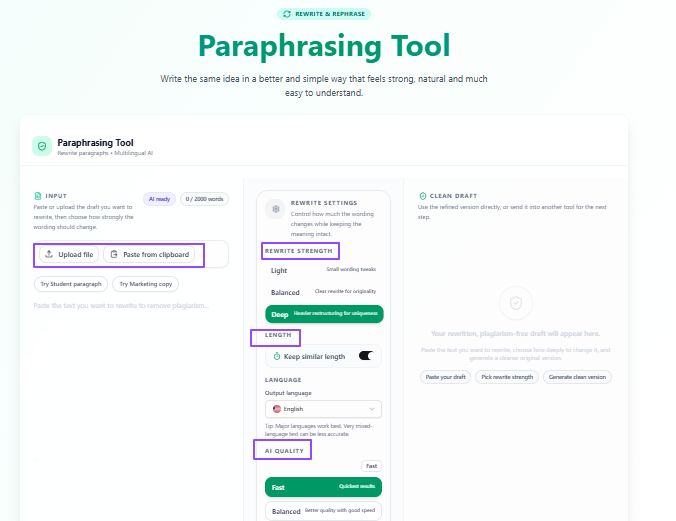
Meaning-preserving rewrite: Rewrites text without changing the core idea.
Rewrite strength options: You can choose Light, Balanced, or Deep.
Light mode: Good for small wording changes.
Balanced mode: Better for clearer and more natural rewriting.
Deep mode: Useful when stronger restructuring is needed.
Keep similar length: Helps maintain the original text length.
Language support: The tool works in different languages.
Quality control: You can choose Fast, Balanced, or Best.
Simple usage: The tool is easy to use and beginner-friendly.
Reset option: You can clear the text and start again quickly.
Tips to remember
Use Light when your writing is already good and only needs minor improvement.
Use Balanced for most student work because it improves clarity without changing too much.
Use Deep when the sentence structure feels weak or too repetitive.
Keep the similar length option on when you want the rewritten version to stay close to the original size.
Always read the final result once to make sure it still matches your exact meaning.
Use paraphrasing to improve clarity, not to replace your understanding of the topic.
Other useful tools for learners
Some tools are not made only for students, but they can still be useful in academic work at different points. This is especially true when students are learning from recorded lectures, educational videos, podcasts, or when they want to convert their study material into another format that is easier to review.
Video to Text AI
Students sometimes learn from recorded lectures, video lessons, webinars, or educational clips, but going back to a full video again just to find a few important points takes extra time.
Video to Text AI can turn video content into readable text, which makes it easier for students to review, scan, edit, and reuse the important material for notes or revision.
Useful features
Video-based transcription: Converts video into text.
Language selection: Supports different language settings.
Auto-detect option: Can detect language automatically.
Processing choices: Includes quality-focused processing options.
Transcript actions: Lets users upload, clear, and transfer text.
Text to Audio AI
Some students understand better by listening. Others may want to hear their notes, scripts, or study material while travelling, walking, or revising away from the screen.
Text to Audio AI changes written content into audio, so students can listen to their study material in a more flexible way instead of only reading it.
Useful features
Script input: Paste, upload, or import text.
Voice setup: Choose voice and output style.
Speed control: Adjust speaking speed.
Voice library: Access more voice options.
Audio generation: Converts written text into audio.
AI Podcast Notes
Students sometimes learn from podcasts, discussions, or long spoken content, but manual note-taking from such material can take too much time.
AI Podcast Notes pulls out the key takeaways and useful moments from long audio-based content, so students can get the main value without manually writing everything down.
Useful features
File or text input: Upload content or paste from clipboard.
Timestamps option: Helps track important moments.
Social hooks option: Available in settings.
Language control: Supports output language settings.
Quality control: Includes Fast, Balanced, and Best.
Generated content tools: Copy, summarize, or transfer output.
Tips to remember
Use Video to Text when your study material is in recorded video form.
Using Text to Audio when listening helps you revise better than reading.
Use Podcast Notes when you want quick takeaways from long spoken content.
Always review the final output once before using it in serious academic work.
These tools work best as support tools, not as replacements for actual understanding.
Conclusion
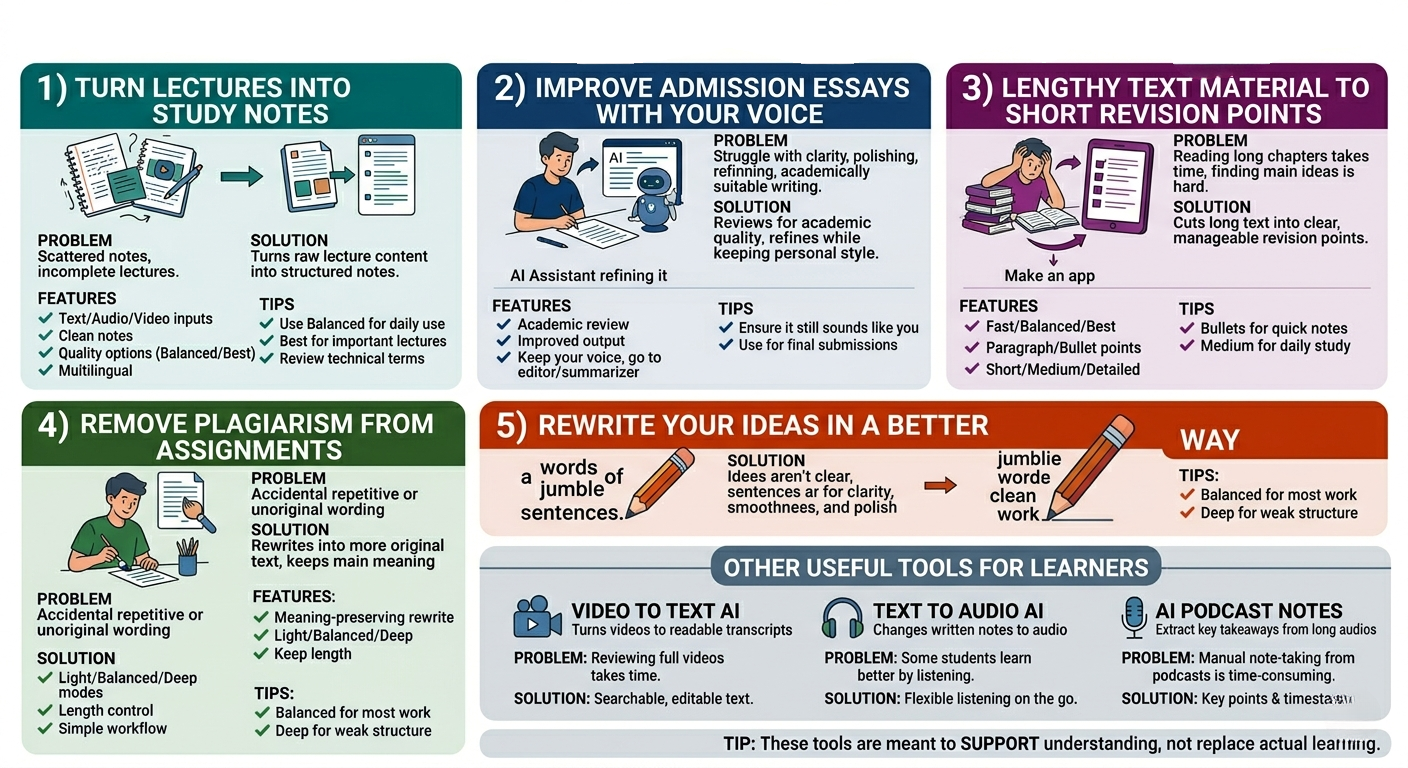
Overall, these use cases show how students can use VoiceCraftTool to make study work more manageable, from taking better notes to improving writing and handling long learning material more easily. It is not about replacing effort, but about helping students save time, stay clearer in their work, and focus more on actual learning.
Put this workflow to work
Use the tools directly once you finish reading, so the guide turns into action instead of just reference material.
Students who want a cleaner path from recordings to usable output.